Following a run
Most work on the platform sets off more work. A schedule starts a process, the process runs scripts and saves data, the saves fire automations, the automations send queue messages and emails, and the dataset checks raise alerts. Each of these records carries ids that link it to the work that started it. Follow a run uses those ids to collect everything one piece of work did, in every log, in order.
Starting
Either:
- select Follow this run in the detail of any record, or select an id chip in any list, or
- open Follow a run, paste one or more ids into Ids and select Follow.
Any of these ids works:
| Id | Where you find it |
|---|---|
| Process execution id | A process run (run), the process runs list in the portal |
| Trace id | Process runs, automations, queue messages, dataset deliveries and alerts (trace) |
| Schedule fire id | A schedule fired (fire) |
| Invocation id | Changes, script runs, automations, queue messages and API requests (inv, root) |
| Alert or Fusion AI run id | An alert (alert), a playbook run (ai run) |
The time window and the other filters are not used here: a run is followed wherever it leads.
What you see
Priya selects the failed LOAD_ICE_ENDEX_SETTLEMENTS run on the Timeline and then Follow this run:
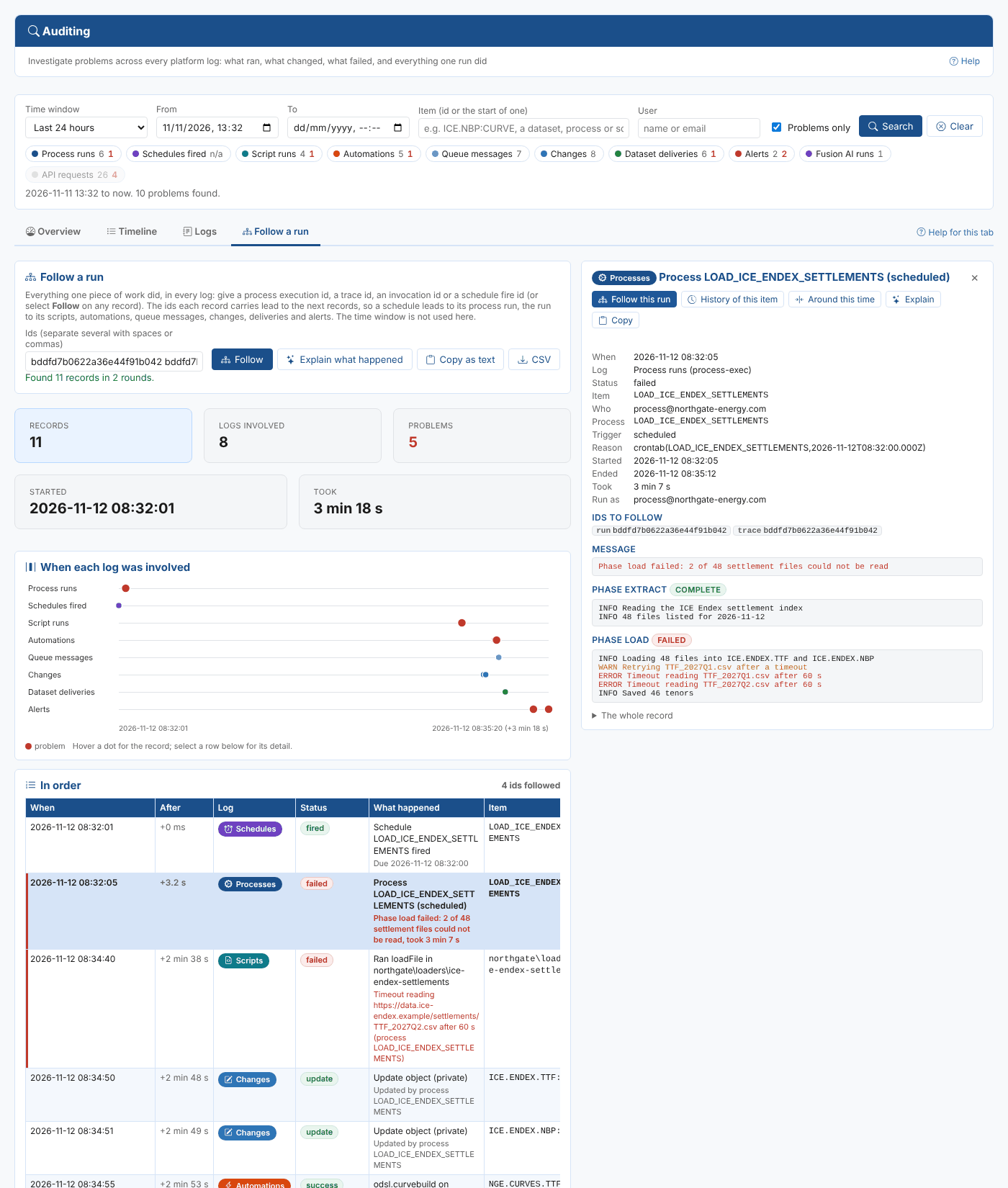
| Part | What it shows |
|---|---|
| Records, Logs involved, Problems, Started, Took | The size of the run. Hover Logs involved for the count per log |
| When each log was involved | A lane per log with a dot per record, red for problems. Hover a dot for the record |
| In order | Every record, oldest first, with After: the time since the first record |
Here the scheduler fired, the process started 3 seconds later, the script timed out after two and a half minutes, the partial settlements were saved, the curve build automation ran but the email automation failed, the dataset delivery was marked partial and the alerts were raised: 11 records in 8 logs over just over 3 minutes.
How the records are found
Each round reads every log for records holding any of the ids so far. The ids those records carry start the next round, until nothing new turns up. Process runs, schedules, scripts, automations, queue messages and alerts pass their ids on; changes, dataset deliveries, Fusion AI runs and API requests are found but do not pass ids on, so one busy item does not pull in unrelated work.
To keep it quick, each round reads at most 200 records from each log, and at most 60 ids are followed. If a run is bigger than that, the status line says so: follow a narrower id, such as one script's invocation id.
Asking Fusion AI
Explain what happened sends the records (with the log lines of failed processes, scripts and deliveries) to Fusion AI and asks what the run did step by step, what went wrong, the likely root cause and what to do next.

The conversation is kept in your Fusion AI chat history under the auditing category, so you can carry on asking there.
Copy as text copies the same summary, one line per record, to paste into a ticket or a message. CSV saves the records.