What is the Documentation Manager?
Documentation gets written all over the platform. The Data Explorer keeps a document about a master data record or a data item, Projects keeps the design notes and evidence of each project, Integration keeps the guide to each connected system, and your team writes its own guides, notes and runbooks. All of these documents live in the platform's documentation service. The Documentation Manager puts them in one place, so you can answer questions like:
- Where did we write down how the gas curves are built?
- Which documents mention
molecule_user? - What changed in the onboarding design since last week, and who changed it?
- Do we have the German version of this guide yet?
Throughout these pages we follow Northgate Energy, a fictional gas and power trader. Priya Shah looks after its market data and keeps the team's runbooks and curve guides up to date.
Key ideas
| Idea | What it means |
|---|---|
| Document | One page of documentation: markdown text, a link to a web page, or JSON shown with a template |
| Scope | The topic a document belongs to, such as guides, runbooks or object. Documents are grouped by scope |
| Entity | What the document is about within its scope, such as a record id (ICE.NDEX.TTF) or a subject (curves) |
| Name | The document's own name, such as about or gas-curve-build |
| Key | Scope, entity and name together, written scope:entity:name. With the language, the key identifies a document |
| Language | The language the document is written in (en, de, fr ...). A document can have a version in each language |
| Title | The name shown in lists. When a document has no title, its name is shown |
| Version | Every save keeps the previous text as an older version you can look at, compare and restore |
| Documentation | Where a document is kept: Ours (your own, private), Common or Public (shared with every client) |
What you get
| Part of the screen | What it is for |
|---|---|
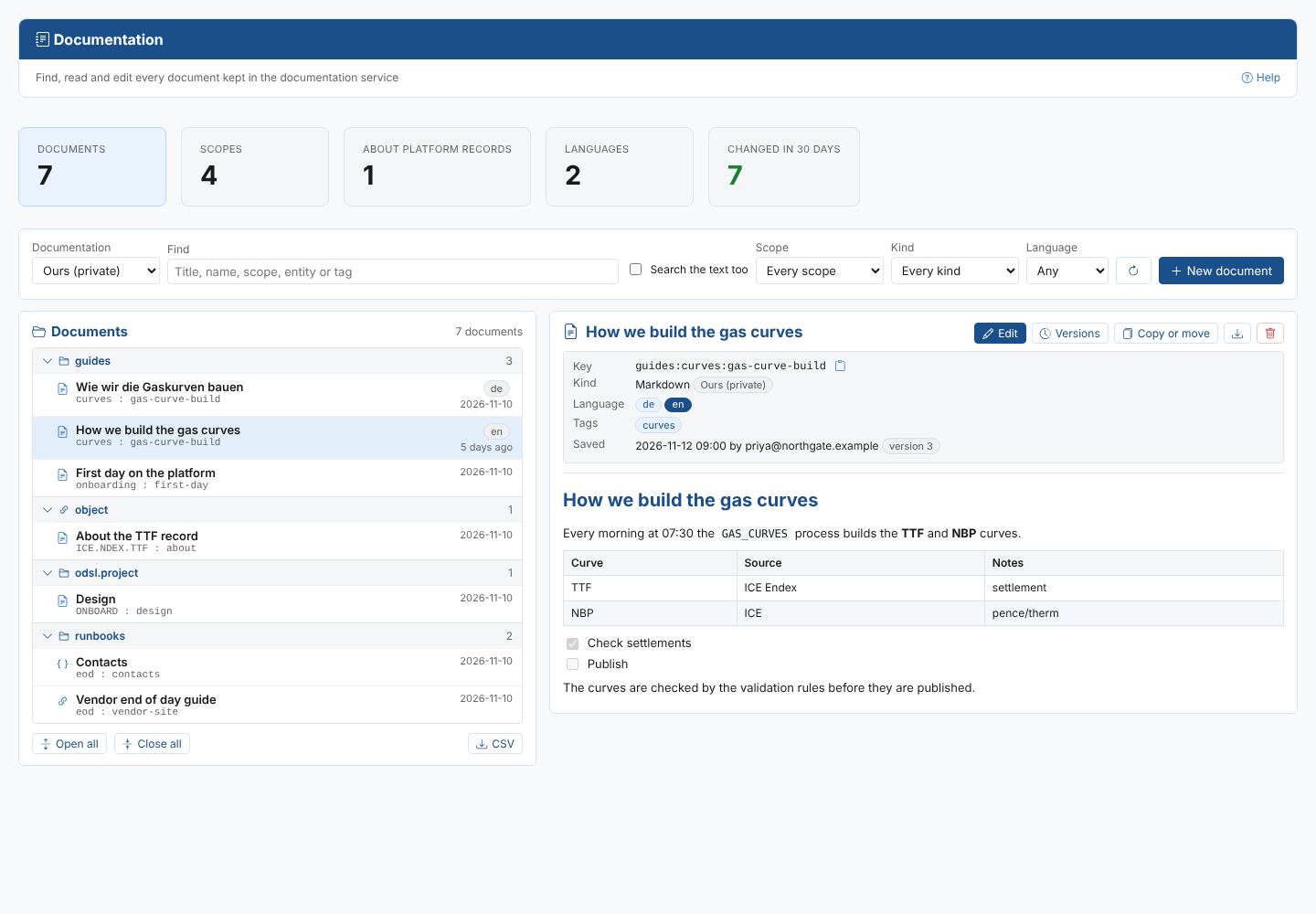
| Summary cards | How many documents, scopes and languages there are, how many are about platform records, and how many changed in the last 30 days |
| Filters | Choose the documentation, find by title, name, scope, entity or tag, search the text inside the documents, and narrow to a scope, kind or language |
| Documents list | The documents grouped by scope, with the newest saves easy to spot |
| The open document | The document as the portal shows it, with its key, language versions, tags and when it was saved, and the buttons to edit, see versions, copy or move, download and delete |
| Home page tasks | Find documentation and Write a document |
The extension adds Documentation to the Manage menu.
Where next
- Finding and reading: find a document and read it
- Writing and changing documents: edit, create, translate, copy and move documents, versions and deleting
- Reference: how documents are kept, permissions and troubleshooting