Example notebooks
The Examples tab lists notebooks published for everyone on the platform. They are a quick way to learn ODSL a step at a time, and a starting point for your own notebooks.
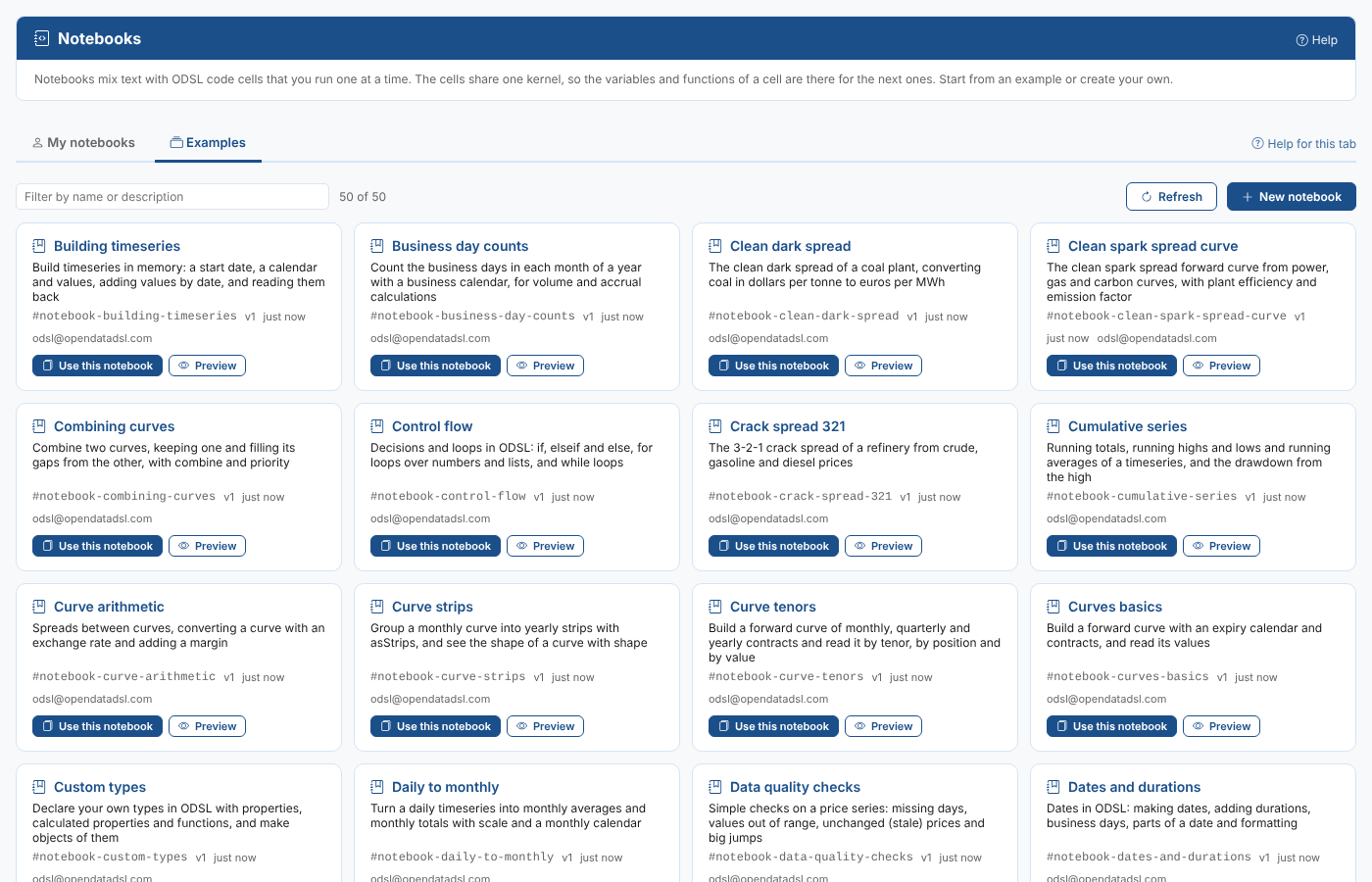
The examples
There are 50 examples, from the first steps in ODSL to energy trading analytics. Type a word such as curve, spread or volatility in the filter box to find them. All but the four in Platform data make their own data in the notebook, so they run anywhere; the platform data ones read the public ECB reference rates.
Getting started with ODSL
| Example | What it shows |
|---|---|
Getting started (#notebook-getting-started) | Cells, variables, the value of a cell, functions, lists of objects shown as a table, and min, max and mean |
Strings and text (#notebook-strings-and-text) | Work with text in ODSL: joining, case, parts of a string, searching, replacing and splitting |
Dates and durations (#notebook-dates-and-durations) | Dates in ODSL: making dates, adding durations, business days, parts of a date and formatting |
Lists and filtering (#notebook-lists-and-filtering) | Lists in ODSL: making them, adding to them, looping, totals and filtering a list of objects by a condition |
Objects and json (#notebook-objects-and-json) | Objects in ODSL: properties, reading them by name, listing their keys and turning them into JSON |
Functions (#notebook-functions) | Write your own ODSL functions: parameters, returning a value, calling functions from functions, and recursion |
Control flow (#notebook-control-flow) | Decisions and loops in ODSL: if, elseif and else, for loops over numbers and lists, and while loops |
Custom types (#notebook-custom-types) | Declare your own types in ODSL with properties, calculated properties and functions, and make objects of them |
Precision and rounding (#notebook-precision-and-rounding) | How ODSL shows numbers: the default precision, setting the number of decimals and the rounding method |
Calendars
| Example | What it shows |
|---|---|
Holiday calendars (#notebook-holiday-calendars) | Build a holiday calendar from rules, check whether a day is a working day and list the working days in a period |
Business day counts (#notebook-business-day-counts) | Count the business days in each month of a year with a business calendar, for volume and accrual calculations |
Intraday calendars (#notebook-intraday-calendars) | Hourly and half-hourly calendars, and a peak calendar that only has the peak hours of working days |
Expiry calendars (#notebook-expiry-calendars) | Expiry calendars: rules for when monthly and quarterly contracts expire, and the expiry date of a tenor |
Timeseries
| Example | What it shows |
|---|---|
Timeseries basics (#notebook-timeseries-basics) | Building daily timeseries, combining them into a spark spread, reading values by date and position, and rebasing to 100 |
Building timeseries (#notebook-building-timeseries) | Build timeseries in memory from a list of values on a calendar, add values by date and read them back by date or position |
Timeseries arithmetic (#notebook-timeseries-arithmetic) | Add, subtract, multiply and divide timeseries by numbers and by each other, date by date |
Timeseries statistics (#notebook-timeseries-statistics) | Summary statistics of a timeseries: count, minimum, maximum, mean, standard deviation, percentiles, skew and kurtosis |
Moving averages (#notebook-moving-averages) | Simple moving averages of a price series, and the days a short average crosses a long one |
Returns and volatility (#notebook-returns-and-volatility) | Daily returns, log returns and annualised volatility of a price series |
Cumulative series (#notebook-cumulative-series) | Running totals, running highs and lows and running averages of a timeseries, and the drawdown from the high |
Differences and lags (#notebook-differences-and-lags) | Day on day changes with diff, and lagging a series by a number of days with shift |
Filling gaps (#notebook-filling-gaps) | Find the missing days of a timeseries and fill them by linear interpolation |
Daily to monthly (#notebook-daily-to-monthly) | Turn a daily timeseries into monthly averages and monthly totals with scale and a monthly calendar |
Overlay series (#notebook-overlay-series) | Combine two timeseries so that the values of one fill the gaps of the other with overlay |
Outliers and z scores (#notebook-outliers-and-z-scores) | Spot unusual prices by how many standard deviations they are from the mean (z scores) |
Forward curves
| Example | What it shows |
|---|---|
Curves basics (#notebook-curves-basics) | An expiry calendar, a curve date, a curve built from contracts and shown as a chart, and scaling a curve |
Curve tenors (#notebook-curve-tenors) | Build a forward curve of monthly, quarterly and yearly contracts and read it by tenor, by position and by value |
Curve arithmetic (#notebook-curve-arithmetic) | Spreads between curves, converting a curve with an exchange rate and adding a margin |
Quarters to months (#notebook-quarters-to-months) | Split a curve of quarters into monthly contracts with bootstrapCurve |
Curve strips (#notebook-curve-strips) | Group a monthly curve into yearly strips with asStrips, and see the shape of a curve with shape |
Seasonal shape (#notebook-seasonal-shape) | Work out the seasonal shape of a monthly curve: each month as a factor of the yearly average |
Combining curves (#notebook-combining-curves) | Combine two curves, keeping one and filling its gaps from the other, with priority |
Energy and trading analytics
| Example | What it shows |
|---|---|
Clean spark spread curve (#notebook-clean-spark-spread-curve) | The clean spark spread forward curve from power, gas and carbon curves, with plant efficiency and emission factor |
Clean dark spread (#notebook-clean-dark-spread) | The clean dark spread of a coal plant, converting coal in dollars per tonne to euros per MWh |
Crack spread 321 (#notebook-crack-spread-321) | The 3-2-1 crack spread of a refinery from crude, gasoline and diesel prices |
Seasonal spreads (#notebook-seasonal-spreads) | Winter against summer spreads from a monthly gas curve, the basis of seasonal storage and hedging |
Gas storage intrinsic (#notebook-gas-storage-intrinsic) | The intrinsic value of a gas storage contract: inject in the cheapest months and withdraw in the dearest |
Peak and offpeak (#notebook-peak-and-offpeak) | Baseload, peak and off-peak averages of a day of hourly power prices |
Heating degree days (#notebook-heating-degree-days) | Heating degree days from daily temperatures, the usual way to relate the weather to gas demand |
Unit conversions (#notebook-unit-conversions) | Convert energy prices between pence per therm, dollars per MMBtu and euros per MWh |
Risk and options
| Example | What it shows |
|---|---|
Gas option pricing (#notebook-gas-option-pricing) | Price a call and a put option on a gas futures contract with the Black-Scholes formula |
Option greeks (#notebook-option-greeks) | Estimate an option's delta, gamma and vega by bumping the forward price and the volatility |
Historical var (#notebook-historical-var) | One day value at risk of a position from historical price changes, at 95% and 99% |
Portfolio mark to market (#notebook-portfolio-mark-to-market) | Mark a small book of forward trades to market against today's curve and total the profit and loss |
Monte carlo price paths (#notebook-monte-carlo-price-paths) | Simulate future price paths with random numbers and read a range of outcomes from them (a Monte Carlo simulation) |
Data quality
| Example | What it shows |
|---|---|
Data quality checks (#notebook-data-quality-checks) | Simple checks on a price series: missing days, values out of range, unchanged (stale) prices and big jumps |
Platform data
| Example | What it shows |
|---|---|
Platform data (#notebook-platform-data) | Reading the public ECB euro reference rates and building a pound to dollar cross rate (reads platform data) |
Ecb fx rebased (#notebook-ecb-fx-rebased) | Read the ECB euro reference rates from the platform and rebase them to 100 to compare the currencies (reads platform data) |
Ecb fx volatility (#notebook-ecb-fx-volatility) | Daily changes and annualised volatility of the ECB euro to dollar reference rate, read from the platform (reads platform data) |
Ecb fx monthly averages (#notebook-ecb-fx-monthly-averages) | Monthly average ECB euro reference rates from the platform, for converting monthly invoices (reads platform data) |
Using an example
Examples are read only: Preview opens one so you can read it, but not run or change it. To run it, select Use this notebook on its card (or in the toolbar of the preview).
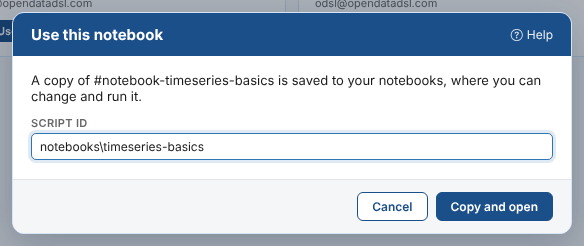
The copy is saved to your notebooks under the id you give (by default notebooks\ and the example's name) and opens straight away. It is yours: change it, run it and save it. Its first version records which example and version it was copied from.
Copy an example again whenever you want a clean start: your earlier copy is not touched.
Publishing examples
Administrators (users with the admin role) can publish notebooks as examples for everyone on the platform. An example is a public script with the category notebook and an id starting #notebook-.
| How | Where | What it does |
|---|---|---|
| Publish as an example | ... menu of one of your notebooks | Publishes the saved notebook (not your unsaved changes, and never its outputs) under the id you give, for example #notebook-spark-spread. If the example exists, it gets a new version. |
| Upload examples | Examples tab | Publishes one or more .odsl files. The file name is the id: #notebook-spark-spread.odsl becomes #notebook-spark-spread, and #notebook- is added to a name without it. |
Examples are seen by every user of the platform. Do not publish a notebook that reads your company's private data or shows its prices.
A good example:
- starts with a markdown cell saying what it shows, and explains each step in a markdown cell before the code,
- ends each code cell with a value line, so running it shows something,
- runs from the top after Restart and Run all, and
- uses public data, or makes its own, so it runs for everyone.
Next
Reference: how notebooks are saved and run, and troubleshooting.