What is Data Reconciliation?
Every trade booked in your ETRM system should also appear, with the same details, in the records of the parties that executed, brokered and cleared it: the exchange trade file, the broker's confirmations and the clearing bank's statement. Data Reconciliation compares them for you every day and shows you the breaks:
- trades in your ETRM that are missing from an exchange, broker or bank record
- trades whose product, buy/sell, contract, price or quantity disagree
- trades an exchange, broker or bank reports that are not in your ETRM at all
Finding these on the day the trade is done, rather than when a margin call or an invoice does not add up, is what trade reconciliation is for.
Master and matchers
Your ETRM is the master: the golden source every other record is checked against. Each external source is a matcher. For a typical gas and power trading desk that might be:
| Source | Example | What it confirms |
|---|---|---|
| ETRM (master) | Aligne, Endur or Allegro trade export | Every deal the desk has booked |
| Exchange | ICE Endex, EEX or Eurex trade files | Exchange traded futures and their fills |
| Broker | Marex, Tradition or ICAP confirmations | OTC deals arranged through a broker |
| Bank or clearer | ABN AMRO Clearing statement | Cleared trades, prices and lots |
A reconciliation model names the master, the matchers and, for each matcher, the rules that decide whether two records are the same trade: for example, the same contract, the same price and the same number of lots.
What you get
The extension adds these screens to the portal:
| Screen | What it does |
|---|---|
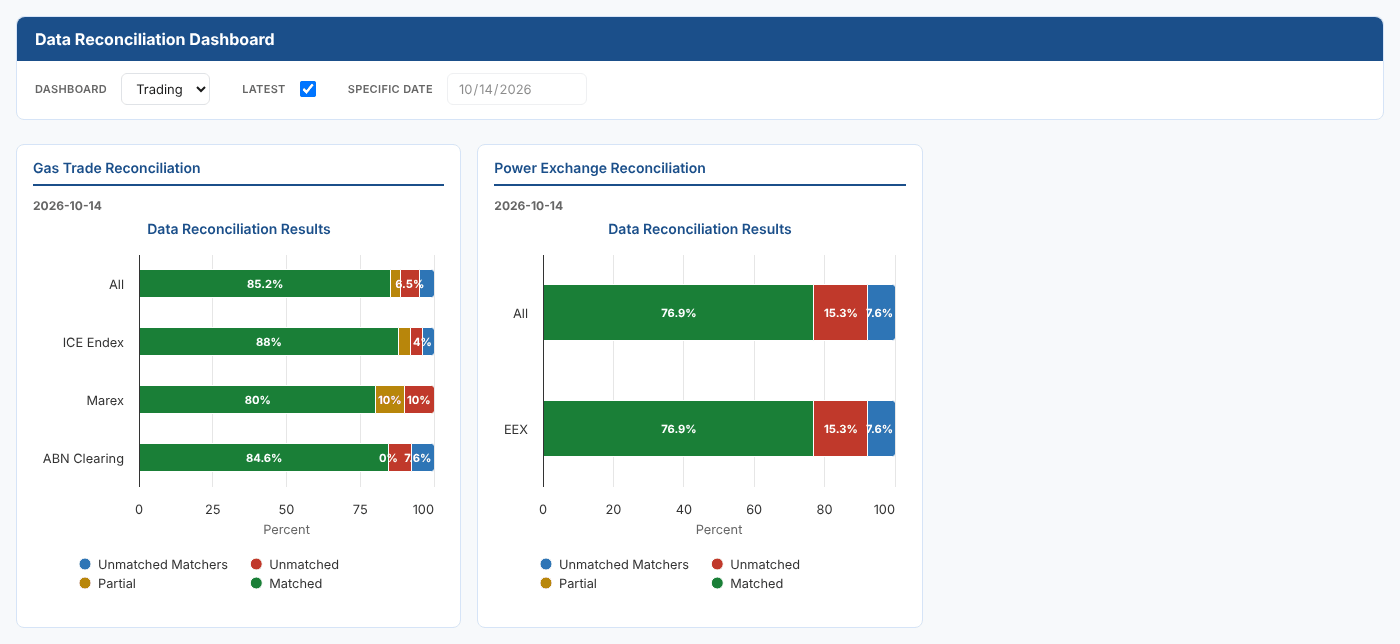
| Dashboard | The latest result for every model: matched, partial and unmatched trades for each source, with click through to the trades behind each number |
| Manage | Set up reconciliation models, test them for a day, save the result and resolve breaks by hand |
| Mappings | The value mappings the reconciliation uses, such as an ETRM product name and the exchange's code for it |
| Data Analysis (insight) | A day's trades plotted against trade time, with the ETRM and external records side by side |
A model can also run on a schedule, or whenever a new exchange, broker or bank file is loaded, so the dashboard is up to date when you start the day.
Where next
- How it works: trades as events, models, rules and what each result means
- Setting up a trade reconciliation: build a model step by step
- Reconciling a day: test a model, save the result and resolve breaks
- Dashboard and analysis: follow the results and investigate breaks
- Running every day: schedules and automations
- Reference: data formats and services