Licences
Open Manage > Data Licences. The Licences tab lists your licences on the left and shows the one you select on the right.
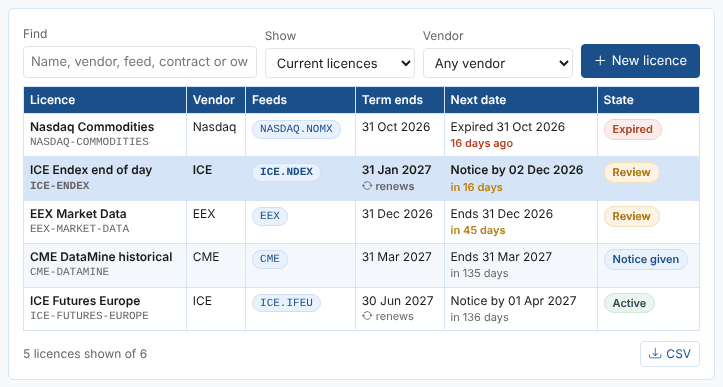
The list
| Column | What it shows |
|---|---|
| Licence | The name and code |
| Vendor | The exchange or vendor |
| Feeds | The dataset feeds the licence covers |
| Term ends | The end of the current term; renews under it when the licence renews automatically |
| Next date | The next thing that needs you: Notice by, Renews or Ends, and how far away it is. Amber when it is in its reminder period, red when it is within 14 days or past |
| State | Active, Review (in its reminder period), Act now (within 14 days), Expired, Notice given, Not started, Draft, Ended or No end date |
Licences that need attention are listed first. Use Find to search names, vendors, feeds, contract references, owners and notes (every word must match), Show to switch between current licences, those to review now, all, drafts and ended or expired ones, and Vendor to see one vendor's licences. CSV downloads the licences shown.
The figures at the top count the current licences, those to review now, expired licences and the feeds of your followed datasets that have no current licence. Select a figure to see the licences or feeds behind it.
Adding a licence
Select New licence and fill in the details. Only the name, vendor and term end are required; everything else can be added later.
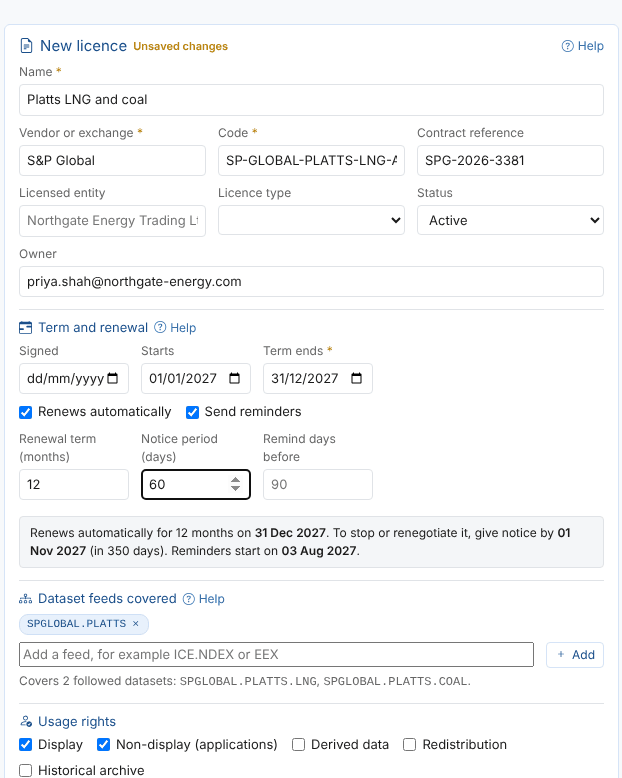
- Enter the Name and the Vendor or exchange. The Code is made from them (
SP-GLOBAL-PLATTS-LNG-AND-COAL); change it before saving if you prefer a shorter one. The code cannot be changed once the licence is saved. - Enter the Term ends date and the term and renewal details (see below).
- Add the feeds the licence covers.
- Select Save.
Save a licence you are still negotiating with the status Draft: it needs no end date, sends no reminders and does not count as covering any feed.
The licence details
| Field | Example | Notes |
|---|---|---|
| Name | ICE Endex end of day | What people call the licence |
| Vendor or exchange | ICE | Offered from the vendors you already use |
| Code | ICE-ENDEX | The licence's id; set when it is created |
| Contract reference | ICE-NG-2024-118 | The vendor's contract or order number |
| Licensed entity | Northgate Energy Trading Ltd | The company named on the licence |
| Licence type | End of day | End of day, delayed, real time, historical, enterprise or other |
| Status | Active | Draft, Active, Notice given or Ended |
| Owner | priya.shah@northgate-energy.com | Who looks after the licence; named in its reminders |
Term and renewal
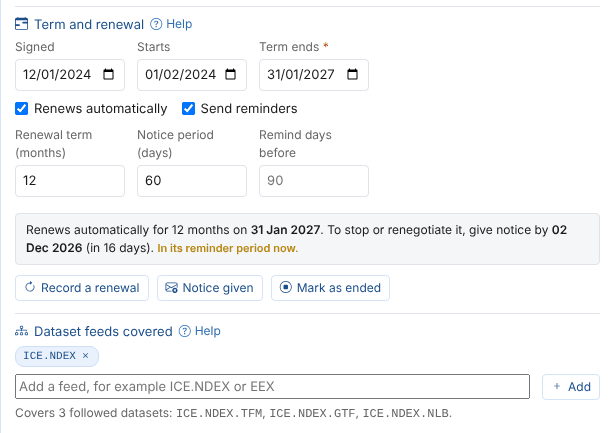
| Field | Example | Notes |
|---|---|---|
| Signed | 12/01/2024 | For your records |
| Starts | 01/02/2024 | A licence that has not started yet shows Not started |
| Term ends | 31/01/2027 | The end of the current term |
| Renews automatically | ticked | The licence rolls on for another renewal term unless notice is given |
| Send reminders | ticked | Untick to stop reminders for this licence |
| Renewal term (months) | 12 | How long each renewal lasts; 12 when empty |
| Notice period (days) | 60 | How many days before the term end notice must be given |
| Remind days before | 90 | How many days before the deadline reminders start; the default from the Reminders tab when empty |
The grey box under the fields says, in words, what happens next: when the licence renews or ends, the date by which notice must be given, and when reminders start. For the ICE Endex licence on 16 November 2026: it renews for 12 months on 31 January 2027, notice must be given by 2 December 2026 (16 days away), and it is in its reminder period now.
When a licence renews automatically and its term end has passed, the next term is worked out for you. The box then offers to make the new date the term end, so the record shows the current term.
Recording what happened
| Button | What it does |
|---|---|
| Record a renewal | Asks for the new term end (the current one plus the renewal term) and a note, sets the status to Active and saves |
| Notice given | Sets the status to Notice given: the licence ends on its term end and no longer renews |
| Mark as ended | Sets the status to Ended: no more reminders, and it no longer covers any feed |
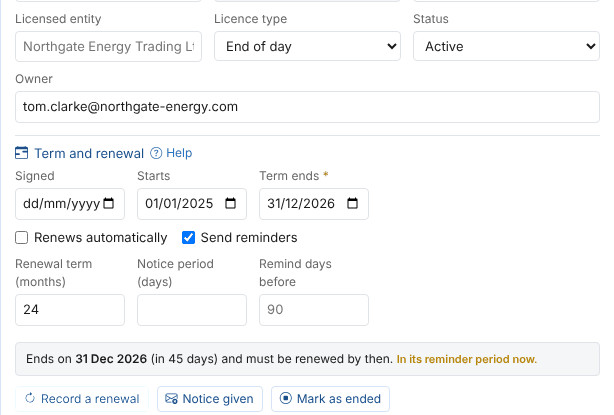
Each of these saves the licence at once and adds a line to its history. An open reminder for the old dates closes at the next daily check.
Dataset feeds
A licence covers the datasets whose id starts with one of its feeds. Add the provider (ICE) to cover everything from ICE, or the provider and feed (ICE.NDEX) to cover only ICE Endex. Type in the box to see the feeds of the datasets you follow, with how many datasets each has, and choose one, or type a feed and select Add.

Under the feeds you see how many of your followed datasets the licence covers, and which feeds match none of them (often a typing mistake). The Feed coverage tab shows the same from the datasets' side.
Usage rights
Tick what the licence allows: Display, Non-display (applications), Derived data, Redistribution and Historical archive. Enter the number of Permitted users, the Sites or locations, the Named users (one email a line) and a short description of the Permitted use. These are records for you and your auditors; the platform does not enforce them.
Vendor and authorisation
Record your contact at the vendor, and whether the vendor has confirmed to OpenDataDSL that you are licensed: Not needed, Requested from the vendor or Confirmed by the vendor, with the date and the vendor's reference. Most exchanges ask the licence holder to authorise a service provider such as OpenDataDSL before the data can be delivered to you.
Documents and notes
Link the signed contract, order forms and the vendor's schedules where they are kept (SharePoint, a contract system): enter a Label and the Link (starting https://) and select Add. The documents themselves stay where they are. Use Notes for anything else: audit dates, special terms, who to call.
Saving, history and deleting
Save stores the licence; Undo changes puts back the saved version. If you open another licence with unsaved changes, you are asked whether to discard them.
Every save adds a line to the licence's History with who changed what, for example Changed notice period 60 -> 90; feeds ICE.NDEX -> ICE.NDEX, ICE.IFEU. The last 50 changes are kept.
Delete removes the licence and its costs after you confirm. Its open reminder closes at the next daily check. If you only want to stop using a licence, Mark as ended keeps its record.
Next
Renewals: see what renews, ends or needs notice in the coming months.