Renewals
The Renewals tab lists everything that comes up in the period you choose in Look ahead (3, 6, 12 or 24 months): notice deadlines, automatic renewals and end dates. Expired licences are listed first, then the rest by date.
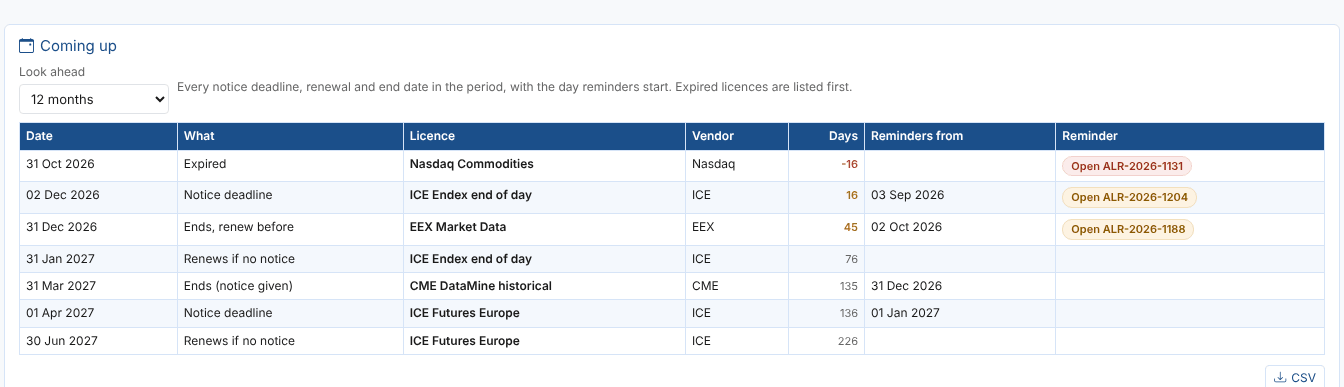
| Column | What it shows |
|---|---|
| Date | The date of the event |
| What | Notice deadline, Renews if no notice, Renews, Ends, renew before, Ends (notice given), Renews (notice date passed) or Expired |
| Licence, Vendor | Which licence; select the row to open it |
| Days | Days from today; amber or red when the licence is in its reminder period |
| Reminders from | The day reminders start for this date |
| Reminder | The open reminder alert, or At the next check when one is due but not raised yet |
CSV downloads the list, for example to send to procurement.
How the dates are worked out
| Licence | Deadline | Example |
|---|---|---|
| Renews automatically, with a notice period | The term end minus the notice period: the notice deadline | ICE Endex: term ends 31 Jan 2027, 60 days notice, so notice by 02 Dec 2026 |
| Renews automatically, no notice period | The term end: it renews then | |
| Does not renew automatically | The term end: it ends and must be renewed by then | EEX: ends 31 Dec 2026 |
| Notice given | The term end: it ends | CME DataMine: ends 31 Mar 2027 |
Reminders start the licence's Remind days before (90 by default) before the deadline. When an automatically renewing licence passes its notice deadline without notice, it renews: the next deadline is a year (one renewal term) later. A licence that does not renew automatically and is still Active after its term end is Expired until you record a renewal or mark it as ended.
The Renewals tab, the Licences list and the daily reminder check all use the same rules, so the dates here are the dates the reminders are raised for.
When a licence is due
- Decide. Renew as it is, renegotiate (and give notice if the contract asks for it), or end it.
- Record it. On the licence, use Record a renewal, Notice given or Mark as ended (see Recording what happened), or change the dates and save.
- The reminder closes by itself at the next daily check, with the reason in its resolution.
Next
Reminders: set up the daily check that raises the reminder alerts.