Reminders
A daily check looks at every licence and raises a reminder alert when a notice deadline, renewal or end date is coming up. The alerts appear in the Alerts screen and on the Home page, and alert automations can email or message people when one is raised.
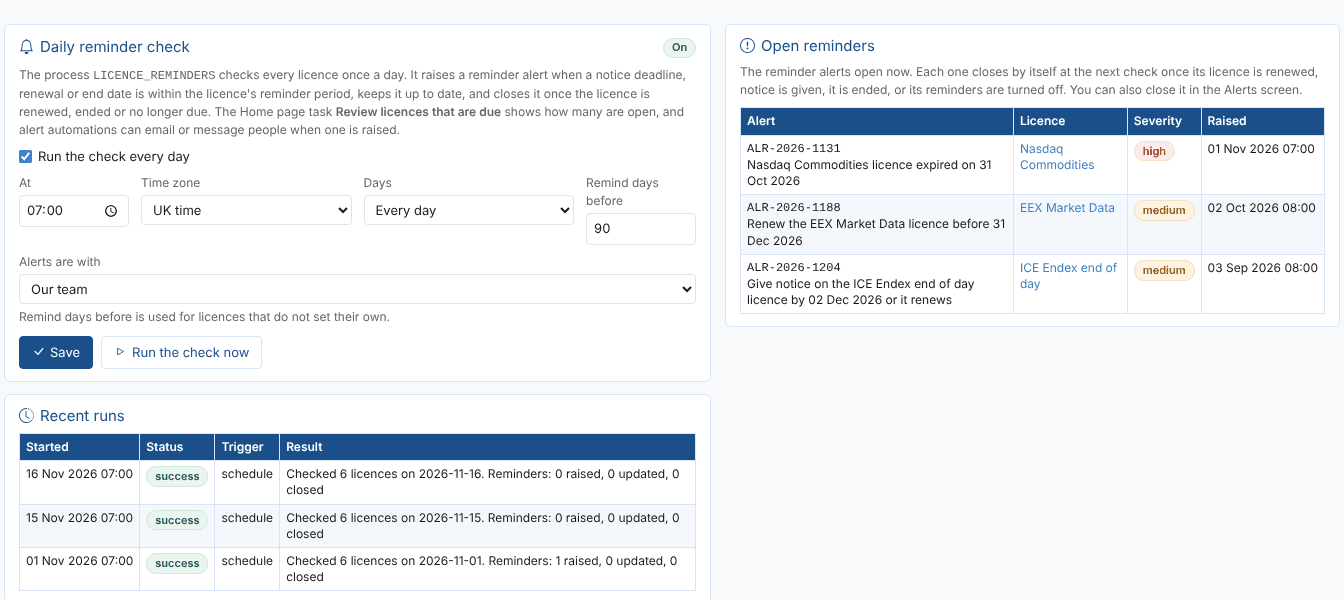
Setting up the daily check
The check is a process, LICENCE_REMINDERS, created from the Reminders tab:
- Tick Run the check every day.
- Choose the time (At), the Time zone and whether it runs Every day or on Weekdays.
- Set Remind days before: how many days before a deadline reminders start, for licences that do not set their own (90 by default).
- Choose who the alerts are with: Our team (the usual choice) or OpenDataDSL.
- Select Save.
Run the check now runs it straight away, for example after adding several licences. The Recent runs list shows when it ran and what it did, such as Checked 6 licences on 2026-11-16. Reminders: 1 raised, 0 updated, 2 closed.
The process can also be seen and changed in the portal's processes screen, and scheduled with any cron expression (see Cron expressions). If you set your own schedule there, the Reminders tab tells you and replaces it when you next save.
The reminder alerts
For each licence that is due, the check raises one alert and keeps it up to date:
| Alert field | Value |
|---|---|
| Title | What to do and by when, for example Give notice on the ICE Endex end of day licence by 02 Dec 2026 or it renews |
| Message | How many days are left, the notice period, the contract reference, the feeds and the owner |
| Category | licence |
| Issue | notice, renewal, ending or expired |
| Severity | low, medium within 45 days, high within 14 days and when expired |
| With | The team chosen on the Reminders tab |
| Subject | The licence (its code), with the deadline as the date |
On later days the same alert is kept: its severity rises as the deadline gets closer, but no new alert is raised. The alert closes by itself at the next check once it is no longer due, with the reason in its resolution:
| What you did | Resolution |
|---|---|
| Recorded a renewal or changed the dates | No longer due: the licence was renewed, changed or deleted |
| Let the notice deadline pass | No longer due: the notice date has passed, so the licence renews on 31 Jan 2027 |
| Gave notice and the licence ended | No longer due: the licence ended on 31 Mar 2027 |
| Marked it as ended, made it a draft, or turned its reminders off | No longer due: the licence was ended (or is a draft, or reminders were turned off) |
The Open reminders list on the Reminders tab shows the reminder alerts open now. You can also comment on, hand over or close them in the Alerts screen like any other alert (see Alerts).
Being told
The alerts are ordinary platform alerts, so you choose how people hear about them with an automation on the alert service: for example an email to the licence owners when an alert of category licence is raised. See Alert automations and Automations.
The Home page task
With the Home extension installed, the task Review licences that are due shows how many reminder alerts are open (2 licences), moves up to Needs you now while any are open, and says Nothing due otherwise. It opens the Renewals tab. Two more tasks open the screen ready for the job: Record a data licence and Check our data feeds are licensed.
Next
Feed coverage: find the datasets you follow that no licence covers.