Costs
Recording costs is optional. They are kept apart from the licences, so you can let everyone see the licences and only some people see what they cost.
Costs on a licence
People who may see costs get a Costs section on each licence:
| Field | Example | Notes |
|---|---|---|
| Currency | EUR | Three letters |
| Annual fee | 18600 | The yearly fee, whatever the billing |
| Billed | Quarterly | Annually, quarterly, monthly or other |
| Next invoice | 01/01/2027 | |
| Renewal uplift % | 3 | The price increase agreed at renewal |
| PO number, Cost centre | PO-44120, MD-100 | For your finance team |
| Cost notes |
The costs are saved with the licence when you select Save.
The Costs tab
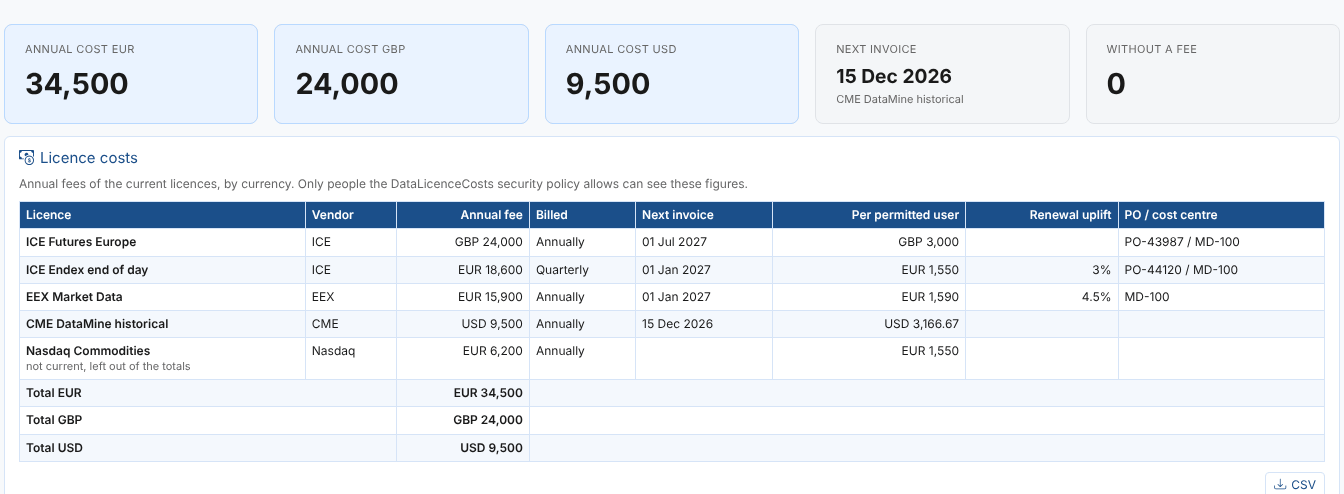
The figures at the top give the annual cost of the current licences in each currency, the next invoice and how many current licences have no fee recorded. The table lists each licence's fee, billing, next invoice, the fee per permitted user, the renewal uplift and the PO number and cost centre, with totals by currency. Licences that are no longer current are listed while they have costs recorded, but left out of the totals. Amounts in different currencies are never added together.
Who can see costs
Two security policies come with the extension:
| Policy | Gives access to | Members when installed |
|---|---|---|
DataLicences | The licences | Everyone (*) |
DataLicenceCosts | The costs | Everyone (*) |
To let only your finance team and the licence owners see costs, change the members of DataLicenceCosts to a policy user group with those people (see the Group Manager). Everyone else then sees the licences with no Costs tab, no cost figure at the top and no Costs section, and nothing they save touches the costs.
Changing the members of DataLicences decides who can see and change the licences at all. Keep the account the reminder process runs as among its members, or the daily check cannot read the licences.
Next
Reference: where everything is kept, the rules in detail and troubleshooting.