Checks and settings
Each curve or timeseries you validate has one validation configuration. It holds the checks, the scripts their functions come from, and a few settings. You edit it on the Validation tab of the Data screen, on the Configurations tab of Information > Validation, or for many data items at once with Bulk changes.
Checks
| Field | Meaning |
|---|---|
| Name | What the check is called in results and reports. Names must be different within a configuration |
| Expression | One line of ODSL, usually a call to a check function, such as checkRange(0, 500), or a condition such as #VALUE > 0 |
| Scope | Curves only: Tenor or Curve (see below) |
| Severity | What a failure counts as: Warning, Failed or Severe |
| On | Whether the check runs |
Checks run in the order they are listed. Use the arrows to move them.
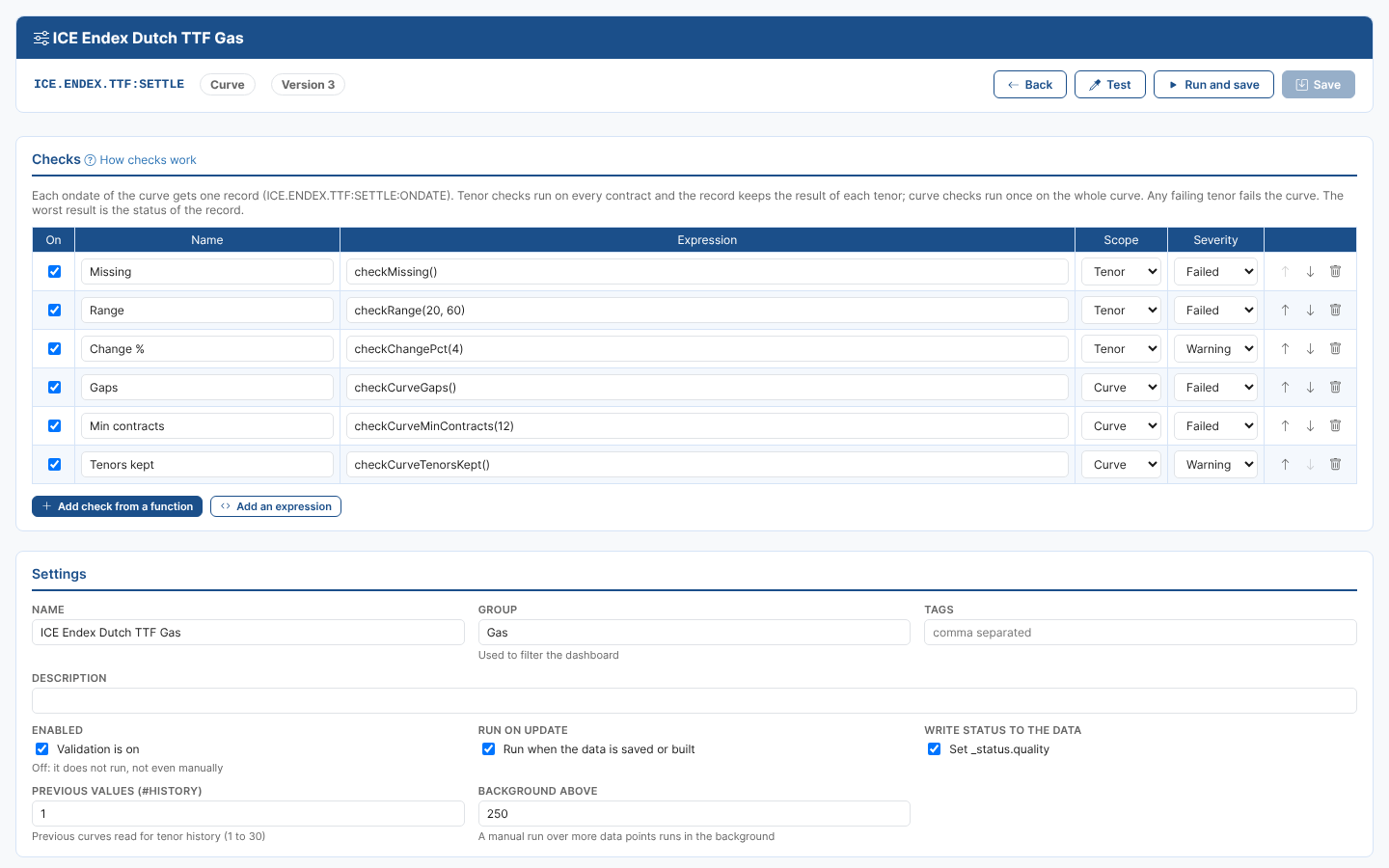
Scope
| Data | Scope | Runs |
|---|---|---|
| Timeseries | (point) | on each observation; one record per observation, DATA_ID:TIME |
| Curve | Tenor | on each contract of the curve |
| Curve | Curve | once on the whole curve |
A curve gets one record per ondate, DATA_ID:ONDATE, holding the results of both kinds of checks:
- Tenors: every contract with its value, status and the checks it failed. A tenor's status is the worst of its tenor checks.
- Failing tenors and warning tenors: lists of the tenors that failed or warned, which you can filter records by.
- Checks: one result per check. A tenor check is as bad as its worst tenor, with a message such as "2 of 40 tenors: M03, Q2", and lists each failing tenor.
Any failing tenor fails the whole curve: the curve record takes the worst result of all its checks.
Value checks (missing, range, change, outliers and so on) use the tenor scope; checks on the shape of the curve (gaps, structure, required tenors, stale curve) use the curve scope. The function picker only offers the functions that fit the scope.
Severity
A check gives back one of these results:
| Result | Becomes |
|---|---|
"valid" or true | Valid |
"warning" | Warning |
"failed" or false | The check's severity: Warning, Failed or Severe |
"severe" | Severe |
"skip" | Skipped |
| anything else, or an ODSL error | Error |
So the same function can fail a record in one configuration and only warn in another. For example checkChangePct(20) with severity Warning flags big moves without stopping the data being used.
The status of a record is the worst result of its checks: Severe, then Failed and Error, then Warning, then Valid. When every check was skipped, the record is Skipped.
Settings
| Setting | Meaning | Default |
|---|---|---|
| Name, Description | Shown in lists and reports | the data name |
| Group | A label for filtering the dashboard and reports, for example "Power curves" | none |
| Tags | Comma separated labels | none |
| Enabled | When off, the checks never run, not even manually | on |
| Run on update | Run when the data is updated: saved (private or public data), a smart or event curve or timeseries rebuilt because its inputs changed, or a composed curve or timeseries whose composition was built. This keeps an automation on the data item that runs the checks in your tenant. When off, the checks only run when you run them | on |
| Write status to the data | Set the quality status of the data. A curve for an ondate gets the worst status of its records; a timeseries the status of its latest checked observation | on |
| Lookback (timeseries) | How many earlier observations a check gets in #HISTORY | 30 |
| Previous values (curves) | How many previous stored curves are read, to give each tenor its earlier values in #HISTORY (1 to 30) | 1 |
| Background above | A manual run over more data points than this runs in the background | 250 |
| Scripts | The scripts the check functions come from. #ValidationLibrary is always loaded; add your own private scripts | the library |
Every save keeps a version of the previous configuration.
Testing and running
| Test | Run | |
|---|---|---|
| Uses | the checks as they are in the editor, saved or not | the saved checks |
| Saves records | No | Yes |
| Updates the data's quality status, raises automations | No | Yes |
| Most data points | 100 (the latest ones) | the Background above setting; more runs in the background |
Both take the latest data point, one date or a date range. For a curve the ondates are the ones the platform has for it: the stored curves, or the ondates a smart, event or composed curve can be built for, up to today. The latest curve is the newest ondate whose curve can be read: if a smart curve cannot be built for today yet, the ondate before it is used (up to 5 ondates back). The previous curves that checks compare with come from the same list.
Deleting validation
Delete validation removes the configuration, so the checks stop running. The validation records already made are kept, and still show on the dashboard and in reports.