Example: a gas forward curve
This example validates the ICE Endex Dutch TTF gas settlement curve, ICE.ENDEX.TTF:SETTLE: a curve of 12 tenors (six months, four quarters and two years) loaded every business day. It sets up the checks from the curve's own data, follows a day when the curve fails, and sends on only the curves that pass.
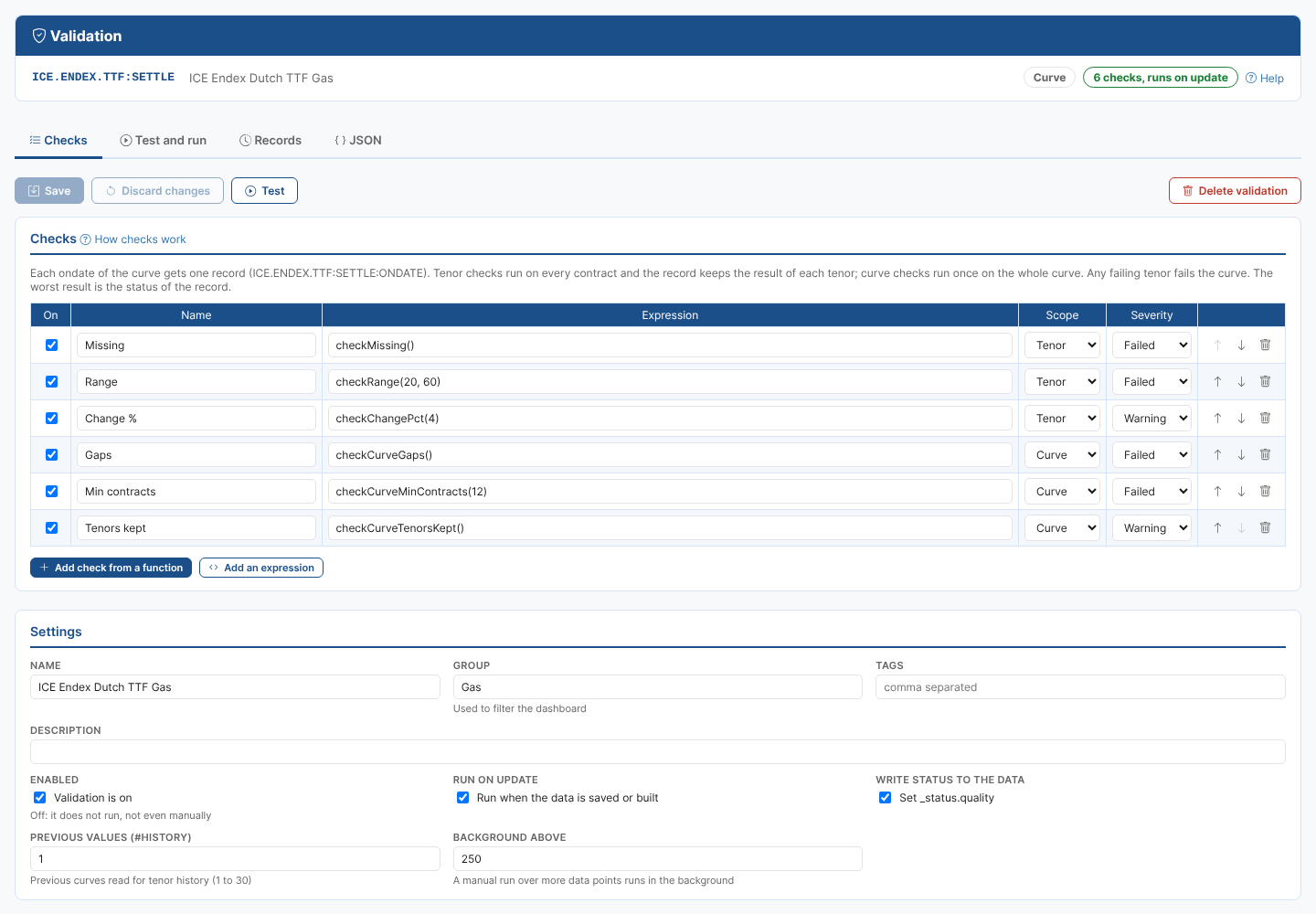
What to check
For a settlement curve that arrives once a day, the questions are:
| Question | Check | Scope |
|---|---|---|
| Does every tenor have a price? | checkMissing() | Tenor |
| Is every price sensible? | checkRange(20, 60) | Tenor |
| Did any tenor move too far since yesterday? | checkChangePct(4) | Tenor |
| Are there gaps between delivery periods? | checkCurveGaps() | Curve |
| Are all 12 contracts there? | checkCurveMinContracts(12) | Curve |
| Did a tenor drop off since yesterday? | checkCurveTenorsKept() | Curve |
Tenor checks run on each of the 12 contracts; curve checks run once on the whole curve. A missing price or a price out of range is a failure, while a big move or a dropped tenor is a warning: worth a look, but the curve can still be used.
Setting the limits from the data
What should the range be, and how big a daily move is normal for TTF? Rather than guess, let the data tell you:
- Open Information > Validation and select Bulk changes.
- Choose Curves and select Find curves. Filter by commodity Gas (or type
SETTLEin Id contains), tickICE.ENDEX.TTF:SETTLEalong with any other gas curves that should get checks too, here the German THE, French PEG, Belgian ZTP and Italian PSV curves, and select Add. - Under Suggest checks from the data, leave Last 30 days and select Suggest checks.
For each curve, the checks are suggested from its last 30 days of curves and then tried on those same curves. The picture shows the suggestions for THE, PEG, ZTP and PSV; TTF gets its own in the same way:
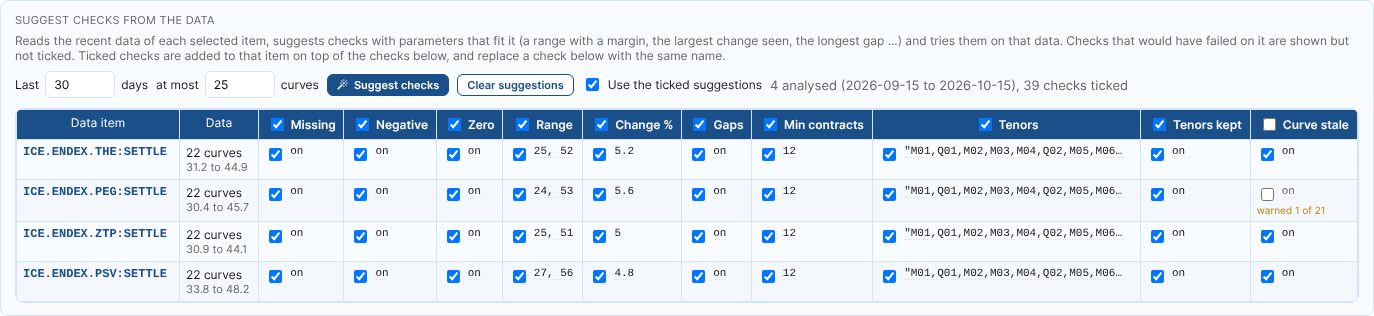
- The range is the lowest and highest prices seen, with a margin, rounded outwards: PEG traded between 30.4 and 45.7, so it gets
checkRange(24, 53). - The change limit is 1.5 times the largest move of a tenor from one curve to the next.
- Tenors and Min contracts take the tenors and the number of contracts that were on every curve.
- A check that would have failed on the history is shown but not ticked. Above, one PEG curve was identical to the curve before it, so Curve stale is left unticked for PEG for you to decide on.
Untick what you do not want, then Preview and Apply. Each curve gets its own limits. See Bulk changes for the details.
The configuration that is saved for TTF:
{
  "_id": "ICE.ENDEX.TTF:SETTLE",
  "kind": "curve",
  "name": "ICE Endex Dutch TTF Gas",
  "group": "Gas",
  "enabled": true,
  "runOnUpdate": true,
  "scripts": ["#ValidationLibrary"],
  "checks": [
    {"name": "Missing", "expression": "checkMissing()", "scope": "tenor", "severity": "failed"},
    {"name": "Range", "expression": "checkRange(20, 60)", "scope": "tenor", "severity": "failed"},
    {"name": "Change %", "expression": "checkChangePct(4)", "scope": "tenor", "severity": "warning"},
    {"name": "Gaps", "expression": "checkCurveGaps()", "scope": "curve", "severity": "failed"},
    {"name": "Min contracts", "expression": "checkCurveMinContracts(12)", "scope": "curve", "severity": "failed"},
    {"name": "Tenors kept", "expression": "checkCurveTenorsKept()", "scope": "curve", "severity": "warning"}
  ],
  "options": {"lookback": 30, "curveHistory": 1, "writeStatus": true, "maxPoints": 250}
}
From now on, the checks run every time the TTF curve is saved.
A day when the curve fails
On 14 October the front of the curve jumps: M01 and M02 settle above 60. The checks run as soon as the curve is saved, and the curve's record for 2026-10-14 fails Range on two tenors. It appears on the Issues tab:
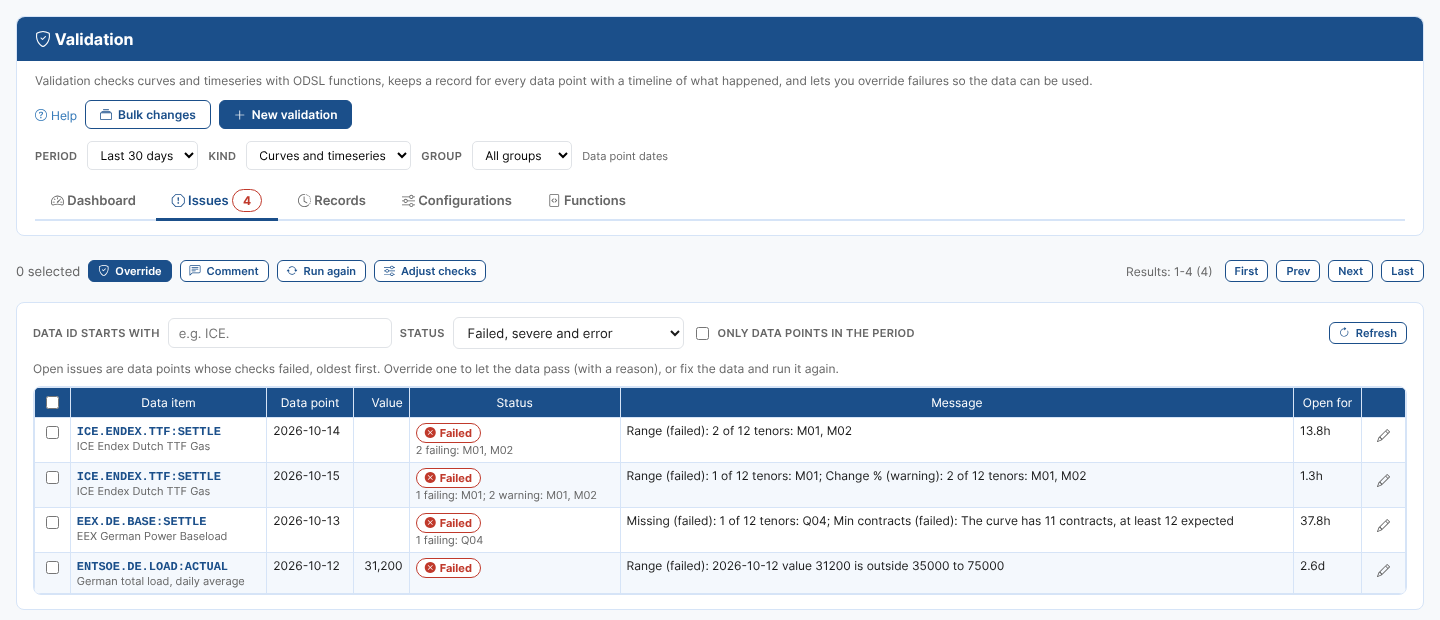
Selecting the row opens the record: the result of each check, each of the 12 tenors, and the timeline of what has happened to the curve for that day. Here is the record of a Brent curve that failed Range on M01 and was then overridden:
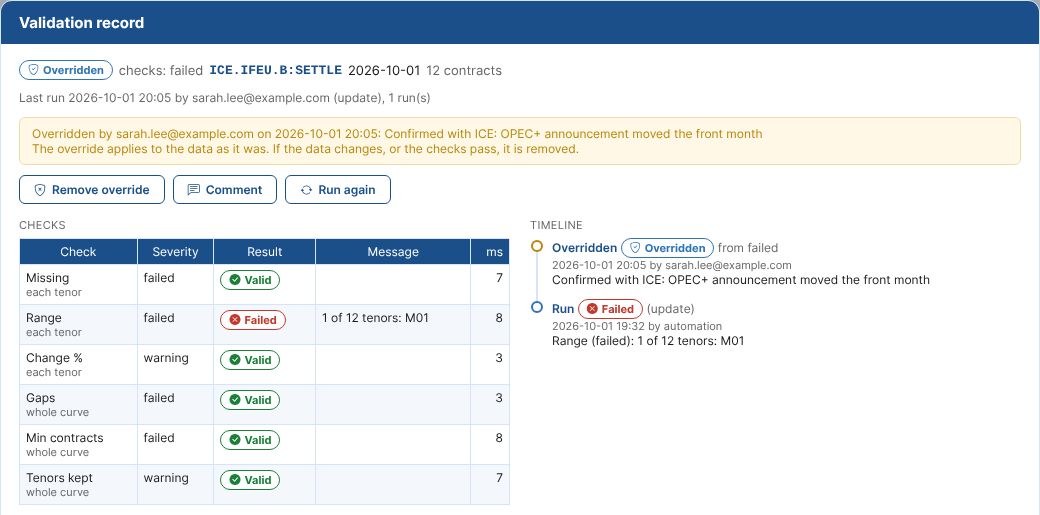
There are three ways to deal with it, depending on what happened.
The data is wrong
If the prices were loaded wrongly, correct the data and load it again. The checks run again on the new curve, the record passes, and it leaves the Issues tab. Its timeline keeps both runs. Or, after the data is corrected another way, select the record and Run again.
The move is real
If gas really did jump, for example after a supply outage, select the record and Override, with a reason such as Confirmed with the exchange: Norwegian outage. The curve can now be used. The override is kept in the timeline with who made it, and it belongs to this data: if the curve is loaded again with different prices, it is checked again from scratch.
The limit is too tight
If prices have simply moved into a new range, select the failing records and Adjust checks. For each check that failed, the smallest change to its limit that lets those curves pass is worked out, with a small margin, together with how many curves of the last 30 days fail now and would fail with the new limit:
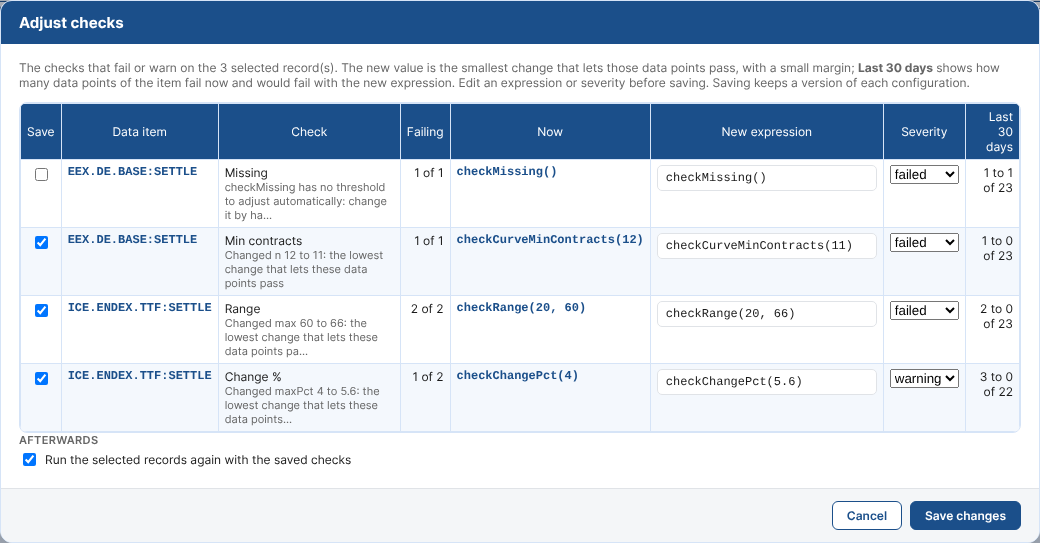
Here the range goes from 60 to 66 and the change limit from 4% to 5.6%, and over the last 30 days that clears the failures without hiding anything else. Select Save changes: the configuration is saved as a new version, and the records run again with the new limits. See Adjust checks.
To change the checks by hand instead, select the pencil on the issue: the checks of TTF open above the list, where you can test them on the failing records and save.
Every change is kept. The configuration's History shows each version, who saved it and what changed:

Sending on only the curves that pass
The TTF curve feeds a pricing system through a queue. Without validation, an automation on update sends the curve as soon as it is saved, checked or not. Instead:
- On the TTF curve, add an automation on passes validation that sends the curve to the queue. A curve is sent only once it passes, passes with warnings, or its failure is overridden.
- Add an email automation on fails validation, with
@transformerset to#email-validation-failedand attachment off. The team gets an email listing the failing tenors and checks as soon as a curve fails.
On 14 October the pricing system receives nothing until the move is confirmed and overridden, or the limit is adjusted; then the curve is sent, once. The record's timeline shows Sent as validated. See Sending only validated data and When data fails validation.
Keeping an eye on it
The dashboard shows how all your validated data is doing: the pass rate, open issues and warnings, records per day by status, and the data items and checks that fail most often.
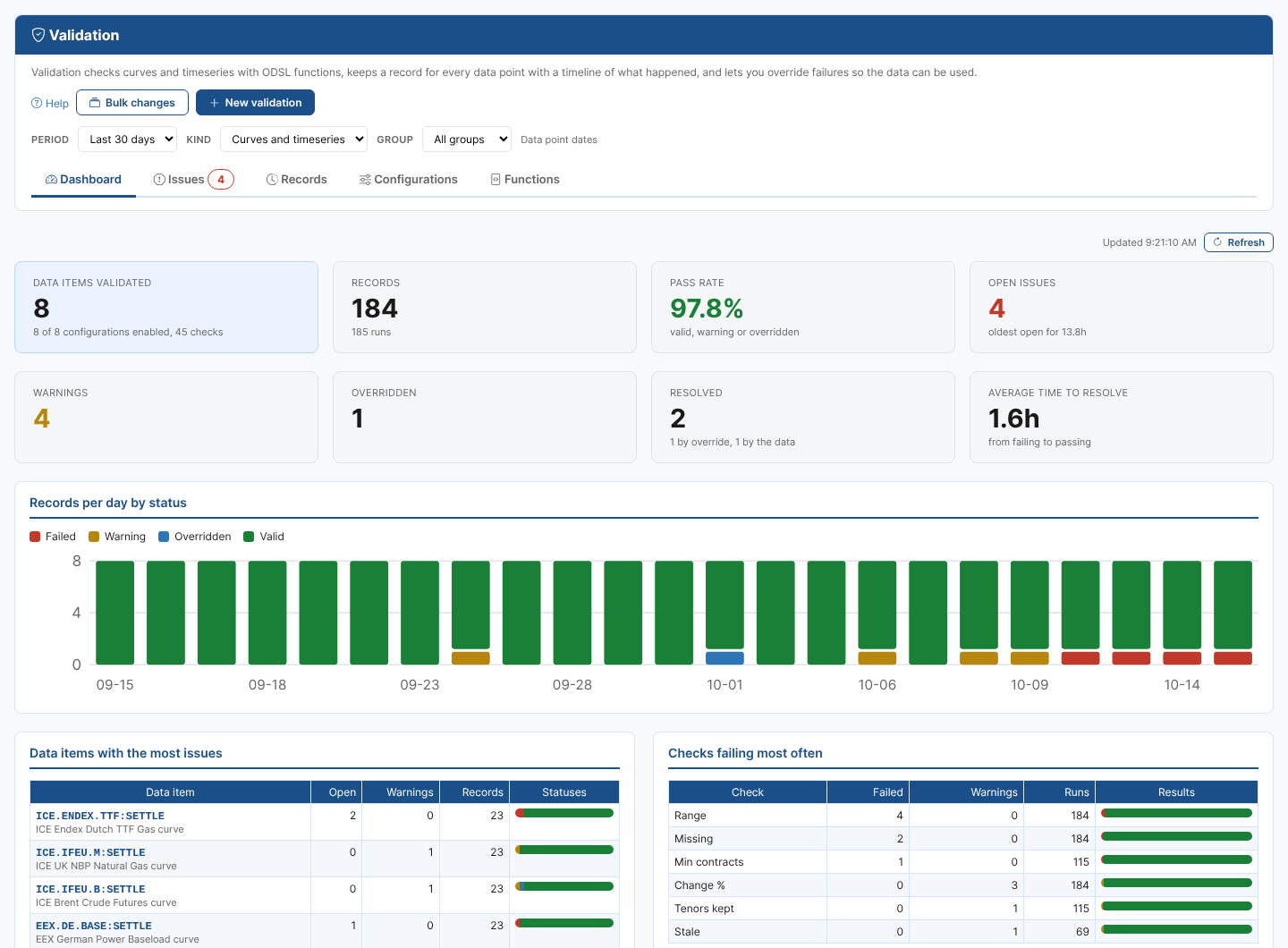
For reports to share, the Validation by Data Item, by Check and by Day insights give the same figures for any period, with CSV export. See Dashboard, issues and overrides.