Kinds of group
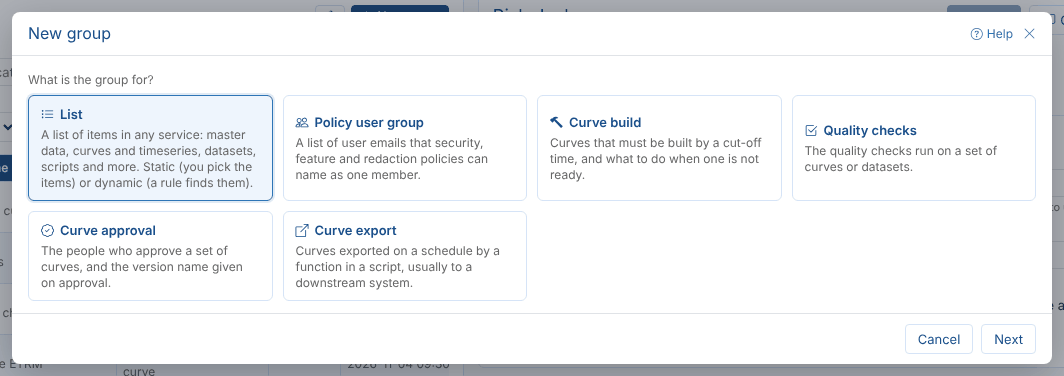
Every group has a service (where its items are), a type and a category. Most groups are plain lists, but some types make the platform do something with the group: give people access, build curves, run checks, ask for approval or export data. Group Manager recognises each kind and shows the settings that matter for it.
Lists
A list holds items of any one service: master data records (object), curves, timeseries and event lists (data), datasets, calendars, scripts, types, processes, reports or workflows. Use a list to name a set of things once and use it everywhere: in an export, an integration, a report, ODSL code or a REST call.
| Setting | Notes |
|---|---|
| Service | Where the items are. A group holds items of one service only |
| Type | Free text used to sort groups; favourite is the usual one |
| Category | Groups with the same category are listed together, for example Trading or Power |
| Static or dynamic | Pick the items yourself, or let a rule find them. See Members |
| Shared | Everyone sees a shared group. An unshared one is seen only by its owner, including by processes and reports run as other users |
Lists sent to a downstream system by the Integration extension are marked integration in the list. Their integration settings are kept when you save them here; change them in the Integration app.
Policy user groups
A policy user group is a list of user emails that security, feature and redaction policies name as one member, written user:security:policy:<name>. Instead of adding each analyst to five policies, Northgate adds the Risk desk group to them, and changes who is in the group.
| Rule | Why |
|---|---|
| Always static | Policies read the emails stored in the group. A dynamic policy group gives nobody access |
| Members are emails, matched exactly | Ana.Lopez@northgate-energy.com does not match a user who signs in as ana.lopez@northgate-energy.com |
| Always shared | Every administrator should see the same members |
Curve management groups
Four kinds of group run the curve day. A curve is in one of them when its curve management record names the group, so these groups are always dynamic: you add and remove curves on the group's Curves tab, and the records change at once.
| Kind | What it does | Field on the curve |
|---|---|---|
| Curve build | Sets a cut-off for the curves to be built by, and what to use when one is not ready: the latest curve, or a substitute from a function in a script | buildGroup |
| Quality checks | The checks run on the curves (or, with Members are Datasets, on datasets) | qualityGroup |
| Curve approval | The people who approve the curves, and the version name given on approval | approvalGroup |
| Curve export | Exports the curves on a schedule with a function in a script, usually to a downstream system | exportGroups (a curve can be in several) |
A curve is in one build, one quality and one approval group at a time, so adding it to another moves it. Saving a build or export group also creates or updates its process, CURVEBUILD_<name> or CURVEEXPORT_<name>, which runs it on its schedule.
Curves and the process name a curve group by its name, so a curve group cannot be renamed. Use Copy to make one with another name, move the curves to it and delete the old one.
Subscription target groups
Older tenants may have Subscription targets groups, used by subscriptions to send data to several places. Automations replace subscriptions, so these groups are shown read only: you can see their targets and delete them once nothing uses them.