Dataset Monitoring
Dataset monitoring gives you visibility into whether your data is arriving on time, in full, and to the quality you expect. It tracks every data load against a configurable set of completeness and quality rules, scores each day's delivery, and raises alerts when things go wrong.
Core Concepts
The monitoring system is built around four entities that nest inside each other:
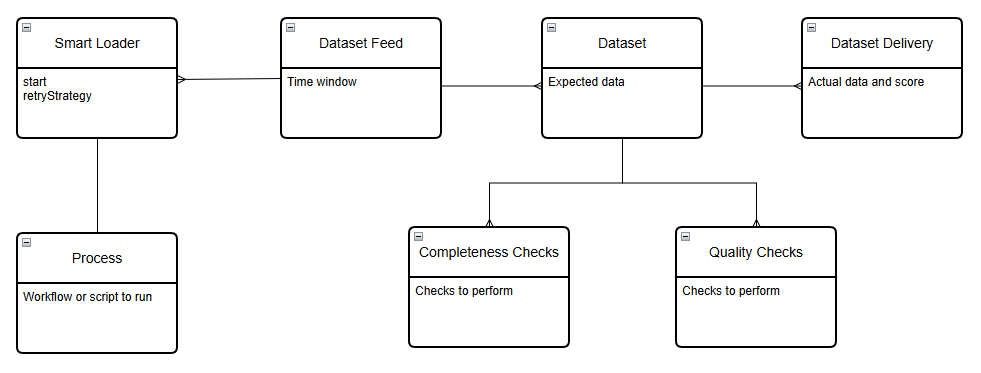
| Entity | Description | Example ID |
|---|---|---|
| Dataset Feed | A configuration defining the expected time window for a specific feed from a single provider | ICE.IFEU |
| Dataset | An individual product within a feed — defines what quantity of data is expected daily | ICE.IFEU.B |
| Dataset Delivery | A daily record of what actually arrived for a dataset, including timing, completeness, and quality scores | ICE.IFEU.B:2024-06-12 |
| Smart Loader | An optional wrapper that re-runs the load process automatically until completeness criteria are met | — |
Delivery Lifecycle
Each day, a new delivery record is initialised for every monitored dataset. The record tracks the dataset through its lifecycle:
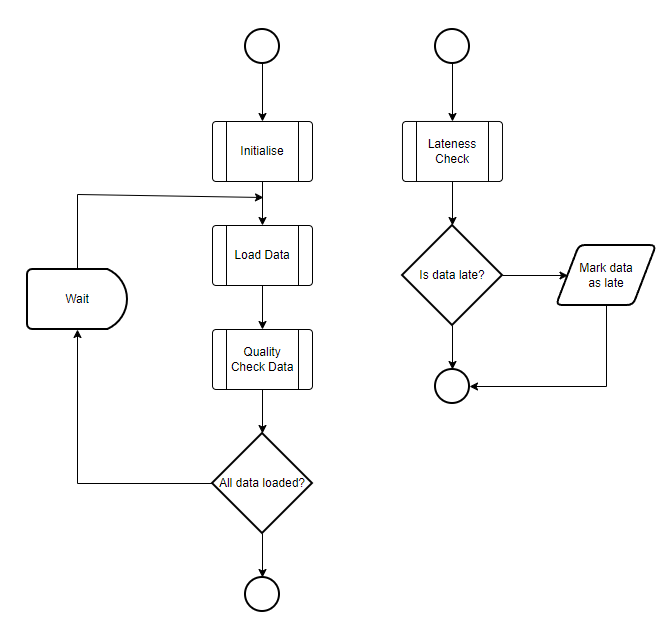
- Initialised — the delivery record is created at the start of the day with status
waitingand a starting score of 4 - Data loaded — when data arrives tagged with a
_dsid, the platform checks for corrections, calculates metrics, assesses completeness, and updates the delivery status topartialorloaded - Quality checks run — any configured quality checks are applied to the full dataset after each load
- Lateness check — a background process checks whether datasets have arrived within their configured time window and reduces the score if they are late or missing
Delivery Scoring
Each delivery is scored daily based on how promptly the data arrived:
| Score | Meaning |
|---|---|
| 4 | Data arrived on time |
| 3 | Data was up to 1 hour late |
| 2 | Data was 1–4 hours late |
| 1 | Data was more than 4 hours late |
| 0 | No data expected (e.g. holiday) |
Setting Up a Private Dataset Feed
For data you load yourself, you define the feed, dataset, and checks. The dataset ID always follows the format PROVIDER.FEED.PRODUCT — use a short form of your company name as the provider.
Create a dataset feed
- ODSL
- REST API
dsf = object as DatasetFeed
    dsid = "ACME.PRICES"
    name = "ACME Daily Prices"
    calendar = "BUSINESS"
    timezone = "Europe/London"
    time = "18:00 EU1"
    late = "20:00 EU1"
end
save dsf
POST https://api.opendatadsl.com/api/dataset/v1/feed
Authorization: Bearer {{token}}

{
  "_id": "ACME.PRICES",
  "calendar": "BUSINESS",
  "timezone": "Europe/London",
  "time": "18:00 EU1",
  "late": "20:00 EU1"
}
Create a dataset with expected tenor counts
ds = object as Dataset
    dsid = "ACME.PRICES.NBP"
    name = "ACME NBP Daily Prices"
    expected = SimpleObject()
end
ds.expected.set("*", 12)       // 12 tenors total expected
ds.expected.set("Month", 12)   // all 12 should be monthly tenors
save ds
Add quality checks
Quality checks are ODSL functions that run after each load to verify values are within acceptable bounds:
ds = object as Dataset
    dsid = "ACME.PRICES.NBP"
end

// Check that SETTLEMENT_PRICE is never zero
check1 = SimpleObject()
check1.type = "function"
check1.script = "#QualityCheckDatasets"
check1.name = "Check for zero settlement prices"
check1.expression = "zeroCheck('SETTLEMENT_PRICE')"

ds.checks = [check1]
save ds
Reusable quality checks can be grouped into a Quality Group and applied to multiple datasets at once. This avoids repeating the same check configuration across every dataset.
Monitoring Public and Common Datasets
For datasets loaded by OpenDataDSL (public) or shared feeds (common), you can add your own quality checks and categorisation without modifying the core configuration:
- ODSL
- REST API
// Add a reference to a common dataset with your own quality check
ds = object as Dataset
    dsid = "ICE.NDEX.NLB"
    source = "common"
end
save ds
POST https://api.opendatadsl.com/api/dataset/v1/info
Authorization: Bearer {{token}}

{
  "_id": "ICE.NDEX.NLB",
  "source": "common",
  "checks": [
    {
      "type": "function",
      "script": "#QualityCheckDatasets",
      "name": "Check for negative values",
      "expression": "negativeCheck('SETTLEMENT_PRICE')"
    }
  ],
  "category": "GAS",
  "priority": "high"
}
Querying Delivery Records
- ODSL
- REST API
// All deliveries for today
find ${dataset:"delivery"}

// All deliveries for a specific date
find ${dataset:"delivery/2024-06-25"}
// All deliveries for today
GET https://api.opendatadsl.com/api/dataset/v1/delivery
Authorization: Bearer {{token}}

// All deliveries for a specific date
GET https://api.opendatadsl.com/api/dataset/v1/delivery/2024-06-25
Authorization: Bearer {{token}}
Alerts
When a dataset is late, missing, or fails a quality check, the platform raises a DatasetAlert. You can create an automation to have notifications sent to email, Teams, or any other target when an alert fires.
POST https://api.opendatadsl.com/api/automation/v1
Authorization: Bearer {{token}}

{
  "_type": "VarAutomation",
  "target": "odsl.email",
  "enabled": true,
  "properties": {
    "to": "ops@company.com",
    "subject": "ALERT: ICE.NDEX.NLB"
  },
  "conditions": [{
    "source": "private",
    "service": "alertrecord",
    "id": "DatasetAlert/ICE.NDEX.NLB",
    "action": "update"
  }]
}