Running an aggregation from code
An aggregation is not only for the portal. Northgate Energy's risk team wants the same delivery check in a Python notebook, and the operations team calls it from a script before they release the evening's curves. Code in the workspace toolbar opens the aggregation as code you can copy or download.
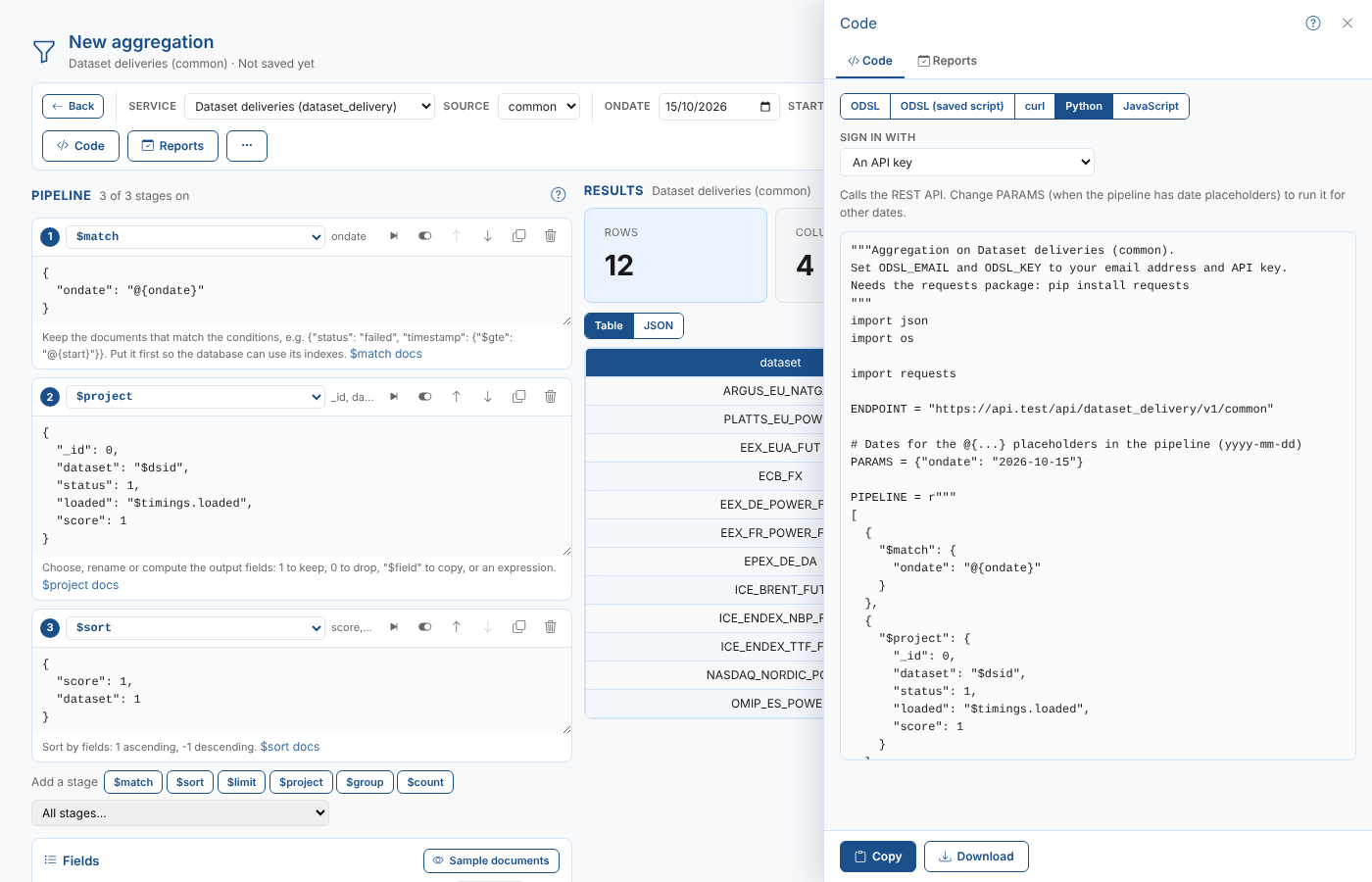
The languages
| Language | What it does | When to use it |
|---|---|---|
| ODSL | The aggregate command with the stages written in, and the test dates filled in | A one-off run in a script or the ODSL console |
| ODSL (saved script) | Imports the saved script and calls its function with dates | Scripts and processes that should always run the saved version. Save the aggregation first. |
| curl | One request to the REST API, with the pipeline in the _aggregate parameter | Trying the REST API, or a shell script |
| Python | A function that calls the REST API with the requests package and returns the rows | Notebooks and Python services |
| JavaScript | The same with fetch, for Node 18 or later | Node services and tools |
Copy puts the code on the clipboard and Download saves it as a file.
Signing in
For curl, Python and JavaScript, choose Sign in with:
| Option | What the code sends | Set these environment variables |
|---|---|---|
| An API key | The headers x-odsl-email and x-odsl-key | ODSL_EMAIL, ODSL_KEY |
| An access token | A bearer token | ODSL_TOKEN |
The code reads the values from environment variables, so they are never written into it. When the portal is not on the production environment, the code also sends the x-odsl-environment header.
ODSL
Once the aggregation is saved, this is the way to call it from ODSL. It imports the saved script, so the script always runs the latest saved pipeline:
// Dataset deliveries for the day: calls the saved aggregation script
import ${script:"aggregator\dataset_deliveries"}

ondate = Date("2026-10-15")
fromDate = Date("2026-10-01")
toDate = Date("2026-10-15")
result = aggregate_dataset_deliveries(ondate, fromDate, toDate)
print result
curl
The curl code has the test dates written into the pipeline:
# Dataset deliveries for the day on Dataset deliveries (common)
# The date placeholders are filled with the test values: ondate 2026-10-15
# Set ODSL_EMAIL and ODSL_KEY to your email address and API key
curl -G "https://api.opendatadsl.com/api/dataset_delivery/v1/common" \
  -H "x-odsl-email: $ODSL_EMAIL" \
  -H "x-odsl-key: $ODSL_KEY" \
  --data-urlencode "_limit=-1" \
  --data-urlencode '_aggregate=[{"$match":{"ondate":"2026-10-15"}},{"$project":{"_id":0,"dataset":"$dsid","status":1,"loaded":"$timings.loaded","score":1}},{"$sort":{"score":1,"dataset":1}}]'
Python and JavaScript
The Python and JavaScript code keep the placeholders in the pipeline and fill them from PARAMS, so you can run them for other dates. In Python:
rows = run_aggregation({"ondate": "2026-10-16"})
and in JavaScript:
const rows = await runAggregation({ondate: "2026-10-16"});
When the aggregation uses report properties, PARAMS holds them too, with their test values, and the curl code has the test values written in. ODSL (saved script) calls the function without a report, so the report properties take their test values.
The code runs the pipeline as it is in the workspace when you open Code, not the saved script. If you change the aggregation later, copy the code again, or use ODSL (saved script).
Next
Creating a report: store the result for each date and show it in the house style.