The Aggregator tab on the Reports screen
Most people meet an Aggregator report on the Reports screen, next to every other report. The Aggregator tab there tells them where it comes from and lets them change it without going to the Aggregator.
Opening it
On the Reports screen, select a report and open the Aggregator tab. For Northgate Energy's report, AGG_DATASET_DELIVERIES:
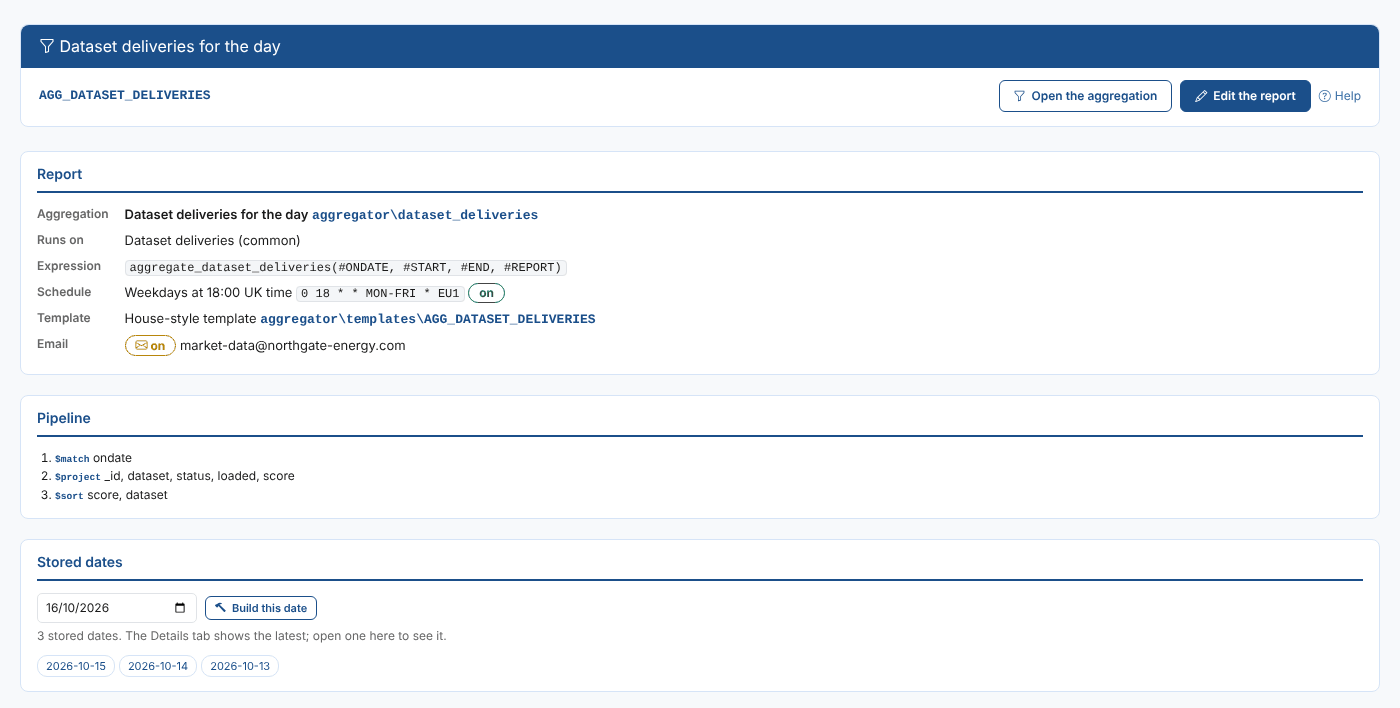
| Section | What it shows |
|---|---|
| Report | The aggregation and its script, the service it runs on, the expression the report runs, the schedule, the template, the email and the report's properties |
| Pipeline | The stages of the aggregation, with a short summary of each |
| Stored dates | The dates stored so far, and Build this date to run and store another |
The Details tab of the Reports screen shows the latest stored date; open one under Stored dates to see another.
For a report that sets report properties, such as the ICE desk's report, Report properties shows each value, or the test value when the report does not set one:

Changing the report
| Button | What it does |
|---|---|
| Open the aggregation | Opens the workspace in the tab, on the report's aggregation |
| Edit the report | Opens the workspace with this report ready to change in the reports panel |
Back in the workspace returns to the summary.
Other reports
For a report that was not made with the Aggregator, or a public report, the tab says so and offers New aggregation, which opens an empty workspace in the tab. Aggregator reports are always private reports.
Next
Examples: the examples you can start from.