What is the Alerts extension?
When something goes wrong with your data, the platform raises an alert: a dataset delivery is late or incomplete, a quality check fails, a curve does not build, an export does not run. You and your team can raise alerts too, to ask OpenDataDSL for help or to keep track of a problem yourselves.
An alert works like a small support ticket. It stays open until the problem is solved, it is always with someone (your team, OpenDataDSL or a data vendor), and everything that happens to it is kept on its timeline: comments, hand-overs, priority changes, closing and reopening.
The Alerts extension puts these alerts in one screen and answers questions like:
- What is wrong with our data today, and what is waiting on us?
- What is OpenDataDSL doing about the ICE Endex delivery that was incomplete last night?
- Is the problem with the dataset itself? What arrived, what is missing, and what did the quality checks say?
- How long has this alert been open, and how long has it been with each party?
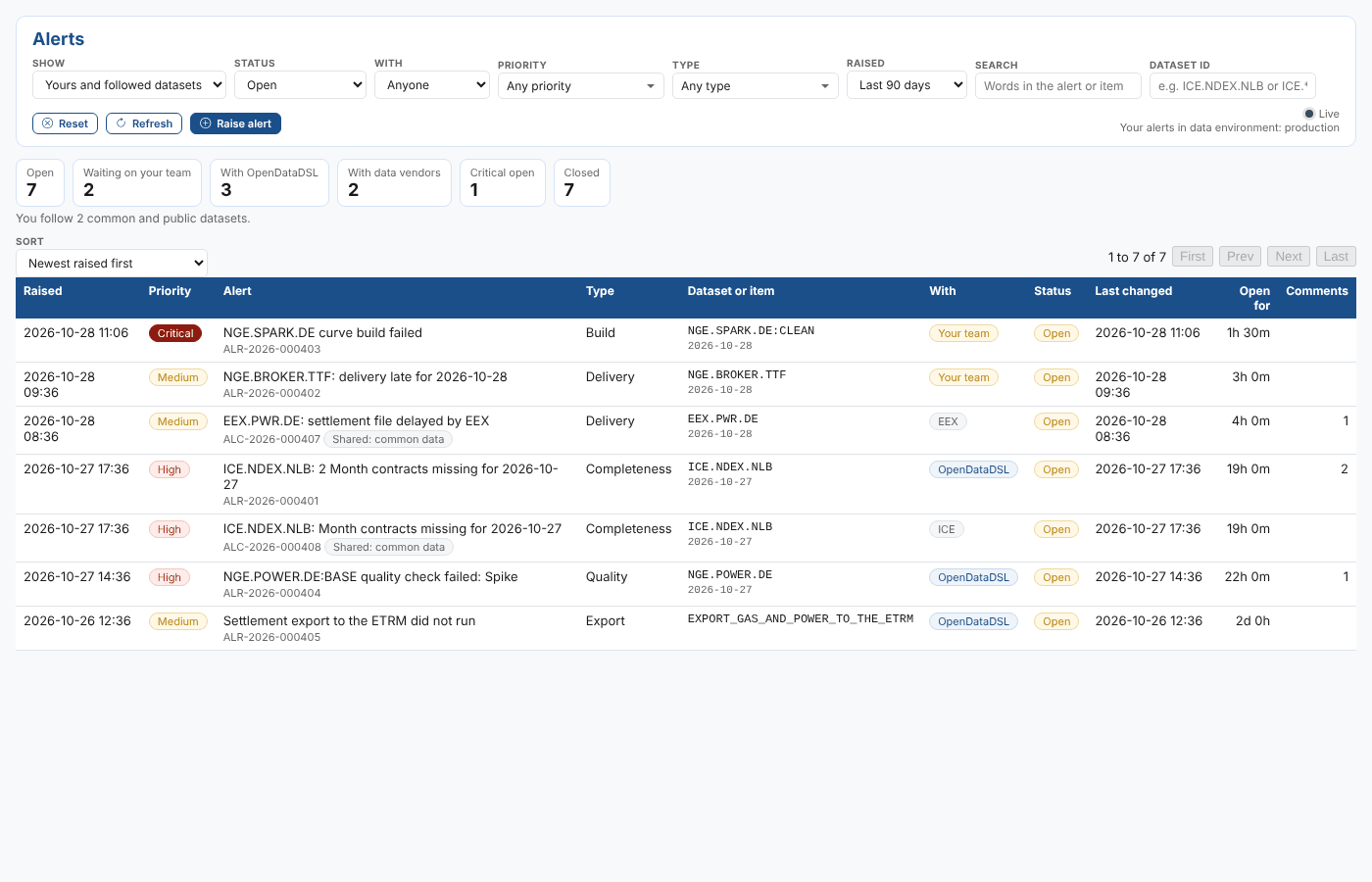
Key concepts
| Concept | What it means |
|---|---|
| Alert | One problem, with a title, a message, a priority, a type and what it is about (a dataset, a curve, a process). It has an id such as ALR-2026-000401 |
| Your alerts | Private alerts: raised by the platform about your data, or by your team. Only your company and OpenDataDSL see them. They belong to a data environment (production, test1 and so on) |
| Shared alerts | Alerts about common or public data, raised and managed by OpenDataDSL for everyone who uses that data. Ids start ALC- (common) or ALP- (public). You can read them and add comments that only your team and OpenDataDSL see |
| Status | Open or Closed. Closing needs a resolution: what was wrong and what was done. A closed alert can be reopened for 7 days |
| With | Who has to act next: Your team, OpenDataDSL, or a data vendor such as ICE or EEX. The time with each one is measured |
| Priority | Critical, High, Medium or Low |
| Type | What kind of problem it is: delivery, completeness, quality, metadata, corrections, build, export, or another type |
| Key | An optional id for the problem itself, such as dataset/ICE.NDEX.NLB/2026-10-27/completeness. Raising an alert with the key of an open alert does not create a second one: it counts another occurrence |
| Timeline | Everything that happened to the alert, in order, with who did it and when |
What you get
| Where | What you can do |
|---|---|
| Operations > Alerts | See your alerts and the shared alerts about the datasets you follow, filter and search them, open one to see its details and the dataset delivery behind it, comment, raise, hand over, change the priority, close and reopen. Updates appear as they happen |
| ODSL | Find, read, raise, comment on and close alerts from your scripts |
| Python | The same from Python with the odsl package |
| REST API | The same from any language |
| Automations | Send an email or a Teams message when an alert is raised, closed, handed over, changes priority or gets a comment |
Where next
- The Alerts screen: filters, figures, the list and one alert
- Working with alerts: raise, comment, hand over, change the priority, close and reopen
- Alerts in ODSL
- Alerts in Python
- Alerts REST API
- Notifications and automations
- Reference: fields, timeline entries, permissions and installation