Root causes
When a data load fails, everything that depends on it can fail too: the datasets it loads are late or incomplete, the curves built from them do not build, and the exports of those curves do not run. Without help that is many alerts for one problem, and someone has to work out that they belong together.
A root cause is the alert raised by the load itself. Problems that it explains are recorded on it, as problems folded in, instead of raising alerts of their own. One alert then holds the whole story, from data collection to data export.
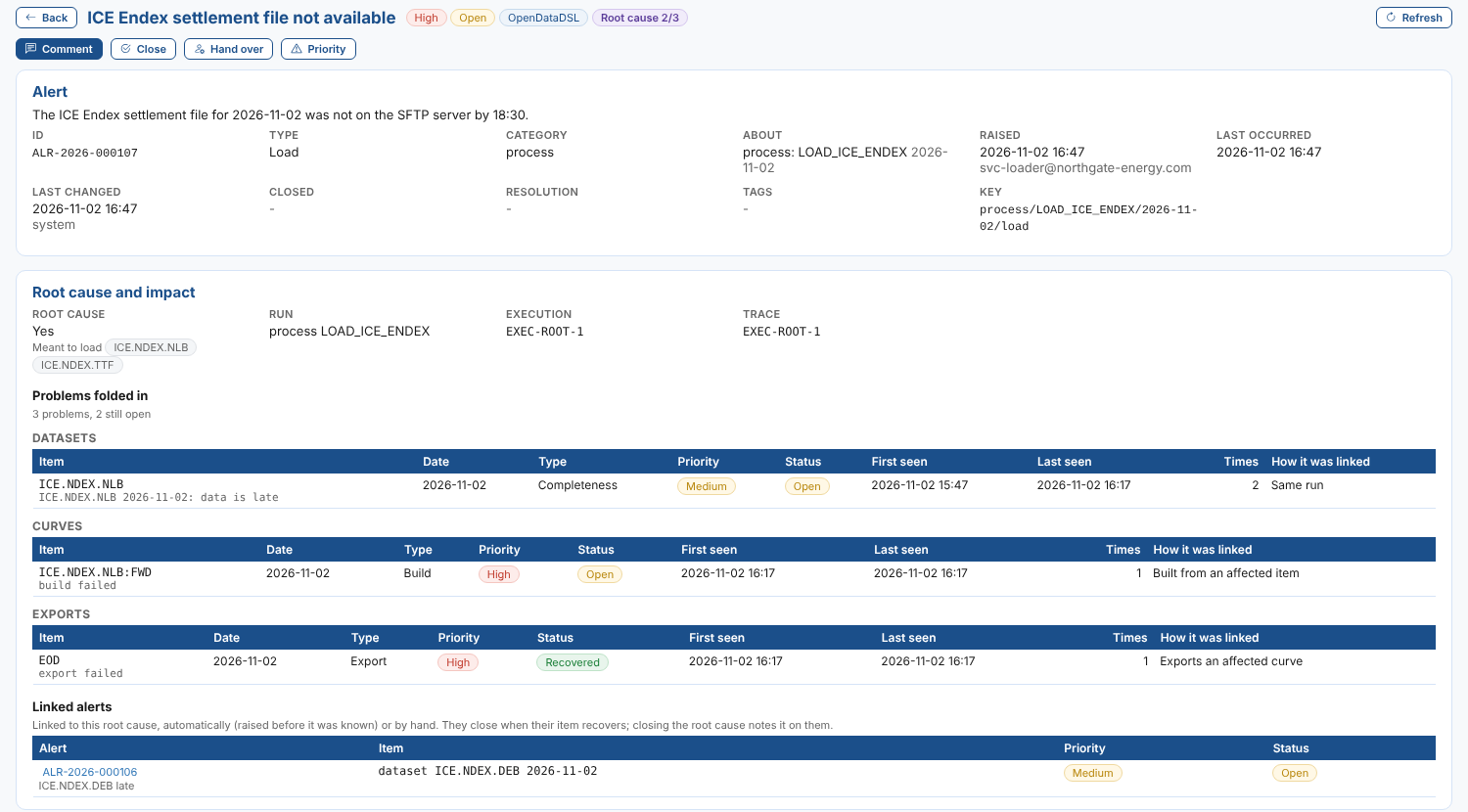
Throughout this page we follow Northgate Energy: their process LOAD_ICE_ENDEX loads the ICE Endex settlement files every evening, and their forward curves and the EOD export are built from that data.
How it works
- The load raises the root cause. The ETL script in the process finds that the settlement file is missing and raises an alert, as scripts already do (see Raising from a process). Because it is raised inside a process run, it is a root cause.
- Problems further down are folded in. At 19:00 dataset monitoring finds
ICE.NDEX.NLBincomplete. Instead of raising an alert, it records the problem on the root cause. The same happens when theICE.NDEX.NLB:FWDcurve fails to build and when theEODexport fails. - Problems recover by themselves. When the file arrives and the data is complete, the folded problem is marked Recovered, just as a standalone alert would close itself.
- Someone closes the root cause. The ETL, your team or OpenDataDSL closes it with a resolution when the load is fixed. Problems folded into it that have not recovered stay open on it until they do.
Every piece of work a process run starts carries the run's trace id: the data it saves, the automations that saves trigger, the curves they build and the exports that follow. That is how a failed curve build an hour later, in another part of the platform, is matched to the load that caused it.
What is a root cause
| Raised by | Root cause? |
|---|---|
| A script (ODSL or Python) running in a process | Yes, unless it sends root: false |
A person, Fusion AI or the REST API, with root: true | Yes. With no run to follow, problems are matched by the datasets it names in affects |
A person, outside a process, without root: true | No |
| The platform itself (dataset monitoring, curve builds and quality, curve exports) | Never: these are the problems that get folded in |
A root cause keeps the priority it was raised with: the problems folded into it do not change it.
Which problems are folded in
Before the platform raises an alert about a dataset, a curve build or quality check, or a curve export, it looks for an open root cause that explains it. The first match wins:
| How it was linked | Matches |
|---|---|
| Same run | A root cause raised in the run that the problem came from (the same trace id) |
| Named by the root cause | A dataset listed in the root cause's affects, for the same date |
| Loaded by its process | A dataset loaded by the root cause's process, for the same date. The loaders of a dataset are the process in the smart feed log for its feed and day, otherwise the processes that delivered its last 10 deliveries |
| Built from an affected item | A curve whose parent curves, or whose base object, already have a problem folded into an open root cause, for the same date |
| Exports an affected curve | An export whose group includes a curve that already has a problem folded into an open root cause, for the same date |
A root cause without a date (one raised by hand without a subject) explains problems raised in the 24 hours after it.
When no open root cause explains a problem, an alert is raised as usual. When the root cause is closed, new problems raise alerts again.
Alerts raised before the root cause
Late data can be spotted before the load raises anything: at 18:00 dataset monitoring raises ICE.NDEX.DEB 2026-11-02: data is late, and at 18:30 the load fails and raises the root cause. The earlier alert cannot be folded in after the fact, so it is linked instead:
- the alert gets
cause, the root cause's id, and is marked Caused by ALR-... - both alerts get a
linkedentry on their timeline - the root cause lists it under Linked alerts
A linked alert closes itself when its item recovers, as before. When the root cause is closed, each linked alert that is still open gets a timeline entry saying so, with the resolution, and stays open.
Linking an alert by hand
Only problems the platform finds are folded into a root cause. An alert someone raises, for example a quality problem a trader spotted, is always raised as an alert of its own, and is not linked automatically.
To connect it to the root cause, open the alert and select Link to root cause. Choose one of the open root causes (yours, and the shared ones about common and public data), or choose Not linked to remove a link. The alert is then marked Caused by, it is listed under the root cause's Linked alerts, and closing the root cause is noted on it, just like an alert linked automatically. Both timelines record the link, and its removal.
A root cause cannot be linked to another root cause. On a shared root cause, other companies never see that your alert is linked to it.
On the Alerts screen
| Where | What you see |
|---|---|
| The list | Root cause 2/3 on a root cause: 2 of the 3 problems folded into it are still open. Caused by ALR-... on a linked alert |
| Link to root cause | On an alert of yours that is not a root cause: link it to an open root cause, or remove the link |
| Kind filter | Root causes only, or Caused by a root cause |
| Trace id filter | The alerts raised in one run, by its trace id |
| Root cause and impact card | On a root cause: the run (process, execution and trace id), the datasets it was meant to load, the problems folded in grouped as datasets, curves and exports, and the linked alerts. On a linked alert: the root cause, which you can open |
| Timeline | Problem folded in, Recovered, Linked and Root cause closed entries |
Notifications
Folding a problem into a root cause does not change who hears about it. Automations on the alert service still run for the item as if the alert had been raised:
raisedwhen a problem is folded in (and when one that recovered comes back)closedwhen it recovers
The alert the automation receives has the root cause's id as its _id, the item as its subject, and an impact object with via (how it was linked), root, rootSource and status. See Notifications and automations.
Shared root causes
Common and public data are loaded by OpenDataDSL's own processes. When one of those loads fails, OpenDataDSL raises the root cause as a shared alert, so every company that uses the data sees the cause. Your own problems caused by it (your curve built from the common dataset, your export) are folded into the shared root cause, but only your team and OpenDataDSL see them: other companies never see your items.
Following a run
The trace id on the root cause's card takes you to everything the run started. Open the Tracer insight and give it the trace id to see the run's process executions, dataset deliveries, curve builds and exports, automation and queue logs, alerts and folded problems, in order (see Tracer).