What is the Calendar Manager?
Every timeseries and curve on the platform follows a calendar. A holiday calendar decides which days are trading days: a gas price is not expected on Christmas Day, and a process should not wait for one. An expiry calendar decides when each contract of a forward curve stops trading and when it delivers: the day the December TTF contract expires, the front month rolls. Both kinds are written as rules in plain English, such as Last Monday in May named 'Spring Bank Holiday' or go to the end of the previous month then go back 1 days using calendar.
Rules are easy to read but easy to get wrong: a typo, a missing weekend shift or a rule that ended years ago quietly changes the dates every curve built on the calendar uses. The Calendar Manager answers questions like:
- Which holiday calendars and expiry calendars do we have, and which are maintained by OpenDataDSL?
- Is this rule written correctly, and if not, where is the mistake and what should come next?
- If I add the coronation bank holiday, which dates change, and how many business days does May have now?
- When does each month contract expire under these rules, and how was that date worked out, step by step?
- What changed in this calendar last month, and who changed it?
- Which of our calendars have rules that no longer work, or no holidays next year?
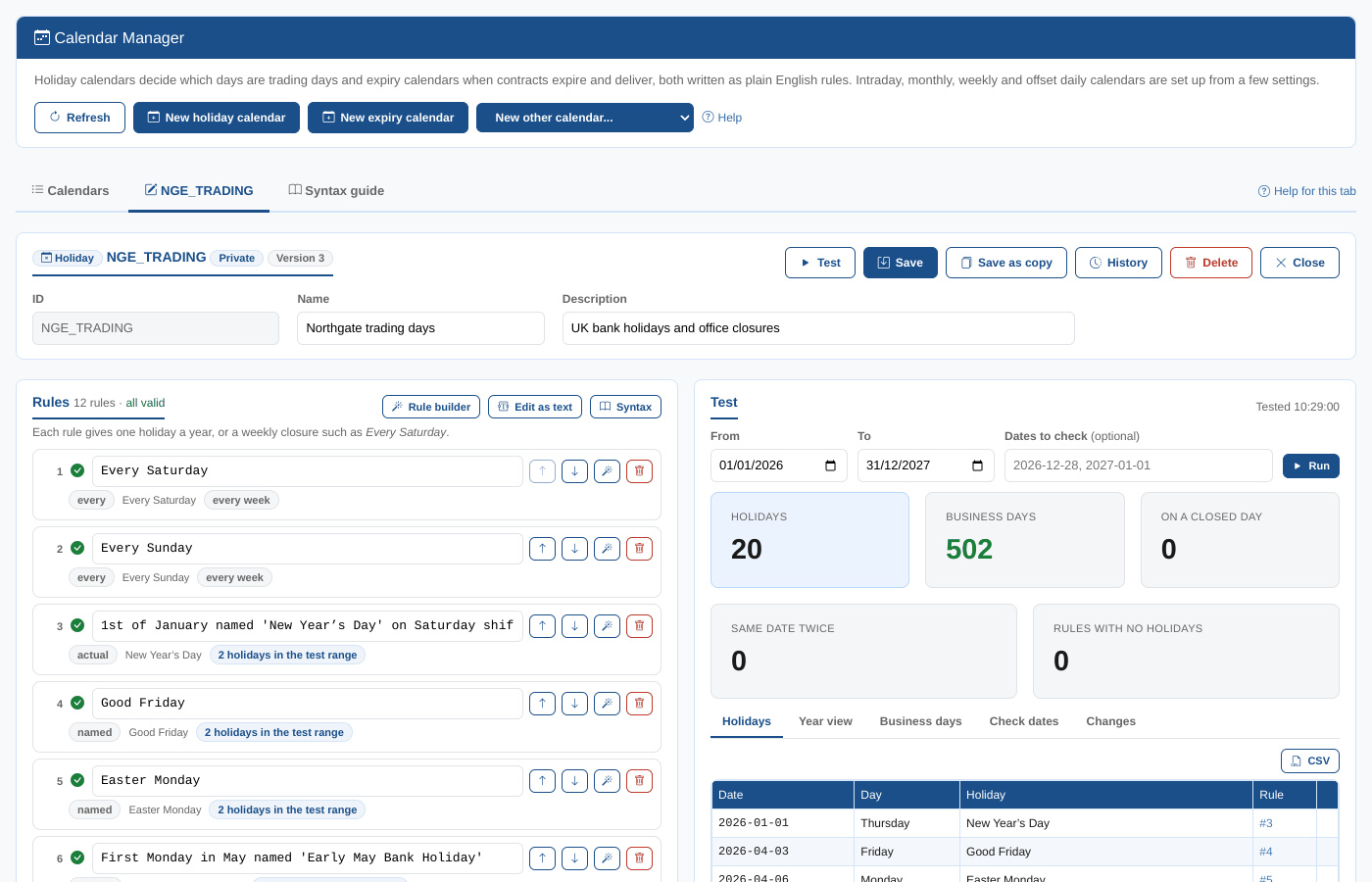
Throughout these pages we follow Northgate Energy, a fictional gas and power trader. Priya Shah, a market data analyst, looks after the company's holiday calendar NGE_TRADING (the UK bank holidays plus Christmas Eve and New Year's Eve, when the office closes) and its expiry calendar NGE_TTF_EXPIRY for the TTF gas contracts it trades. Tom Clarke, in the risk team, checks the expiries before each roll.
Key ideas
| Idea | What it means |
|---|---|
| Holiday calendar | A daily calendar with holiday rules. Each rule gives one holiday a year (such as Christmas Day) or a weekly closure (every Saturday). Its business days are the days no rule closes. |
| Expiry calendar | Rules that work out, for each contract (a month, quarter, season, year, week or day), its expiry (the last trading day) and optionally when its delivery starts and ends. Its rules move on a trading calendar, and its delivery rules on a delivery calendar. |
| Intraday calendar | Hourly, half-hourly or quarter-hourly intervals in a time zone, with the hours of the day it keeps (such as peak, 08:00 to 20:00) and an optional holiday calendar for the days it is open. It has no rules. |
| Monthly, weekly and offset daily calendars | Calendars set up from a few settings: one date a month, quarter, half year or year on a day of the month; one date every few weeks on a day of the week; or a day that starts at an hour in a time zone, such as the gas day. Monthly and weekly calendars can move a date that is not a business day. |
| Financial expiry calendar | The tenors of FX forwards, deposits and overnight index swaps (ON, TN, SN, weeks, months, years), counted from spot on three calendars. It has no rules: it is set up from a trading, a cross and a base calendar and a spot offset. |
| Other calendars | Daily, sparse and other built-in calendars with nothing to set. The Calendar Manager lists them and shows their dates. |
| Rule | One line of plain English. The platform reads it with a grammar (an ANTLR 4 grammar for holiday rules and one for expiry rules). A rule that does not follow the grammar is marked in red, where the mistake is. |
| Private and public calendars | Private calendars belong to your company and you can change them. Public calendars, whose ids start with #, are maintained by OpenDataDSL and used by every tenant: you can test them and copy them. Only OpenDataDSL users can change them. |
| Test | Working out the dates a calendar gives, with your unsaved changes, before you save: holidays and business days, or expiries and delivery periods. |
| Version | Each save makes a new version of the calendar, with who saved it and when. |
What you get
| Screen | Where | What it does |
|---|---|---|
| Calendars tab | Manage, Calendars | Every calendar you can read, private and public, with filters, counts and CSV export |
| Editor tab | Same screen, with a calendar open | The rules, checked as you type, with suggestions, the rule builder and edit as text (or, for an intraday, monthly, weekly, offset daily or financial expiry calendar, its settings); save, save as a copy, delete and history |
| Test panel | Next to the rules | Holidays, a year view, business days, date checks and changes for a holiday calendar; expiries, a year view, a step by step trace and changes for an expiry calendar; the tenors from spot, a trace and changes for a financial expiry calendar |
| Syntax guide tab | Same screen | The rule syntax with examples you can add to the calendar, and the grammars themselves |
| Insights tab | Same screen | Calendar Health Check, Holiday Calendar Comparison, Business Days by Month and Calendar Changes |
Every tab has a Help for this tab link that opens the matching page of this guide.
Saving a calendar needs the update action on the calendar or expiry calendar service in your security policies. Without it you can still open and test calendars. Public calendars can only be changed by OpenDataDSL users.
Where next
- Managing calendars: the Calendars tab, opening, creating, copying and deleting
- Editing rules: checking rules as you type, suggestions, the rule builder, saving and history
- Testing a calendar: every view of the Test panel, including the step by step trace
- Intraday calendars: hourly and sub-hourly calendars, peak and off-peak hours, and testing them
- Monthly, weekly and offset daily calendars: month-end, quarterly and yearly dates, fortnightly dates and the gas day
- Financial expiry calendars: FX and money market tenors from spot, on three calendars
- Rule syntax: every kind of holiday and expiry rule, with examples
- Insights: the calendar insight reports
- Reference: the platform functions, the extension contents and troubleshooting