Undoing a deployment
The morning after Priya's release, the trading desk asks for the dark spread to wait for the new coal curve. Priya opens the deployment on the Deployments tab and selects Undo deployment. To undo a single item, use the undo button at the end of its row instead.
What undo does
Before anything is changed, Promotion reads every item of the deployment in the target as it is now and shows what it will do:
| Undo | When | How |
|---|---|---|
| Remove | The deployment created the item, and nobody has changed it since. | The item is deleted from the target, with all its versions. |
| Roll back | The deployment updated the item, and its version in the target is still the one the deployment made. | The version the deployment made is deleted, which makes the version before it current again: exactly what was there before. |
| Save back as it was | The deployment updated a security policy or an automation (the platform keeps no versions of these), and nobody has changed it since. | The copy taken before the deployment is saved back. |
| Changed since: leave | Somebody changed the item in the target after the deployment. | It is left as it is, so their change is not lost. |
| (nothing) | The item was skipped, was already the same, or failed without changing anything. | Nothing to undo. |
Items are undone in the reverse order of the deployment: processes and reports before the scripts they run, smart data before its master data record, master data before its type.
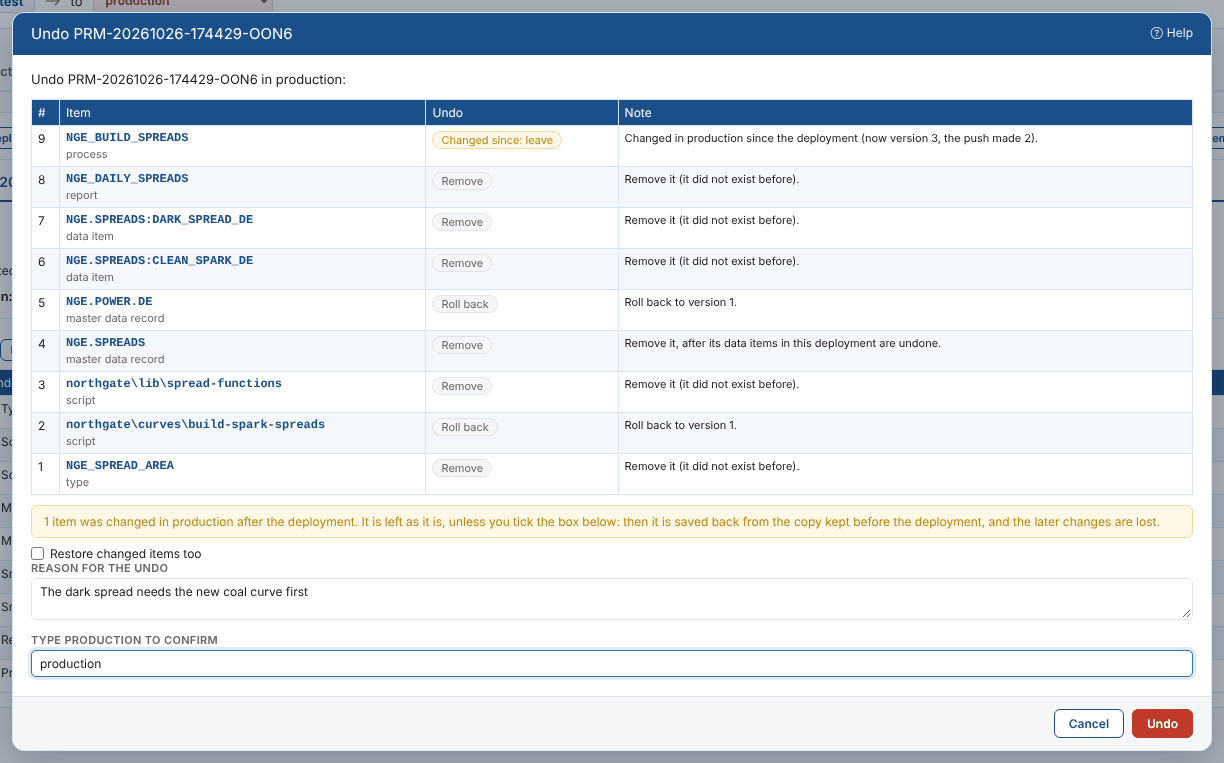
In Northgate's case, Tom Clarke moved the build process 15 minutes earlier in production after the release, so NGE_BUILD_SPREADS is marked Changed since: leave. Everything else goes back as it was.
Restoring changed items too
Tick Restore changed items too to put back the items changed since the deployment as well. They are saved back from the copy kept before the deployment, so the later changes (Tom's new schedule) are lost: they stay in the item's version history in the target, where they can be found again.
Confirming
Give a reason for the undo (required). For production you type production to confirm. The undo runs with a progress bar and a log, then the deployment shows its new status (undone or partly undone), each item's undo result, and an entry in Undo history. You can undo a partly undone deployment again later, for example once the items left can be restored.
A smart curve or timeseries pushed onto a master data record gives the record a new version as well. Undoing the data item rolls the record back too, when the record has not been changed since.
Undo works on what the deployment changed in the target. It does not undo what happened because of it, for example reports a pushed process produced or emails a pushed automation sent.