Browsing and editing scripts
Open Information, Scripts. The scripts are on the left, and the script you open is on the right with its editor.
The script tree
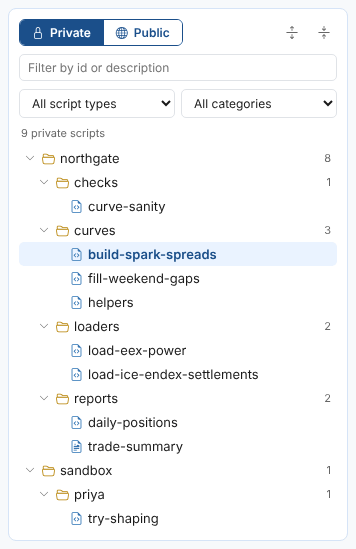
A backslash in a script's id is a folder, so northgate\curves\build-spark-spreads shows as build-spark-spreads in the folder curves of the folder northgate. Each folder shows how many scripts it holds.
| Control | What it does |
|---|---|
| Private and Public | Your company's scripts, or the public scripts published by OpenDataDSL (ids starting with #) |
| Expand and collapse buttons | Open or close every folder. The tree remembers which folders you left open. |
| Filter by id or description | Shows only the scripts whose id, description or category contains the text, with every folder that has a match open |
| All script types | Only ODSL scripts, only Mustache templates, and so on |
| All categories | Only the scripts of one category, or those with no category. Each category shows how many scripts it has. |
| Refresh | Reads the list of scripts again |
Hover over a script to see its description, category, type and when it was last saved. Select it to open it.
Creating a script
Select New script. The new script goes in the folder you selected last, so select the folder first.
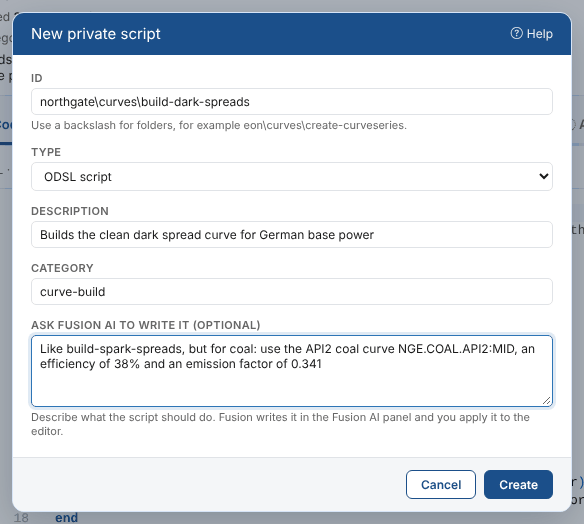
| Field | Example | Notes |
|---|---|---|
| Id | northgate\curves\build-dark-spreads | Letters, digits, _, . and -, with a backslash between folders. Public ids start with #. |
| Type | ODSL script | ODSL, Mustache, HTML, JavaScript, Python, JSON, Markdown, SQL or Mermaid |
| Description | Builds the clean dark spread curve for German base power | What the script does |
| Category | curve-build | Optional. Smart curves offer the scripts of the category curve-build, smart timeseries those of timeseries-build. |
| Ask Fusion AI to write it | Like build-spark-spreads, but for coal... | Optional. Fusion writes the script in the Fusion AI panel, see Writing a new script with Fusion AI. |
An ODSL script starts with a header comment that holds its description and category. The script is saved straight away, with the reason New script, and opened in the editor.
Copying, renaming and moving scripts
Select the ... button next to Run and Debug, or right-click a script in the tree. Either way you get these choices:

| Choice | What it does |
|---|---|
| Copy | Saves the script as a new private script, with the same type, category and description. The copy starts at version 1, and the original is unchanged. If you have unsaved changes, you choose whether they go to the copy. A public script can be copied too: the copy is private, so you can change it. |
| Rename | Changes the script's id. The script keeps its versions. The audit trail records the rename under both the old and the new id. |
| Move to a folder | Changes the folder part of the id, and keeps the name. Pick a folder or type a new one, or leave it empty for the top level. |
You can also drag a script onto a folder in the tree to move it there.
Here Priya moves her script into a new folder for the spread builds, northgate\spreads:
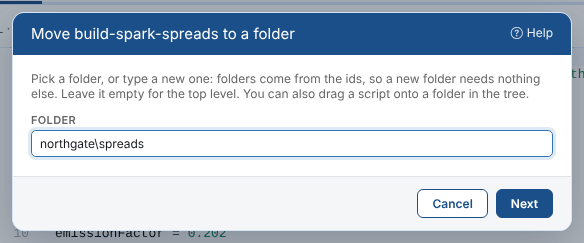
Before a rename or a move, the Script Manager checks where the script is used and lists what still refers to the old id. Those processes, smart curves, reports and other items do not change by themselves: change them to the new id afterwards. Scripts that import the script, or include it as a partial, are not checked, so change them too.
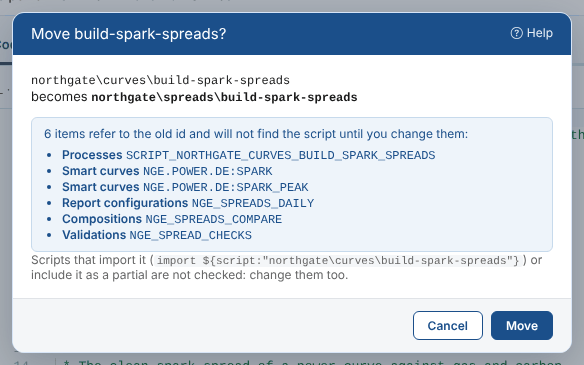
The spark spread script is used by its schedule, two smart curves, a report, a composition and a validation, so Priya decides to keep it where it is. Instead she copies it to start the peak load version:
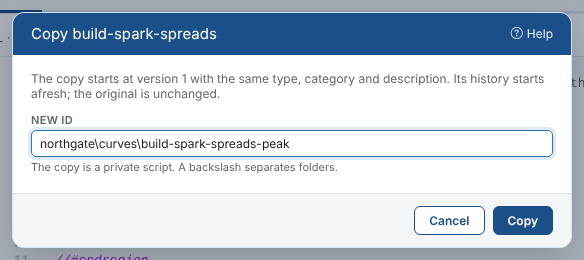
Save or revert your changes before you rename or move the open script. Your breakpoints, watches and run input move with it.
The editor
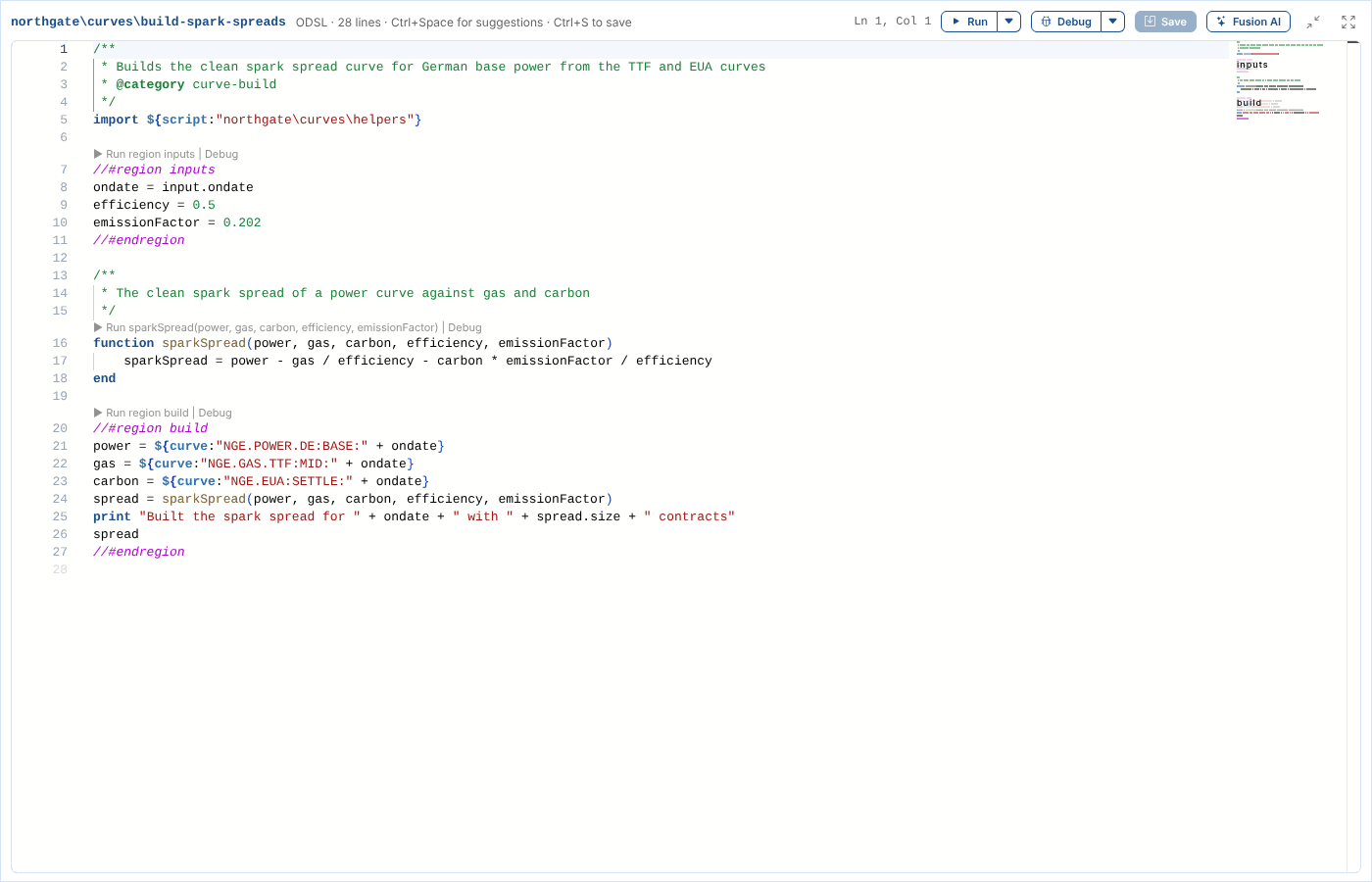
The Code tab shows the script in a code editor with colours for the language, line numbers, a map of the script on the right and folding for functions and //#region blocks. Above the editor you see the language, the number of lines and the cursor position.
| Shortcut | What it does |
|---|---|
Ctrl+S | Save |
Ctrl+Enter | Run the script |
Ctrl+Shift+Enter | Run the region at the cursor |
F5 | Debug the script |
F9 | Add or remove a breakpoint on the line |
Ctrl+Space | Show the suggestions |
Ctrl+F, Ctrl+H | Find, and find and replace |
Ctrl+Shift+O | Go to a function or region |
F11 | Full screen |
Next to the script's name you see its type, Can edit or Read only, and Unsaved changes while you have changes that are not saved. The header also has buttons to copy the script's id, to download the text in the editor, and the ... button to copy, rename or move the script.
Intellisense
In an ODSL script the editor suggests what you can write as you type, and Ctrl+Space shows every suggestion for the word at the cursor.
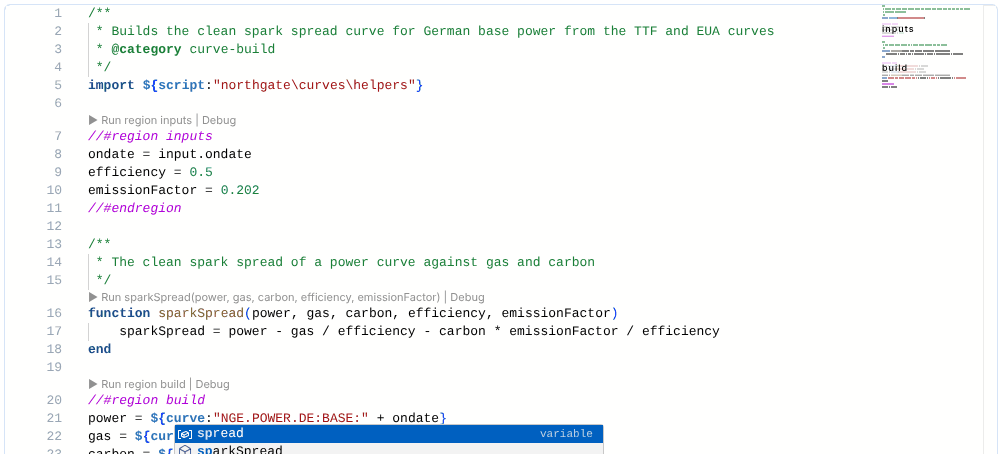
| Suggestion | Where it comes from |
|---|---|
| Variables | The names the script assigns, its loop variables and its function parameters |
| The script's own functions | Every function name(...) in the script, with the /** */ comment above it as its help |
| Imported functions | The functions of the scripts the script imports with import ${script:"id"} |
| Built-in functions | Every ODSL function of the platform, with its parameters and description |
| Keywords and snippets | function, if, for, while, //#region, find, import, a script header and more |
| Script ids | After ${script:", the ids of your scripts and the public ones |
| Services | After ${, the services such as curve, data, object and timeseries |
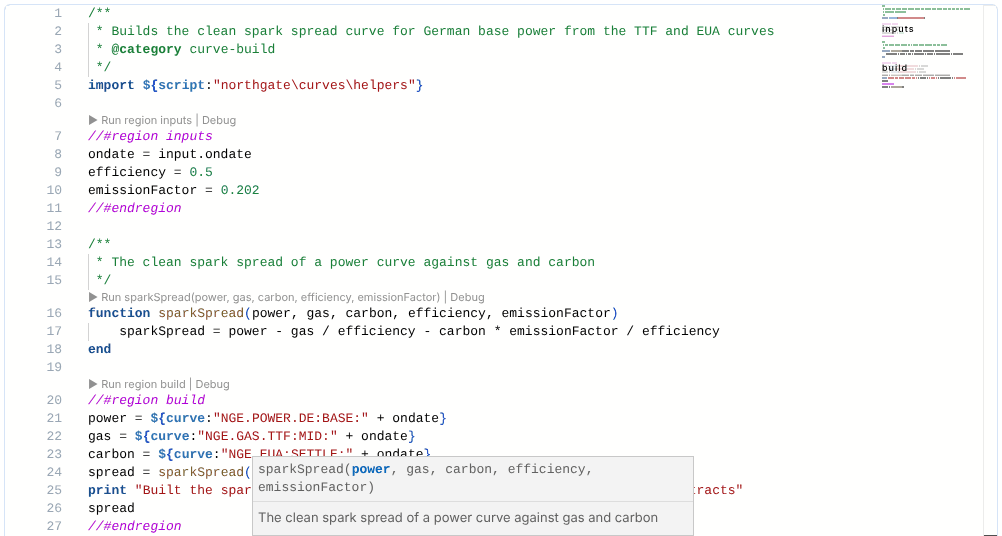
Hover over a function call to see its help. Inside the brackets of a call, the editor shows the function's parameters and highlights the one you are typing.
In Mustache and HTML templates, the editor suggests script ids after a partial tag.
Syntax checking
The platform checks the ODSL in the editor a moment after you stop typing. Errors are underlined in red, marked at the right of the editor, and counted above it. Hover over the underline to read the error, or select 1 syntax error to go to the first one.
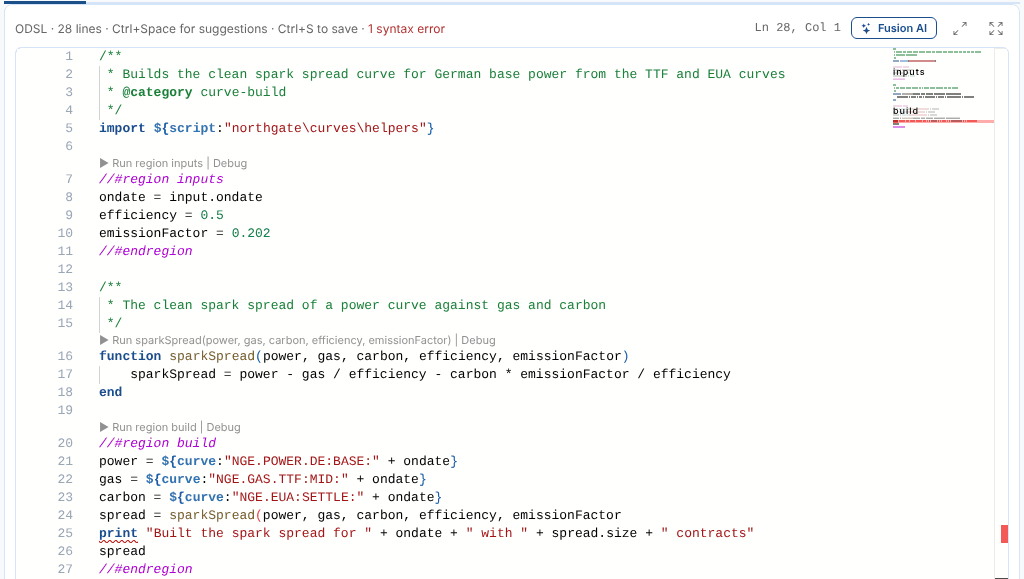
The platform reports an error where it notices it, which can be the line after the mistake. Here the bracket missing at the end of line 24 is reported at print on line 25.
A script with syntax errors is not run: see Running scripts.
Editing the details
Select Edit details under the script's name to change its type, category and description.
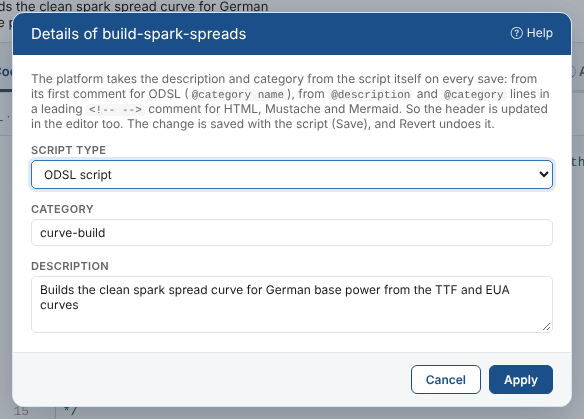
The platform reads the description and category from the script itself each time it is saved:
| Type | Where the platform reads them |
|---|---|
| ODSL | The first comment of the script: its text is the description, and @category name the category |
| HTML, Mustache and Mermaid | @description and @category lines in a <!-- --> comment at the very start of the script |
| Others | Saved as you enter them |
So when you select Apply, the Script Manager also writes the description and category into that header in the editor, and you can see the change before you save. An ODSL script without a header comment gets one at the top. Other @ tags in the header, such as @author, are kept.
| Rule | Why |
|---|---|
| No spaces in the category of an ODSL script | The platform reads the category up to the first space |
No * in the description of an ODSL script | The platform removes them |
| No header is added to a template that has none | A comment at the start of a template changes what it renders, so the details are saved as you enter them instead |
Changing the type changes the editor's language. The changes are saved with the script when you select Save, and Revert undoes them.
Saving
Select Save or press Ctrl+S. The Script Manager asks why you changed the script.

The reason is kept with the new version and shown in the audit trail, so the next person can see why the script changed without reading the code. A reason is required. The list offers your last reasons, and some changes fill it in for you:
| After | The reason starts as |
|---|---|
| Restoring a version | Restored version 2 |
| Applying a change from Fusion AI | Fusion AI: and what you asked for |
| Editing the details | Changed the details or Changed the script type to ... |
Before it saves, the Script Manager reads the script again. If someone saved a newer version after you opened it, it tells you who and when, and you can Compare first (your changes against theirs, on the Compare versions tab) or Save mine anyway.
Revert undoes every change since the last save. Undo (Ctrl+Z) works too, step by step.
Save mine anyway replaces the other person's version with yours. Their version is kept in the history, but their changes are not in yours. Compare first when you are not sure.
Full screen
There are two ways to give the editor more room, with the two buttons at the right of the bar above the editor:
- Fill the view (two diagonal arrows): the editor and the output panel cover the whole Script Manager view. Your browser window does not change.
- Full screen, or F11 in the editor: the same, on the whole screen, where your browser allows it. You can go to it from Fill the view. Leaving full screen takes you back to filling the view.
The bar keeps Run, Debug, Save and Fusion AI. Press Esc, or the button again, to go back.
Who can edit or run a script
| You can | When your security policies allow |
|---|---|
| Read a script | The read action on the script service |
| Change and save it | The update action on that script. Otherwise the editor is read only and says why when you type. |
| Create a script | The create action on the script service |
| Run or debug it | The run action on that script |
| Copy it | The create action on the script service, for the copy |
| Rename or move it | Rights to change scripts in that source. The platform refuses the rename when it is not allowed. |
Public scripts are maintained by OpenDataDSL: you can read them, and run them where your policies allow, but not change them.
Next
Running scripts: try the script, one function or one region, and read the result.