Scheduling a script
A schedule is a process on the platform that runs the saved script on a cron. Priya wants the spark spread curve built every weekday evening after the gas, power and carbon curves have settled.
Creating a schedule
Open the script and select Schedule at the top. The Schedules tab opens, with a new schedule ready when the script has none. Otherwise select New schedule.
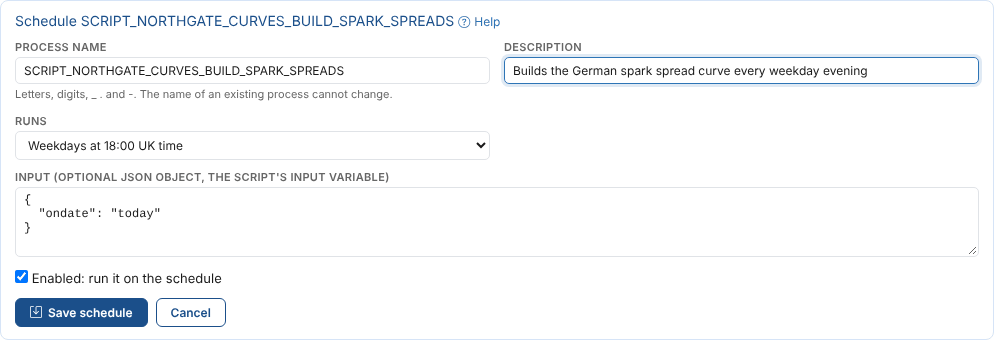
| Field | Example | Notes |
|---|---|---|
| Process name | SCRIPT_NORTHGATE_CURVES_BUILD_SPARK_SPREADS | Starts as SCRIPT_ and the script's id. Letters, digits, _, . and -. It cannot change once the schedule is saved. |
| Description | Builds the German spark spread curve every weekday evening | What the schedule is for |
| Runs | Weekdays at 18:00 UK time | When it runs, see When it runs |
| Input | {"ondate": "today"} | Optional. A JSON object passed to the script as the variable input. A new schedule starts from the input you last used in the output panel. |
| Enabled | On | Off keeps the schedule but stops it running |
Select Save schedule. The platform runs the script from then on.
A schedule runs the saved script. Changes you have not saved are not run, and the Script Manager reminds you when you have some.
Only ODSL scripts can be scheduled.
When it runs
| Choice | Cron |
|---|---|
| Weekdays at 08:00 UK time | 0 8 * * MON-FRI * EU1 |
| Weekdays at 18:00 UK time | 0 18 * * MON-FRI * EU1 |
| Weekdays at 07:00 Central European time | 0 7 * * MON-FRI * EU2 |
| Every hour | 0 * * * * * UTC |
| Every day at 06:00 UTC | 0 6 * * * * UTC |
| Mondays at 08:00 UK time | 0 8 * * MON * EU1 |
| The first of each month at 08:00 UK time | 0 8 1 * * * EU1 |
| Custom cron | Any cron with 6 or 7 parts: minute, hour, day, month, weekday, year and time zone |
| Not scheduled | The process only runs when you run it |
The time zone EU1 is UK time and EU2 is Central European time. See CRON expressions for the full syntax.
Running it now and checking the runs
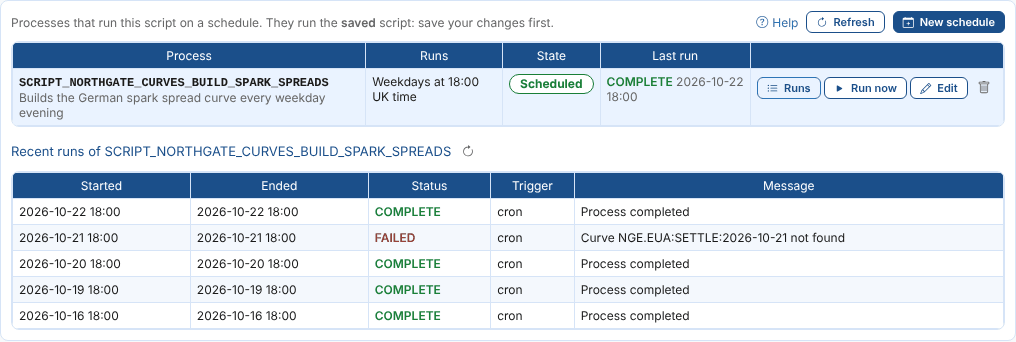
The tab lists every process that runs the script, including ones set up elsewhere, with when it runs, whether it is on, and how its last run went.
| Button | What it does |
|---|---|
| Runs | The latest runs of the process: when they started and ended, their status, what started them (cron or manual) and the message |
| Run now | Runs the saved script now with the schedule's input, as the schedule would |
| Edit | Changes the description, when it runs, the input or whether it is on |
| Delete | Deletes the process. The script is not deleted. |
On 21 October the EUA settlement curve was late, so the run failed with Curve NGE.EUA:SETTLE:2026-10-21 not found. An automation on the process, such as an email when it fails, tells the team straight away: see Automation basics.
Changing and deleting a schedule
Select Edit, change what you need and select Save schedule. Choose Not scheduled to keep the process but stop it running on a cron, or untick Enabled.
Delete a schedule with the bin button. The process and its schedule are deleted; the script and its earlier runs stay.
Next
Versions and the audit trail: see what changed in the script and why.