The action library
Installing the Workflow Manager adds a library of general actions to your private actions, ready to drag onto a workflow. The sample workflows show them in use. They cover the steps most workflows need: working out dates, checking data has arrived, making decisions, reading files from the web, starting other processes and telling people what happened.
Their ids start with wm_, so they do not clash with your own actions. They are in your private actions, so you can open them in the Actions tab, see how they work and change them, or copy one to start an action of your own. Upgrading the extension puts the library versions back, so copy an action before changing it if you want to keep your changes.
In the tables, an input marked optional can be left empty.
General
wm_log_message
Writes a message to the process log.
| Input | |
|---|---|
| message | The message to log |
| level optional | debug, info, warn or fatal (info if not given) |
Exits: ok.
wm_build_text
Builds a text, such as an email body or a file name, by filling the {name} placeholders of a template with values.
| Input | |
|---|---|
| template | The text with placeholders, e.g. Prices for {ondate} loaded |
| values | The values to put in, by name, e.g. {"ondate": output.today.date} (id cannot be a placeholder, as every object has an id) |
Outputs: text. Exits: ok, failed.
wm_set_values
Sets values once for later steps to share, such as a date, a list of ids or an email address. Later steps read them as output.<step name>.values.<name>.
| Input | |
|---|---|
| values | The values, by name |
Outputs: values. Exits: ok.
wm_wait
Pauses the workflow, for example to give another process time to finish.
| Input | |
|---|---|
| seconds | How long to wait, in seconds (at most 900) |
Exits: ok.
Dates
wm_resolve_date
Works out a date: today or a given date, moved by a number of business days.
| Input | |
|---|---|
| date optional | The date to start from, yyyy-MM-dd (today if not given) |
| offset optional | Business days to move: -1 is the previous business day, 1 the next |
| calendar optional | The holiday calendar to count business days with (business if not given) |
Outputs: date (yyyy-MM-dd), dow (the day of the week). Exits: ok, failed.
wm_is_business_day (gateway)
Decides whether a date is a business day, so a workflow can skip holidays.
| Input | |
|---|---|
| date optional | The date to check (today if not given) |
| calendar optional | The holiday calendar (business if not given) |
Exits: business_day, holiday.
wm_business_days
Lists the business days between two dates, for example to load or check each day of a period.
| Input | |
|---|---|
| start_date | The first date, yyyy-MM-dd |
| end_date optional | The last date (today if not given) |
| calendar optional | The holiday calendar (business if not given) |
Outputs: dates (a list of yyyy-MM-dd dates), count. Exits: ok, none (no business days), failed.
Checks
wm_compare_value (gateway)
Compares a value with a target, for example a count of rows loaded against the number expected.
| Input | |
|---|---|
| value | The value to check |
| operator optional | One of == != > >= < <= contains starts ends (== if not given) |
| target | The value to compare it with |
Exits: true, false.
wm_check_range (gateway)
Checks a number is within limits, for example a price between sensible bounds.
| Input | |
|---|---|
| value | The number to check |
| min optional | The lowest value allowed |
| max optional | The highest value allowed |
Exits: in_range, out_of_range.
wm_check_not_empty (gateway)
Checks a value has something in it: not missing, not empty text and not an empty list, for example that a download returned data.
| Input | |
|---|---|
| value optional | The value to check |
Exits: has_value, empty.
Data
wm_check_curve (gateway)
Checks a curve has been loaded for a day, for example before building curves or reports from it.
| Input | |
|---|---|
| id | The curve id, OBJECT:CURVE, e.g. ICE.IFEU.B:SETTLE |
| ondate optional | The curve date (the previous business day if not given) |
| min_contracts optional | The fewest contracts it should have (1 if not given) |
Outputs: contracts. Exits: loaded, missing.
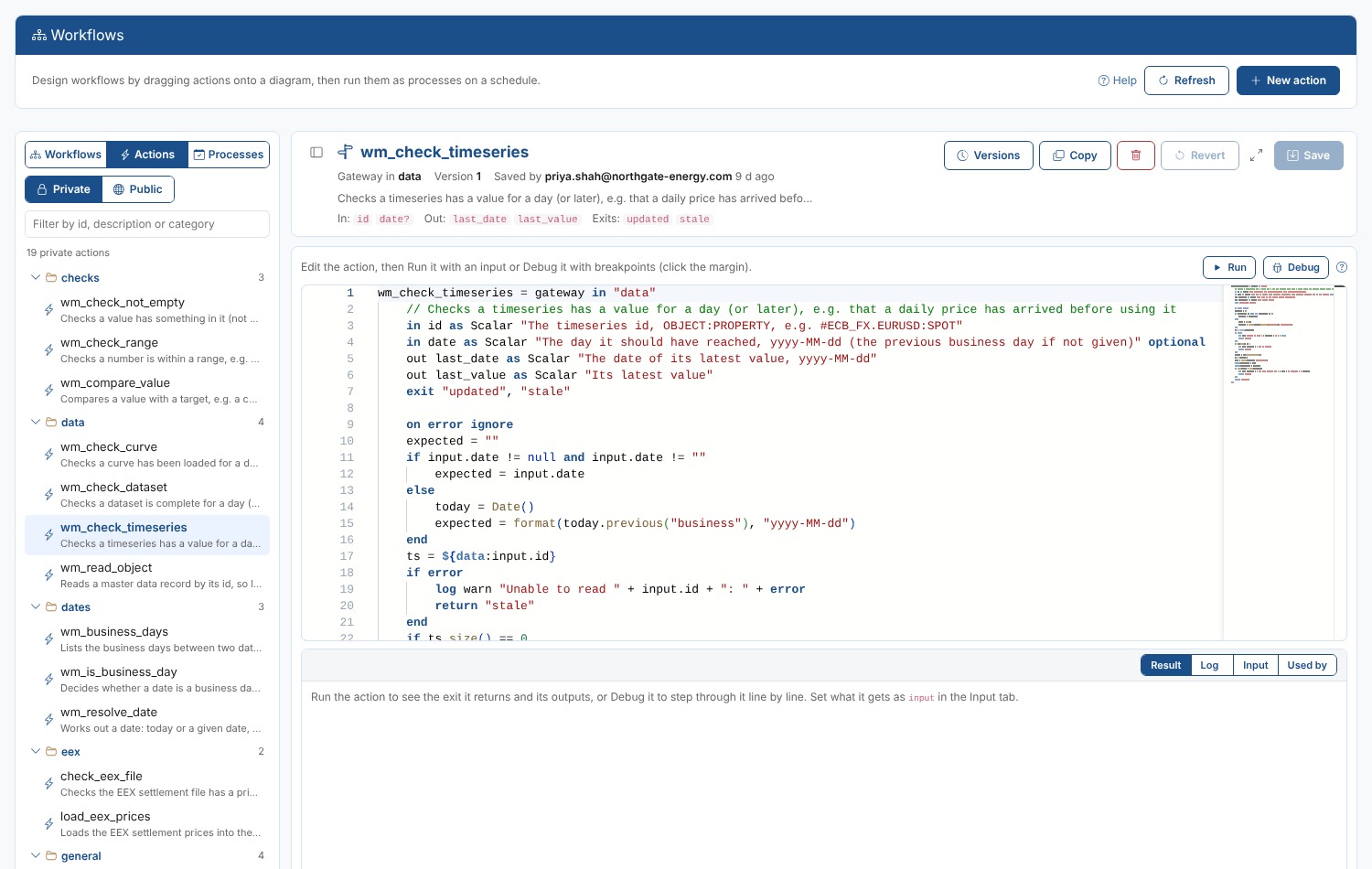
wm_check_timeseries (gateway)
Checks a timeseries has a value for a day or later, for example that a daily price has arrived.
| Input | |
|---|---|
| id | The timeseries id, OBJECT:PROPERTY, e.g. #ECB_FX.EURUSD:SPOT |
| date optional | The day it should have reached (the previous business day if not given) |
Outputs: last_date, last_value. Exits: updated, stale.
wm_check_dataset (gateway)
Checks a dataset is complete for a day: every item of the delivery has arrived.
| Input | |
|---|---|
| dsid | The full dataset id |
| ondate optional | The delivery date (the previous business day if not given) |
Exits: complete, incomplete.
wm_read_object
Reads a master data record, so later steps can use its properties.
| Input | |
|---|---|
| id | The id of the record |
Outputs: object. Exits: found, missing.
Loaders, processes and notifications
wm_read_url
Downloads a CSV, XML or HTML page from a web address and reads it, for the next step to transform and load.
| Input | |
|---|---|
| url | The web address |
| format optional | csv, xml or html (worked out from the address if not given) |
| options optional | Options of the reader, e.g. headerpos=0 for CSV or selector=table for HTML |
Outputs: data. Exits: ok, failed.
wm_run_process
Starts another process, for example a curve build once its prices have loaded. It does not wait for the process to finish.
| Input | |
|---|---|
| process | The name of the process |
| values optional | The input to run it with (its own input if not given) |
Exits: ok, failed.
wm_send_email
Sends an email, for example to tell a team a load has failed or a report is ready.
| Input | |
|---|---|
| to | An email address, or several separated by commas |
| subject | The subject |
| message | What to send: text, or an object or list |
| template optional | The id of an email template to format it with |
Exits: ok, failed.
An example
Priya's evening load uses the library around her own EEX actions:
wm_is_business_daywith the calendar#EEX: on a holiday, go straight to the Success end.wm_resolve_date, namedtodayon the diagram, givesoutput.today.date, used as the date of every later step.- Her own download and load actions.
wm_check_timeserieson the front month settlement with dateoutput.today.date:stalegoes to step 5,updatedto the Success end.wm_build_textmakes the messageEEX settlements for {ondate} have not arrived, andwm_send_emailsends it to the team, then the Failed end.
Installing the library in another environment
The library is installed with the extension. To add or refresh it in an environment without reinstalling the extension, run the script upload-actions.odsl from the extension's folder in that environment: it saves every action of the library to your private actions in one go.
Uninstalling the extension deletes the library actions, and workflows that use them stop working. Copy the ones you use under your own ids first if you plan to uninstall it.