Billing, budgets and limits
Fusion AI is billed by the tokens it uses: the text it reads and writes when it answers questions, runs agents and runs playbooks. The Fusion AI Billing insight shows what this month costs so far, your monthly bills, and lets you set a budget and a limit.
How tokens are billed
Tokens are billed per calendar month, in bundles of 10 million tokens at 30 EUR a bundle.
- Bundles are charged in fractions, rounded up to 0.01 of a bundle (100,000 tokens). For example 859,126 tokens is 0.09 bundles, which is 2.70 EUR.
- Your agreement may include a number of bundles each month. Only the bundles above those are charged.
The tokens counted, the billed tokens, are worked out for every call Fusion makes:
billed tokens = (input + output + 1.25 x cache write + 0.1 x cache read) x model weight
| Model | Weight |
|---|---|
| Haiku | 1 |
| Sonnet | 2 |
| Opus | 4 |
So reading from the prompt cache costs a tenth of new input, and a question answered on Opus costs twice as much as the same question on Sonnet. The model depends on the assistant that answers; you choose it for custom assistants.
Worked example
In a month with 37,899,559 billed tokens and 2 bundles included:
| Bundles used | 37,899,559 / 10,000,000 = 3.79 |
| Chargeable bundles | 3.79 - 2 = 1.79 |
| Price | 1.79 x 30 EUR = 53.70 EUR |
The Billing insight
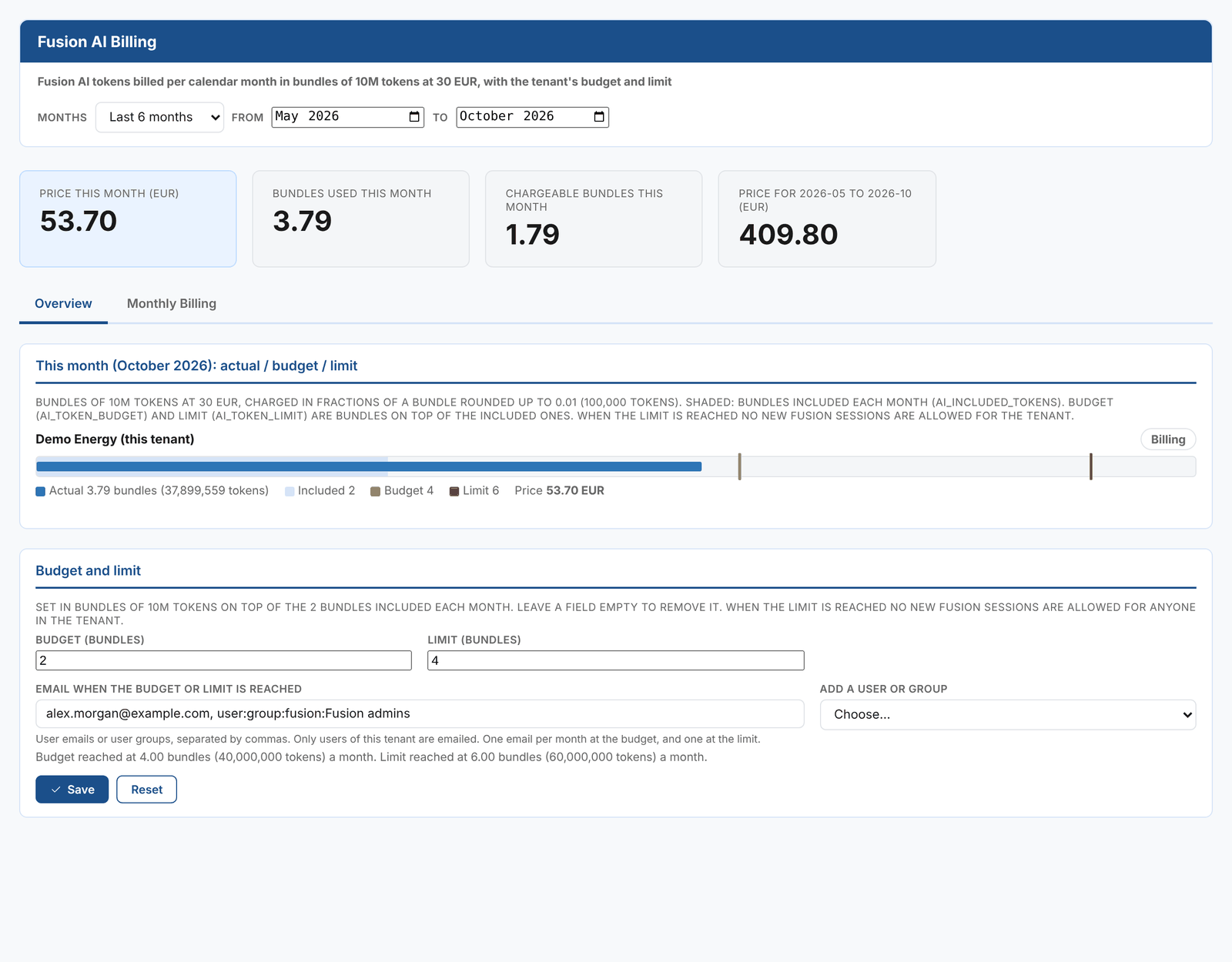
Choose the Months to show at the top: this month, last month, the last 3, 6 or 12 months, this year or a custom range. The KPIs show this month's price, the bundles used and chargeable this month, and the price for the months selected.
Overview
This month: actual / budget / limit draws this month's use as a bar:
- The shaded part is the bundles included each month.
- The bar is the bundles used so far.
- The amber marker is your budget, and the red marker your limit.
The badge shows where you are:
| Status | Meaning |
|---|---|
| Within included | Nothing to pay this month so far |
| Billing | Above the included bundles |
| Over budget | Above your budget |
| Limit reached | At your limit. No new Fusion sessions are allowed until next month, or until the limit is raised. |
Monthly Billing
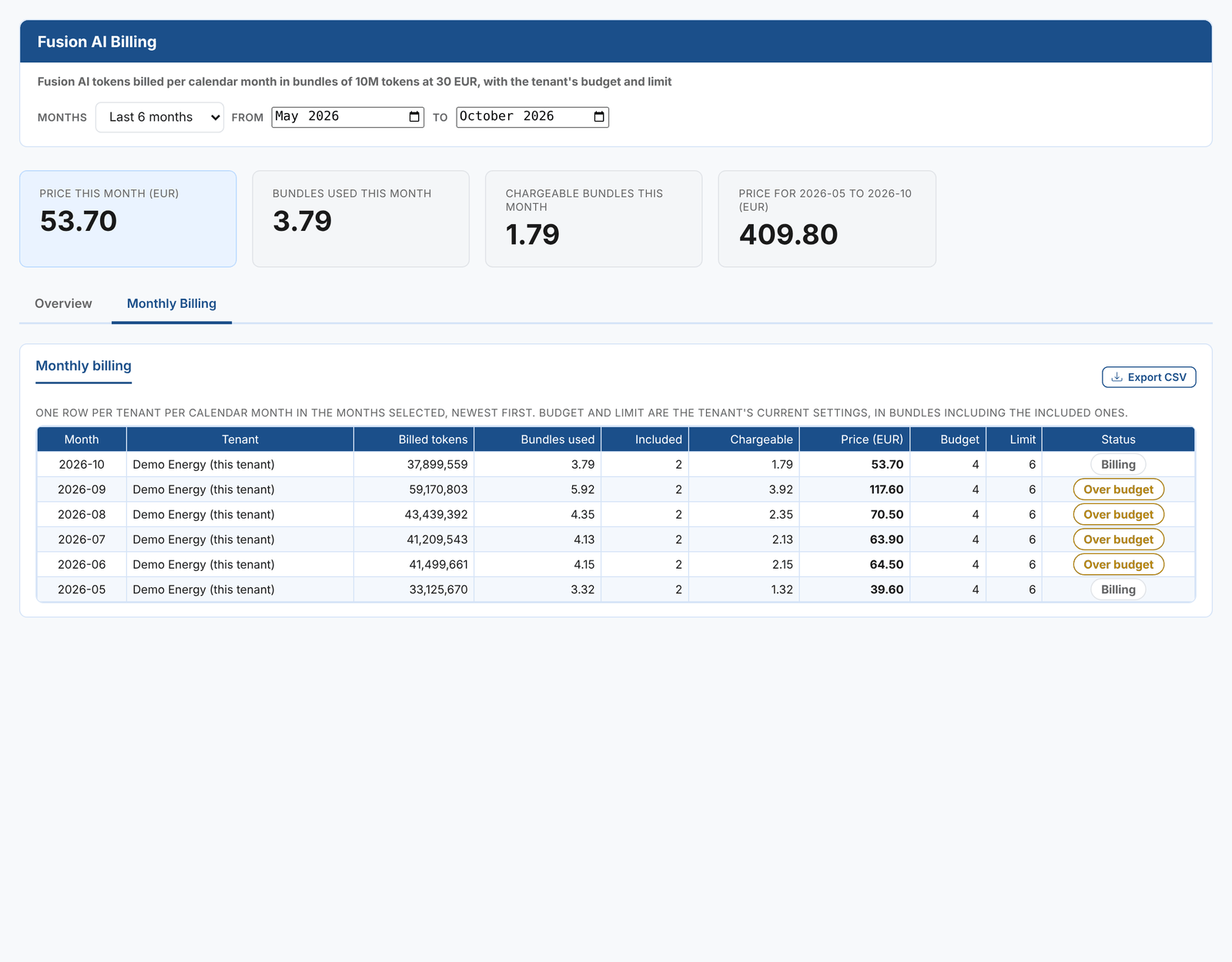
One row per month: the billed tokens, bundles used, included and chargeable bundles, the price in EUR, your budget and limit, and the status. Export CSV downloads the table.
Setting a budget and a limit
The Budget and limit form on the Overview tab sets them for your tenant. Both are in bundles on top of the bundles included each month:
| Setting | What happens when it is reached |
|---|---|
| Budget | The people in Email when the budget or limit is reached are emailed. Fusion carries on working. |
| Limit | They are emailed again, and no new Fusion sessions are allowed for anyone in the tenant for the rest of the month. |
For example, with 2 bundles included, a budget of 2 and a limit of 4, the budget is reached at 4 bundles (40 million tokens, 60 EUR) and the limit at 6 bundles (60 million tokens, 120 EUR). The form shows these figures below the fields.
Leave a field empty to remove the budget or the limit.
Email when the budget or limit is reached takes user emails and user groups, separated by commas. Choose them from Add a user or group, or type them. Only users of your tenant are emailed, once a month at the budget and once at the limit.
Select Save. Reset puts back the saved values.
Playbook runs also stop at the limit, with the status Stopped, and can be resumed once the limit allows. Each playbook also has its own token cap per run. See Running playbook tasks.
Keeping costs down
- Start a new chat when you change subject. Every question sends the conversation so far.
- Use the right model. A custom assistant for simple lookups can run on Haiku at a quarter of the cost of Opus.
- Be specific. A question that names the curve, dates and tenors needs fewer tool calls than one that leaves Fusion to search.
- Watch the heaviest conversations in the Token Usage insight, and the tokens per run in Playbook Runs.