What is Fusion AI?
Fusion AI is the OpenDataDSL AI assistant. You ask it questions in plain language and it answers from your own platform data: forward curves, timeseries, datasets, processes, reports and automations. It can also do work for you, such as writing and validating ODSL scripts, building SMART curves, creating reports and sending emails, always with your own access rights.
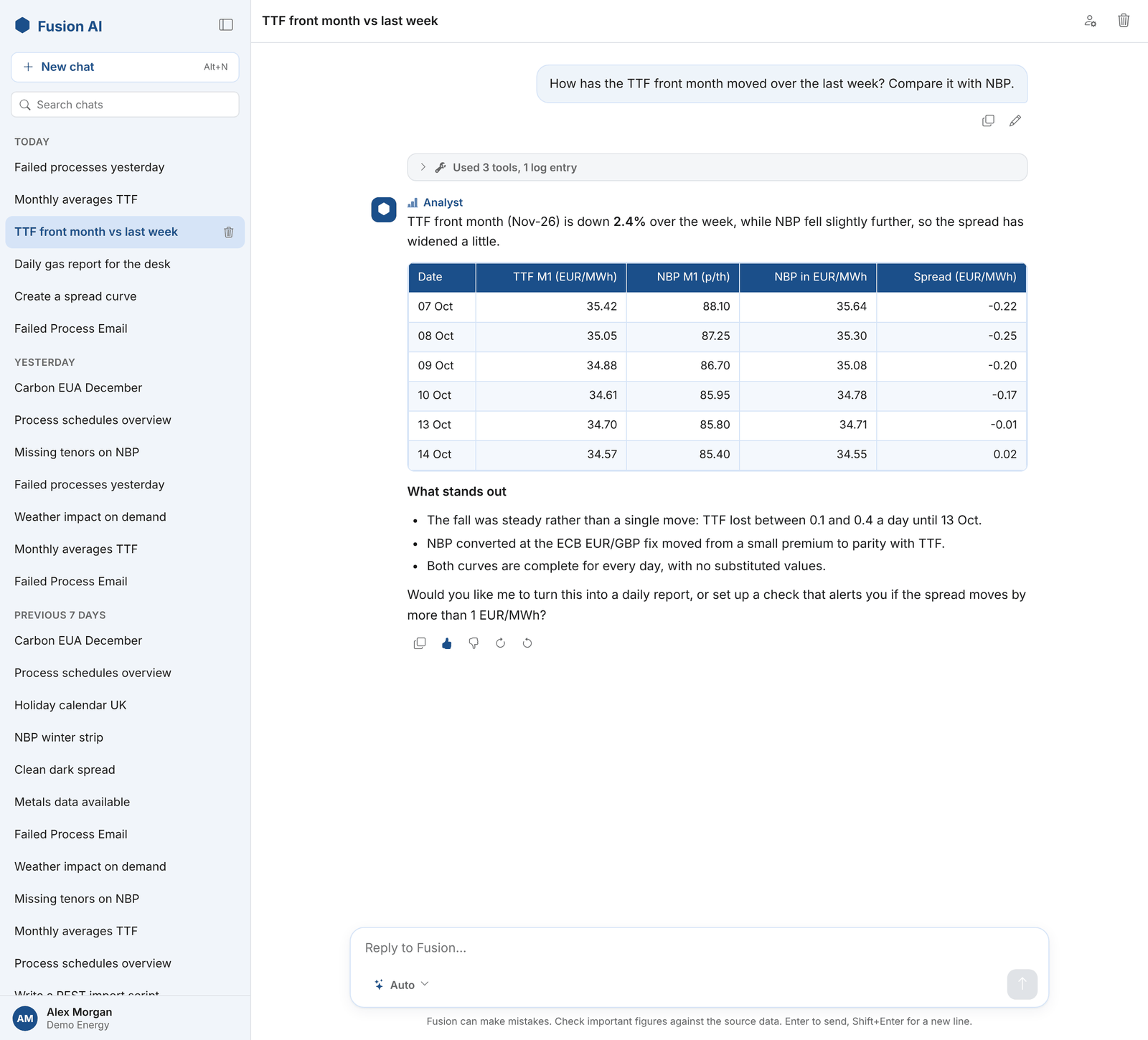
Fusion AI is used in three ways:
| Way | What it is | Where |
|---|---|---|
| Chat | Ask a question and get an answer, with tables, code and the tools Fusion used to find it | The Studio tab, or any AI tool connected through the MCP server |
| Agents | A saved set of questions that runs on demand, on a schedule or from an automation | The Agents tab |
| Playbooks | A written, repeatable job that runs step by step, with checks and approvals, as a task | The Playbooks and Tasks tabs |
How it fits together
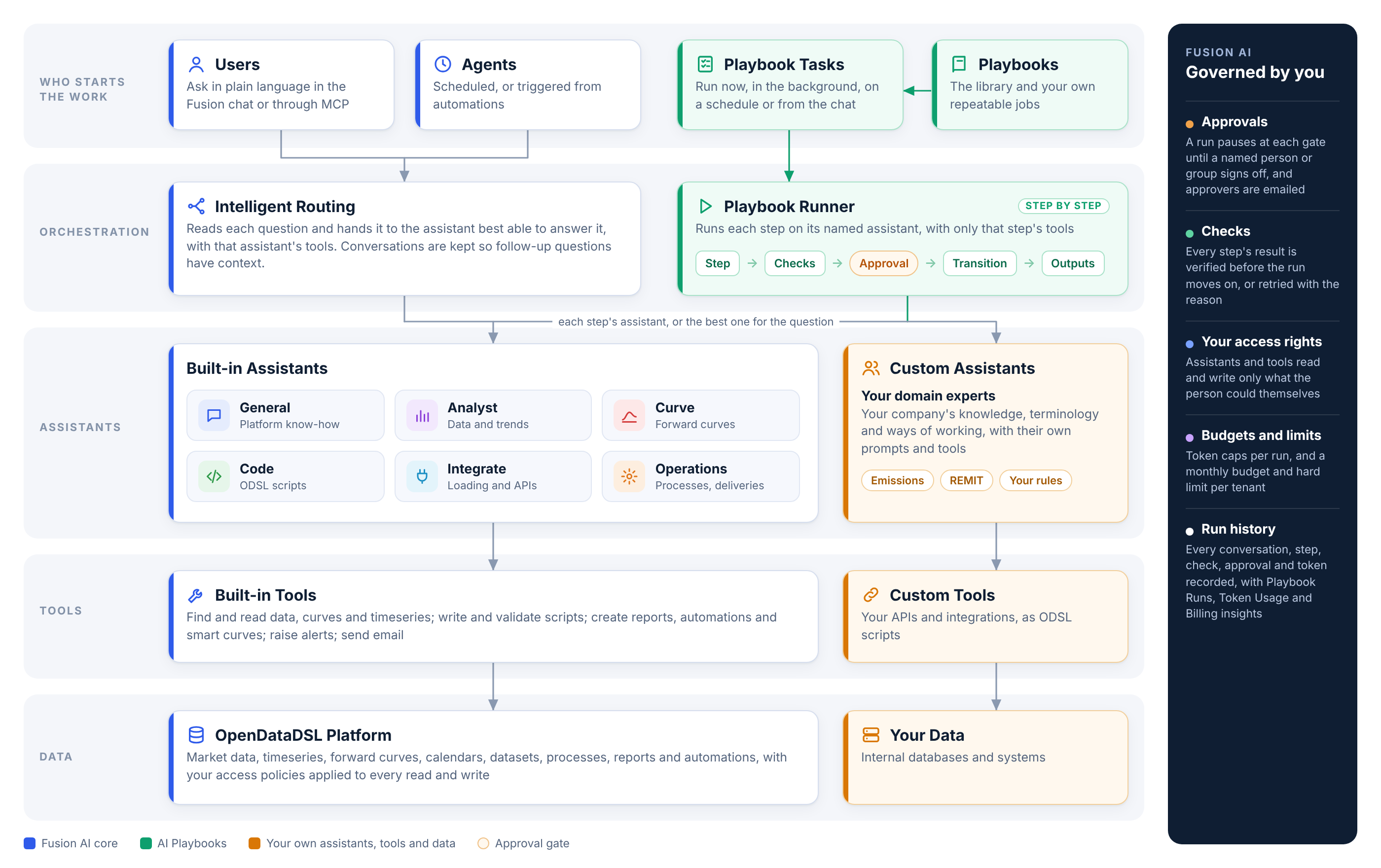
- Intelligent routing: each question goes to the assistant best able to answer it, with that assistant's tools. You can also pick the assistant yourself.
- Assistants are specialists. Six are built in (General, Analyst, Code, Curve, Integrate and Operations), and you can add your own with your company's knowledge, terminology and ways of working.
- Tools are how assistants read and change the platform: find curves, read data, validate scripts, create reports, raise alerts, send email. You can add custom tools that call your own scripts, systems and APIs.
- The playbook runner carries out a playbook one step at a time, on the assistant each step names and with only that step's tools.
- Your access rights apply to everything. Fusion reads and writes only what the person using it could read and write themselves.
The Fusion AI extension
The Fusion AI extension adds a Fusion AI entry to the Information section of the portal, with these tabs:
| Tab | What you do there | Page |
|---|---|---|
| Studio | Chat with Fusion, with your conversation history in a sidebar | Studio |
| Agents | Save sets of questions as agents, schedule them, or run them from automations | Agents |
| Assistants | See the built-in assistants and create your own | Assistants |
| Tools | Register custom tools backed by your own scripts | Custom tools |
| Playbooks | Browse the playbook library, and write your own playbooks | Playbooks |
| Tasks | Fill in and run playbook tasks, and approve runs | Running playbook tasks |
| Architecture | The diagram above |
It also installs five insights, listed with your other insights:
| Insight | Shows | Page |
|---|---|---|
| Fusion AI Agent Logs | Every Fusion conversation in full, with the tools used and any warnings | Insights |
| Fusion AI Feedback | The thumbs up and thumbs down your users give, with their comments | Insights |
| Fusion AI Playbook Runs | Playbook runs, success rates, failures and tokens per run | Insights |
| Fusion AI Token Usage | Tokens used by user, day and conversation | Insights |
| Fusion AI Billing | Monthly billing, and your budget, limit and notifications | Billing, budgets and limits |
Before you start
Fusion AI is a premium feature. It needs an AI API key configured for your tenant. Until it is, the Studio shows Fusion AI is not enabled; speak to your system administrator or to OpenDataDSL support. See Administration for the settings and policies that control who can use each part of Fusion AI.
Next steps
- Studio: ask your first question
- What are AI Playbooks?: repeatable, governed AI workflows
- MCP server: use Fusion AI's tools from Claude, ChatGPT and other AI tools