Custom tools
Fusion's assistants work through tools: find curves, read data, validate a script, create a report, send an email. A custom tool adds one of your own, so Fusion can read your internal systems, databases and APIs, and take actions in your technology environment.
For example, a get_open_positions tool that reads positions from your trading system lets you ask:
What is our open position on GAS-TTF for Q1, and how close is the book to its limit?
Information > Fusion AI > Tools lists your custom tools.
How a custom tool works
A custom tool is a function in a script on the platform. When Fusion decides to use the tool, it fills in the tool's input properties, calls the function with them, and reads back what the function returns.
Fusion decides when to use a tool from its description alone, so the description matters as much as the code.
Writing the script
- Write the tool as a function in an ODSL or JavaScript script. The function has the same name as the tool and takes one argument,
input, which holds the input properties Fusion filled in. - Return the result: an object, a list or a value. Fusion receives it as JSON, so return the fields it needs to answer, with clear names.
- Give the script the category
aitooland save it as a private script, so it can be chosen on the Tools tab.
// Script aitool-positions, category aitool
function get_open_positions(input)
    book = input.book
    asOf = input.asOf
    // Read the positions from your system, for example through a REST call
    // and return one row per delivery period
    result = Object()
    result.book = book
    result.rows = []
    // ...
    return result
end
Tools suit REST APIs, database connections and custom business logic. Keep each tool to one job, and return an error message in the result rather than failing, so Fusion can explain what went wrong.
Registering the tool
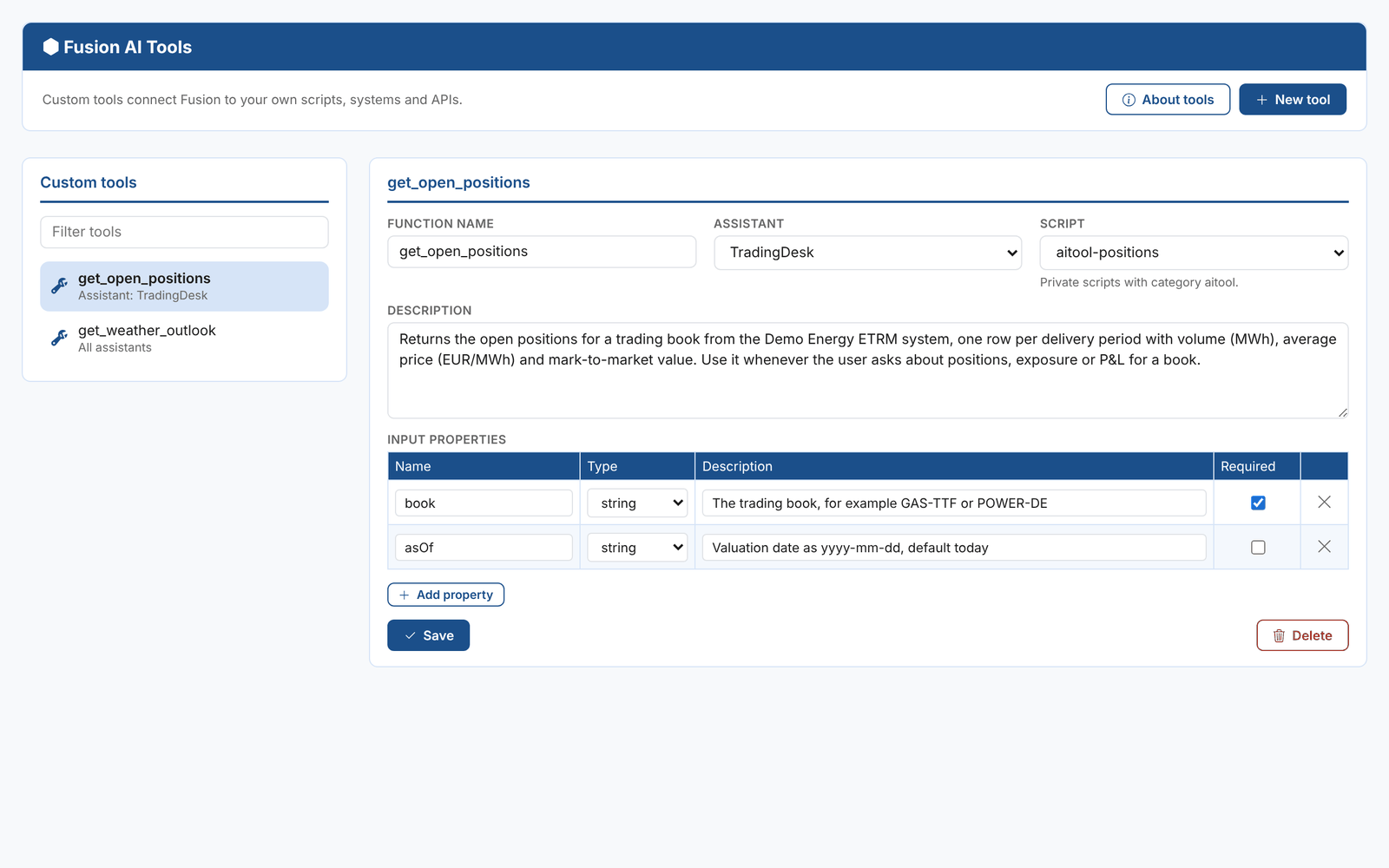
Select New tool and fill in:
| Field | What it is for |
|---|---|
| Function name | The name of the function in the script, and of the tool. Letters, numbers, underscores and hyphens only, for example get_open_positions. |
| Assistant | All assistants, or one of your custom assistants to limit the tool to that assistant |
| Script | The private script with category aitool that implements the tool |
| Description | What the tool does, what it returns and when Fusion should use it |
| Input properties | One row per parameter: its name, type (string, number or array), a description of what Fusion should pass in, and whether it is required |
Select Save. Fusion starts using the tool straight away. Delete removes it; Fusion stops using it at once.
Writing a good description
Say what the tool returns and when to use it, in the terms your users ask in:
Returns the open positions for a trading book from the Demo Energy ETRM system, one row per delivery period with volume (MWh), average price (EUR/MWh) and mark-to-market value. Use it whenever the user asks about positions, exposure or P&L for a book.
Describe each input property the same way, with an example value: "The trading book, for example GAS-TTF or POWER-DE".
Then test it in the Studio: ask a question the tool should answer, and open the tool activity under the answer to check Fusion called it with the right values.
Combine a custom tool with a custom assistant whose prompt says when to use it, and set Only use custom tools on the assistant if it should answer from your system alone.