Building smart curves
A stored build is a smart curve calculated for one ondate and saved, like any other curve. Reports, Composer, Excel and scripts read stored builds quickly, and a stored build keeps the curve as it was on that day even if an input is corrected later.
When the platform builds a smart curve
The Build card's Build and store it setting decides when the platform builds and stores the curve:
| Setting | When it is built and stored |
|---|---|
| When its inputs are updated (the default) | For an ondate as soon as its base and inputs for that ondate are updated: Northgate's spread is built every evening once the power, gas and carbon curves are in |
| The first time it is read | The first time anyone reads it for an ondate |
| On a schedule | On the cron schedule you give, such as 0 18 * * MON-FRI (see CRON expressions) |
| Never: always calculated when read | Never stored |
| Built and saved by an external app | By another application |
The card also shows the stored builds: how many, the first and last ondate and when it was last built.

Building one smart curve for a range of ondates
The platform builds a new smart curve for new ondates. To fill in its history, or to build past ondates again after changing it, select Build in the toolbar (or Build for a range of ondates... on the Build card).
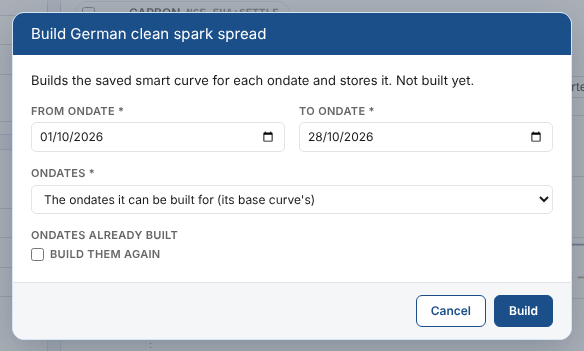
| Field | What to choose |
|---|---|
| From ondate and To ondate | The range. By default the four weeks up to the last weekday |
| Ondates | The ondates it can be built for (its base curve's), Weekdays or Every day |
| Ondates already built | Tick Build them again to rebuild ondates that already have a stored build, for example after changing the expression. Otherwise they are skipped |
Select Build. The ondates are built a few at a time, with the progress shown and Cancel to stop before the next one. The summary says how many were built and, for any that failed, the platform's reason: most often that an input has no curve for that ondate.
- You can build up to 750 ondates at a time.
- Only a saved smart curve can be built. With unsaved changes you are asked to save first, because the platform builds the saved definition.
- Builds are only stored for When its inputs are updated and The first time it is read. For the other settings, Build explains why it cannot store them.
Building several smart curves
To build several at once, select them in the list and choose Build....
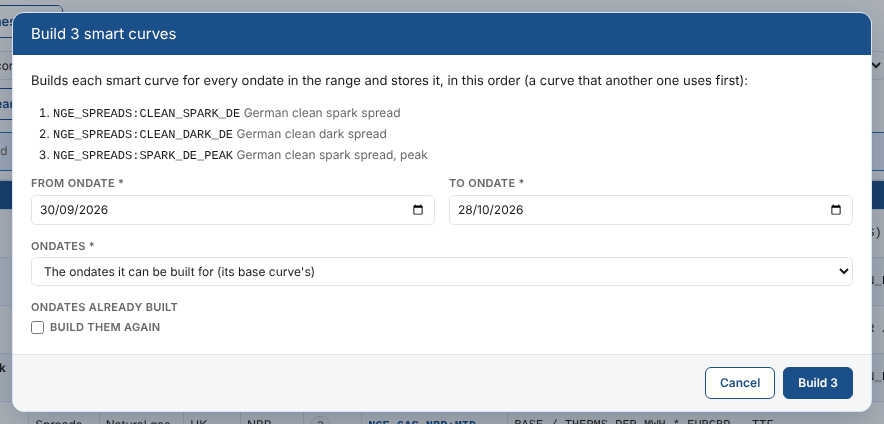
- The dialog lists the curves in the order they are built. A selected curve that is the base or an input of another selected curve is built first, so the second one finds the builds it needs.
- Curves whose builds are not stored (built on a schedule, never, or by an external app) are left out and listed.
- Each curve is built for its own ondates in the range; ondates already built are skipped unless you tick Build them again.
The summary in the list shows, for each curve, how many ondates were built, skipped or failed.
After changing a smart curve that other smart curves are built from, select it and the curves that use it, and build them again with Build them again ticked: the list builds them in the right order.
Next
Versions and the audit trail: what changed, who changed it, and going back.