What is Smart Data?
Much of the data a trading company uses every day is calculated from other data: a spark spread from the power, gas and carbon curves, a price in another currency, an off-peak curve from base and peak. On the platform these are smart curves and smart timeseries: a base curve or timeseries, some other inputs and an ODSL expression, built again by the platform whenever their inputs change. Smart Data is the extension for creating and looking after them, and answers questions like:
- Can I make our clean spark spread curve without writing a script, and see what it gives before I save it?
- Which smart curves do we have for German power, and what are they calculated from?
- Is there a ready-made example I can start from, or can Fusion AI design it for me?
- Can I build the new curve for the last month of ondates, so our reports have its history?
- What changed in this curve last week, who changed it, and can I go back to the version before?
- Can I edit and test the script functions a smart curve uses, next to the curve itself?
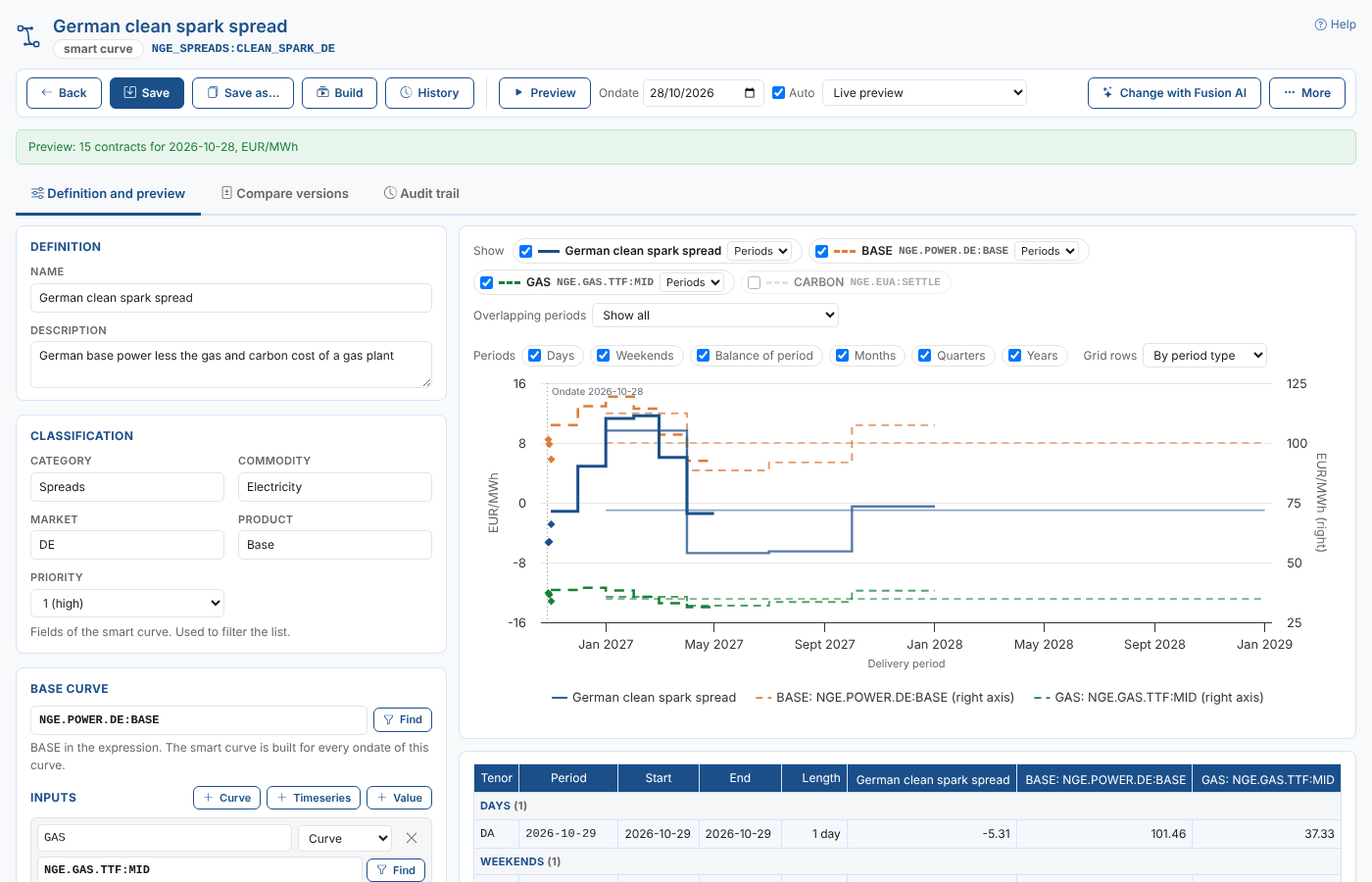
Throughout these pages we follow Northgate Energy, a fictional gas and power trader. Its market data team keeps its forward curves on master data records such as NGE.POWER.DE (German power) and NGE.GAS.TTF (TTF gas), and its calculated curves in a smart data area called NGE_SPREADS. Priya Shah, a market data analyst, looks after NGE_SPREADS:CLEAN_SPARK_DE, the clean spark spread of German base power: what a gas plant earns on a MWh of power after paying for its gas and its carbon.
Key ideas
| Idea | What it means |
|---|---|
| Smart curve | A forward curve calculated for every ondate of its base curve, contract by contract, with an expression such as BASE - GAS / EFFICIENCY. |
| Smart timeseries | A timeseries calculated from a base timeseries, date by date, with an expression such as BASE * FX. |
| Base | The curve or timeseries the smart data is built from. It is called BASE in the expression and gives the smart data its ondates (a curve) or its dates (a timeseries). |
| Input | Another curve, a timeseries or a value the expression uses, with a name such as GAS or EFFICIENCY. |
| Expression | The ODSL formula that calculates the result: arithmetic, functions such as sma or bootstrapCurve, and functions from a script. |
| Script | An optional ODSL script whose functions the expression can call, for calculations too long for one line. |
| Smart data area | A master data record that holds smart curves and timeseries, such as NGE_SPREADS. Smart data can also be stored on any other private master data record. |
| Build | A smart curve calculated for one ondate and stored, so it is read quickly and keeps its history. The platform builds a smart curve again when its inputs are updated. |
| Version | Each save makes a new version, with who saved it and when. Earlier versions are kept. |
What you get
| Screen | Where | What it does |
|---|---|---|
| Smart data tab | Information, Smart Data | Every smart curve or smart timeseries of your company, filtered by id, record, category, commodity, market, product and priority, with bulk updates and building |
| Library tab | Same screen | 44 ready-made examples (spreads, blends, curve building, moving averages, currency conversion and more) to start from |
| Workspace | Open or create one | The definition on the left, a live preview chart and grid on the right, saving, building and Fusion AI |
| Script tab | In the workspace, when it uses a script | The Script Manager's editor, runner and debugger on the script |
| Compare versions tab | In the workspace, once saved | Any two versions side by side, and Restore |
| Audit trail tab | In the workspace, once saved | Who created and changed it and its script, when and what |
| Smart Data tab | Master Data, on a record | The smart curves and timeseries stored on that record |
Every screen has a Help link that opens the matching page of this guide.
Smart curves and timeseries are kept in your private data. Public master data records (ids starting with #) can be previewed in the Master Data tab but not changed.
Where next
- How smart data works: the base, inputs and their ondate options, the expression, scripts, conversion and building.
- Creating a smart curve: a walk-through from a library example to a saved, built curve.
- Finding and organising smart data: the list, its filters, bulk updates and the Master Data tab.
- The workspace: editing, the live preview chart and grid, saving and the More menu.
- Smart data with Fusion AI: having Fusion AI design, adapt, change or fix smart data.
- Scripts: script functions in the expression, and editing, running and debugging the script in the Script tab.
- Building smart curves: when the platform builds them, and building one or several curves for a range of ondates.
- Versions and the audit trail: comparing, restoring, rolling back and deleting, and who changed what.
- Smart Data reference: how smart data is stored, the preview calls, permissions and what the extension contains.