What is Projects?
Bringing a new client onto OpenDataDSL is a project with three teams in it: OpenDataDSL, the client, and usually an implementor such as ETRMServices that connects the platform to the client's ETRM. Each team has its own part to play: the client lists its data sources and signs off the curves, the implementor writes the curve definitions and maps the ETRM fields, OpenDataDSL loads the data and builds the curves. Without one shared plan, the work lives in spreadsheets, inboxes and meeting notes, and nobody can say what is late until go-live slips.
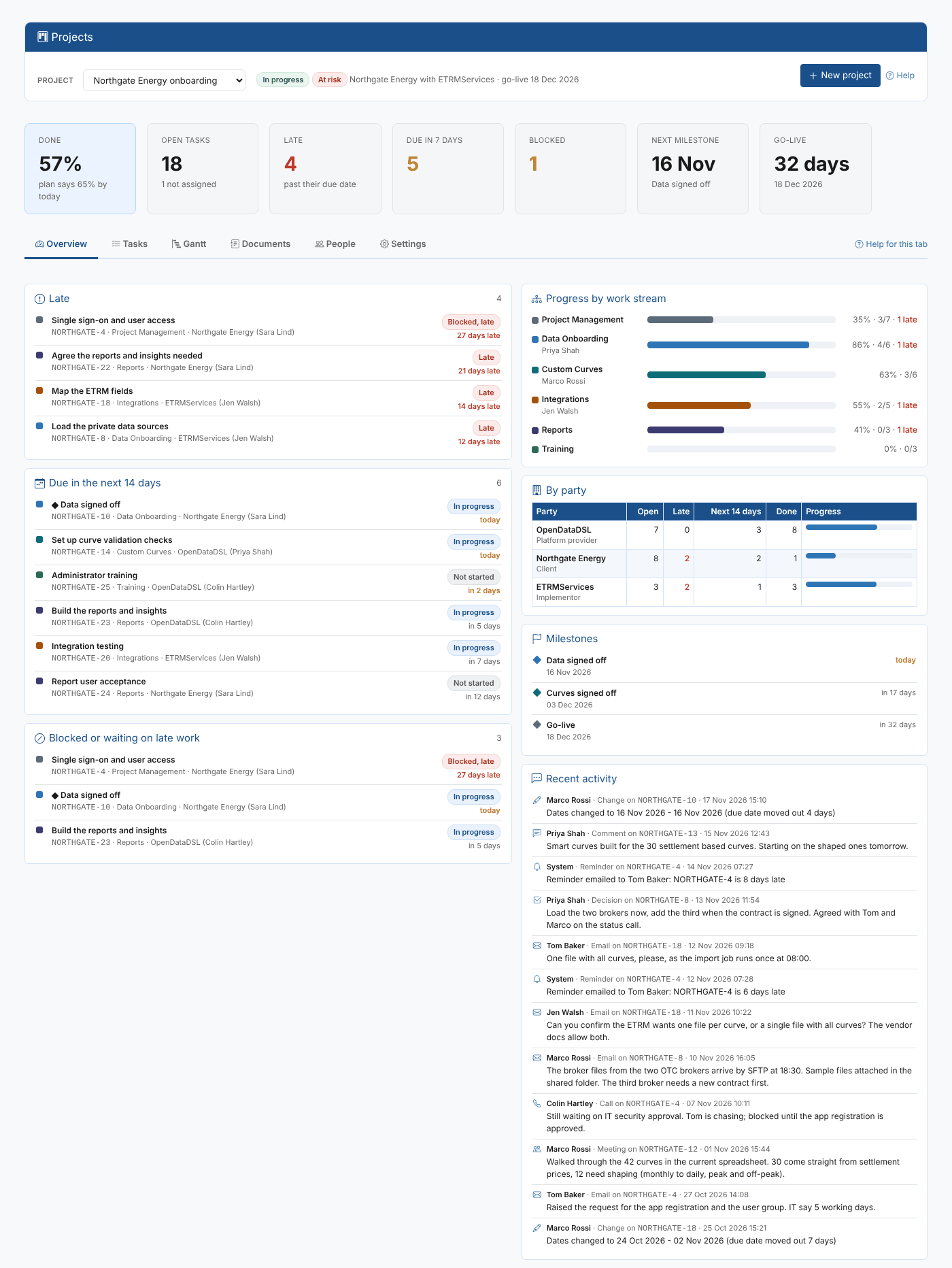
Projects keeps the whole plan in the portal, next to the data it is about, and answers questions like:
- What has each team still to do, and what is late?
- Which tasks are due in the next two weeks, and are they assigned to anyone?
- Are we on track for go-live, and which milestones have moved?
- What did we agree with the client about the ETRM file format, and when?
- Where are the curve requirements, and which tasks do they belong to?
Throughout these pages we follow the onboarding of Northgate Energy, a fictional gas and power trader, with ETRMServices as the implementor. Colin Hartley at OpenDataDSL owns the project; Tom Baker and Sara Lind work at Northgate, Marco Rossi and Jen Walsh at ETRMServices.
Key ideas
| Idea | What it means |
|---|---|
| Project | One onboarding, with a code such as NORTHGATE, a start date and a target go-live |
| Work stream | A top level part of the project, such as Data Onboarding, Custom Curves, Integrations, Reports or Training. Each project has its own list, and you can add your own |
| Party | An organisation working on the project: OpenDataDSL, the client, the implementor, or another such as a data vendor |
| Task | A piece of work in a work stream, done by a party and assigned to a person, with a start and due date. Task ids are the project code and a number, such as NORTHGATE-18 |
| Milestone | A task that marks a point in the plan, such as Curves signed off or Go-live |
| Waits for | A task that cannot start until other tasks are done |
| Activity log | Everything recorded on a task: emails, calls, meetings, comments and decisions, plus reminders and changes |
| Document | A markdown document kept in the platform's documentation service and linked to tasks |
| Evidence and sign-off | Proof that a task is done (a data loader's loading history, a curve, timeseries or options, an integration's deliveries, or an evidence document), formally signed off by the person responsible |
| Plan template | A set of tasks a new project starts from: the built-in Standard onboarding plan, or one you saved |
| Partner | An implementor that OpenDataDSL allows to work on a client's projects. The client shares each project with it |
| Added project | A project of another tenant (a client's) on your own Projects screen, worked on in its own tenant |
What you get
| Screen | What it is for |
|---|---|
| Overview tab | Every project at a glance, then what is late, coming up and assigned to you. With a project chosen: progress by work stream and by party, milestones and recent activity |
| Tasks tab | The tasks by work stream, with filters, the status changed in the list, and the task panel to change everything else and record what was said |
| Gantt tab | The plan on a timeline, with dependencies, milestones, today and the go-live; drag tasks to reschedule them |
| Documents tab | Markdown documents for the project, linked to tasks |
| Evidence tab | The evidence of the tasks that need a formal sign-off, provided or still to provide; select a piece of evidence to see it, and sign the task off there |
| People tab | The parties and the people tasks are assigned to |
| Settings tab | Project details, work streams, plan templates, reminders and the defaults for new projects |
| Insights tab | The Project Status insight, run for the chosen project: a status report: progress against the plan, late and at-risk work, milestones, schedule changes and communication |
| Reminders | A daily check emails people before their tasks are due and while they are late, and raises an alert for each late task |
| Working with partners | Share a project with your implementor; OpenDataDSL and implementors add the client's projects to their own screen and work on them there |
| Home page tasks | Catch up on late project tasks (with the number late), My project tasks and Start an onboarding project |
The extension adds Projects to the Manage menu.
Where next
- Getting started: create a project from the standard onboarding plan
- Tasks: find, allocate and update tasks
- Gantt chart: see and change the schedule
- Communication and reminders: the activity log and reminders
- Documents: write project documents and link them to tasks
- People: the parties and people on a project
- Settings: work streams, templates and defaults
- Working with partners: share projects and work on the projects of client tenants
- Project Status insight: report on progress
- Reference: where everything is kept