The library
Many clients load the same public data: exchange rates, gas storage, day-ahead power prices. OpenDataDSL builds and checks loaders for these and publishes them in the library. Install one into your tenant and it is a data loader of your own: set its secrets, look over its steps, and deploy it.
Opening the library
Select Library at the top of the list of data loaders.
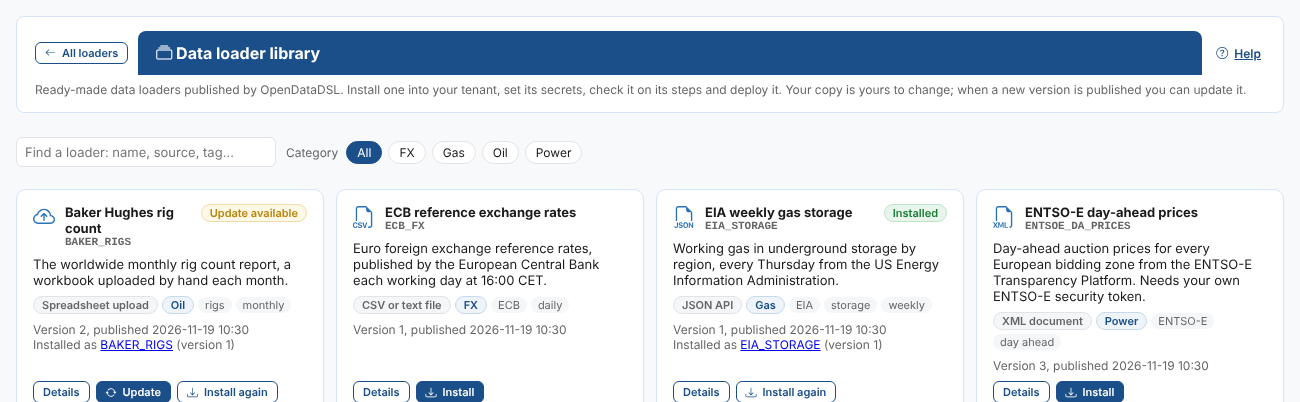
Each card shows the loader's name and code, what it loads, the kind of source, its category and tags, and the library version with the date it was published. Type in Find a loader to search the names, descriptions and tags, and select a category to see only those.
A card is marked Installed when you have a loader installed from it, with links to your copies, and Update available when a newer version has been published since you installed it.
Details shows the loader's settings and what installing it brings.
Installing a loader
Select Install on the card. Give the loader a name and a code; the code is the library's unless you already have a loader with it.
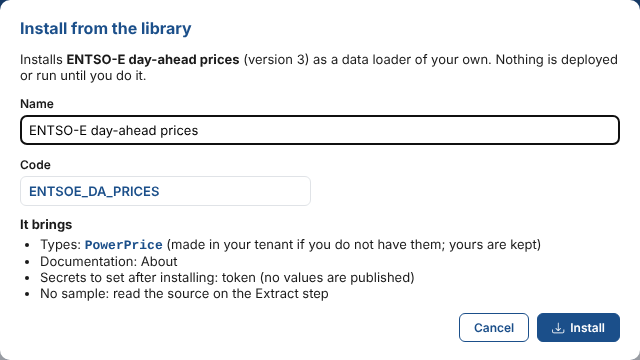
Installing saves a new data loader in your tenant. It also brings:
- Types the loader uses that are not standard platform types, such as its event type. A type is only made if you do not have one with that name; yours is kept.
- The data series set of a spreadsheet upload loader, if you do not have it.
- Its documentation, if it was published with it.
- A sample of the source, if it was published with one, so you can look at the mapping before reading the source yourself.
Nothing is deployed or run. The loader opens, marked library version with the version you installed. Then:
- On the Extract step, set the values of its secrets, such as an API key. The library never holds secret values, only their names. A secret of the loader's own is named after your code, such as
etl_entsoe_da_prices_token. - Read the source with Extract, and check each step.
- Set its stage and deploy it on the Deploy and run step.
Your copy is yours: change any step, as with a loader you built. Select Install again to install a second copy under another code, for example to load a second set of variables on a different schedule.
Updating a loader
When OpenDataDSL publishes a new version, the card shows Update available. Select Update, and choose the copy to update if you have more than one.
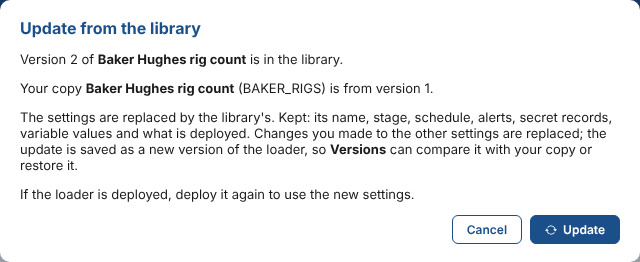
The loader's settings are replaced by those of the new version. These are kept:
- its name, stage, schedule and alerts;
- the secret records it uses, and the values of its variables;
- what is deployed.
Changes you made to other settings are replaced. The update is saved as a new version of the loader, so Versions can show what changed and restore your copy. If the loader is deployed, deploy it again to use the new settings.
Types, a series set and documents you already have are never changed by an update; new documents are added.
Publishing to the library (OpenDataDSL)
This part is for OpenDataDSL staff. Publish to library is shown at the top of a loader only to OpenDataDSL users working in the OpenDataDSL tenant, not when working as a client.

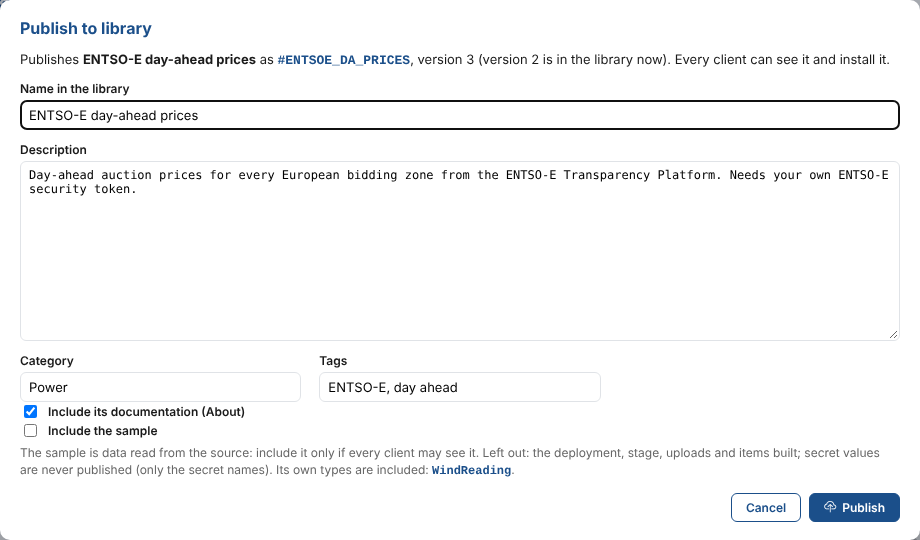
Save the loader first, then select Publish to library.
| Setting | What it is |
|---|---|
| Name in the library | The name on the card |
| Description | What it loads, from where, and what a client needs, such as an account or an API key |
| Category | Groups the cards, such as Power, Gas or FX |
| Tags | Words to find it by, separated by commas |
| Include its documentation | Publishes the loader's documentation; installing it adds the documents |
| Include the sample | Publishes the sample. It is data read from the source: include it only if every client may see it |
The loader is published as #<CODE>. Publishing it again makes the next library version, and clients who installed an earlier one see Update available.
What is published: the loader's settings, the names of its secrets and variables, its schedule as a suggestion, and the types it uses that are your own (a type that cannot be found is named in the message and left out). What is left out: the deployment, the stage, the uploads and items built, and every secret value.
On a card, the bin takes the loader out of the library, every version. Loaders clients have installed stay.
Where the library is kept
| What | Service and source | Id |
|---|---|---|
| A library entry | object, the custom collection etl_loaders in the public database (object/v1/public.etl_loaders) | #<CODE> |
| An installed loader | object, custom collection etl_loaders | your code; installedFrom records the entry and its version |
Everyone can read the public database. Only users with a security policy that lets them write to the public source, which OpenDataDSL has, can publish.