What are Data Loaders?
A lot of the data a trading business relies on arrives as files and API answers: a broker's end of day settlements as a CSV file, a wind farm's readings from a JSON API, an exchange's settlement workbook, a terminal's send-out as an XML document. Getting each one into the platform used to mean writing an ODSL script by hand. Data Loaders lets you build that loader step by step, on screen, and answers questions like:
- Can I load this broker file every evening without writing a script?
- What is actually in the file, and which columns are numbers, dates or text?
- How do I turn its columns into the fields of an event type, with the right date format and decimal comma?
- Which rows should be left out, and what happens to a row that cannot be read?
- Where do the events go, and how do I stop a rerun from loading them twice?
- Did last night's run work, and how many events did it load?
The Integration extension sends data out to downstream systems; Data Loaders is the other direction, bringing data in as events.
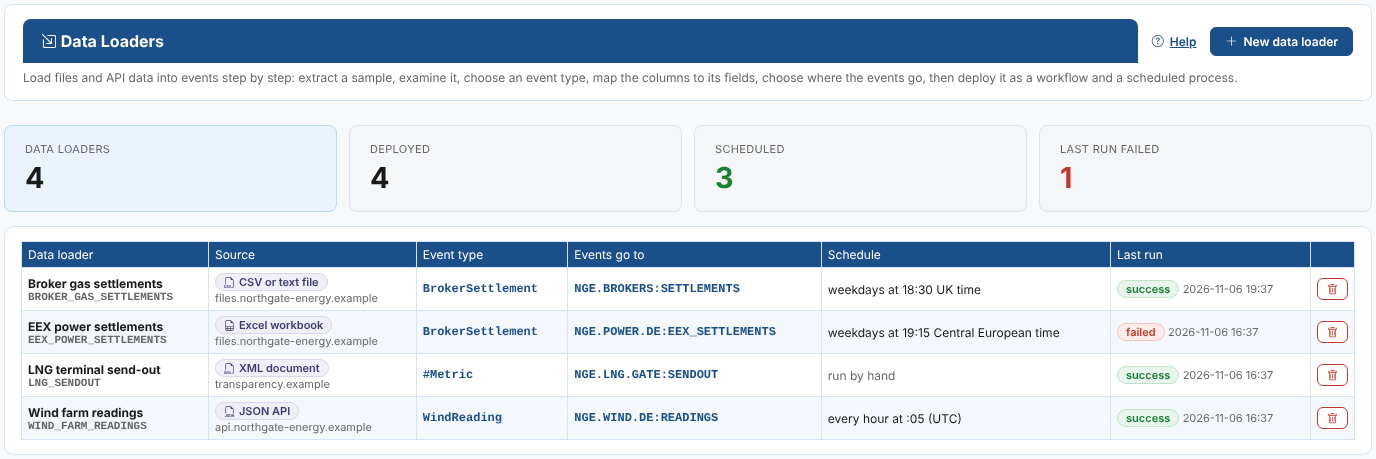
Throughout these pages we follow Northgate Energy, a fictional gas and power trader. Every evening its two brokers send a semicolon separated file of end of day gas settlements for TTF, THE, NBP and PEG. Priya Shah, a market data analyst, builds a data loader for it that saves the settlements as BrokerSettlement events in NGE.BROKERS:SETTLEMENTS, every weekday at 18:30.
Key ideas
| Idea | What it means |
|---|---|
| Data loader | A design that says where the data comes from, how its rows become events and where the events go. It has a name and a code, such as BROKER_GAS_SETTLEMENTS. |
| Source | A CSV or text file, a JSON API, an XML document, an Excel workbook or a table on a web page, read from a URL, or your own ODSL code. The URL can contain the date being loaded, variables and secrets. |
| Sample | The first 50 rows of the source, read by the platform exactly as a run reads them. You design the loader with it. |
| Event type | The structure of the events, like a type for master data. Its properties are the fields you map the columns to. You can choose one, define a new one from the columns, or use none. |
| Mapping | Which column, fixed value or template fills each field, with its data type, date format, decimal separator, empty values and value map. |
| Event id | Built from the event time and the columns that make a row unique, so loading a row again replaces its event instead of adding a copy. |
| Destination | The master data record and the event list on it, for example NGE.BROKERS:SETTLEMENTS, and an optional dataset id (_dsid). |
| Curves and series | Event timeseries, event curves and event options made once from the events, kept on the same master data record and built by the platform whenever they are read. |
| Deploying | Saves a workflow made of the standard ETL actions and a process that runs it, which you can run now or on a schedule. |
What you get
| Screen | What it is for |
|---|---|
| Operations, Data Loaders | The list of data loaders with their schedule and last run, and the step by step editor: Extract, Examine, Event type, Map, Destination, Deploy and run, and the optional Curves and series step. |
| Insights tab | The Data Loader Runs insight: every run in a period, by loader and by day, with the failures. |
| Workflows (Workflow Manager) | Each deployed loader's workflow, etl_<code>, shown as a diagram. |
| Home page tasks | Load data from a file or API, Check data loaders that failed (with a badge for open alerts) and Review data loader runs. |
Where next
- How it works: what a loader is made of and what deploying creates.
- Building a data loader: Priya's broker settlements loader, step by step.
- Mapping columns to fields: data types, formats, value maps and filters.
- Sources: the settings of each kind of source, dates in URLs and custom ODSL.
- Deploying, running and scheduling: runs, run reports and alerts.
- Curves and series: event timeseries, curves and options from the events.
- Fusion AI: let Fusion AI propose the event type and the mapping.
- The ETL actions: the standard actions, also usable in your own workflows.
- Reference: where everything is kept, and troubleshooting.