Round-trip confirmations
What confirmations are
A run sends the curves and timeseries of a group to the system. Without confirmations, an item the system accepted is complete as soon as it is sent.
With confirmations on, the system tells the platform afterwards whether each item was loaded:
| State | When |
|---|---|
| sent | The run sent the item. The platform is waiting for the system to confirm it. |
| complete | The system confirmed it received and loaded the item. |
| failed | The system failed the item, with its reason. A failure in the run itself, before the item reached the system, is failed too. |
Each confirmation gives the item a Confirmed time and the system's message, shown on the report's Items tab and in its email. The report's counts and matrix count confirmed items, and show the items still waiting.
Confirmations are optional for each system. Use them when the system loads what it receives later, for example from a queue or a file, so that "sent" does not mean "loaded".
Switching confirmations on
- On the Integrations screen, choose the system.
- On its System setup tab, select Switch confirmations on under Round-trip confirmations.
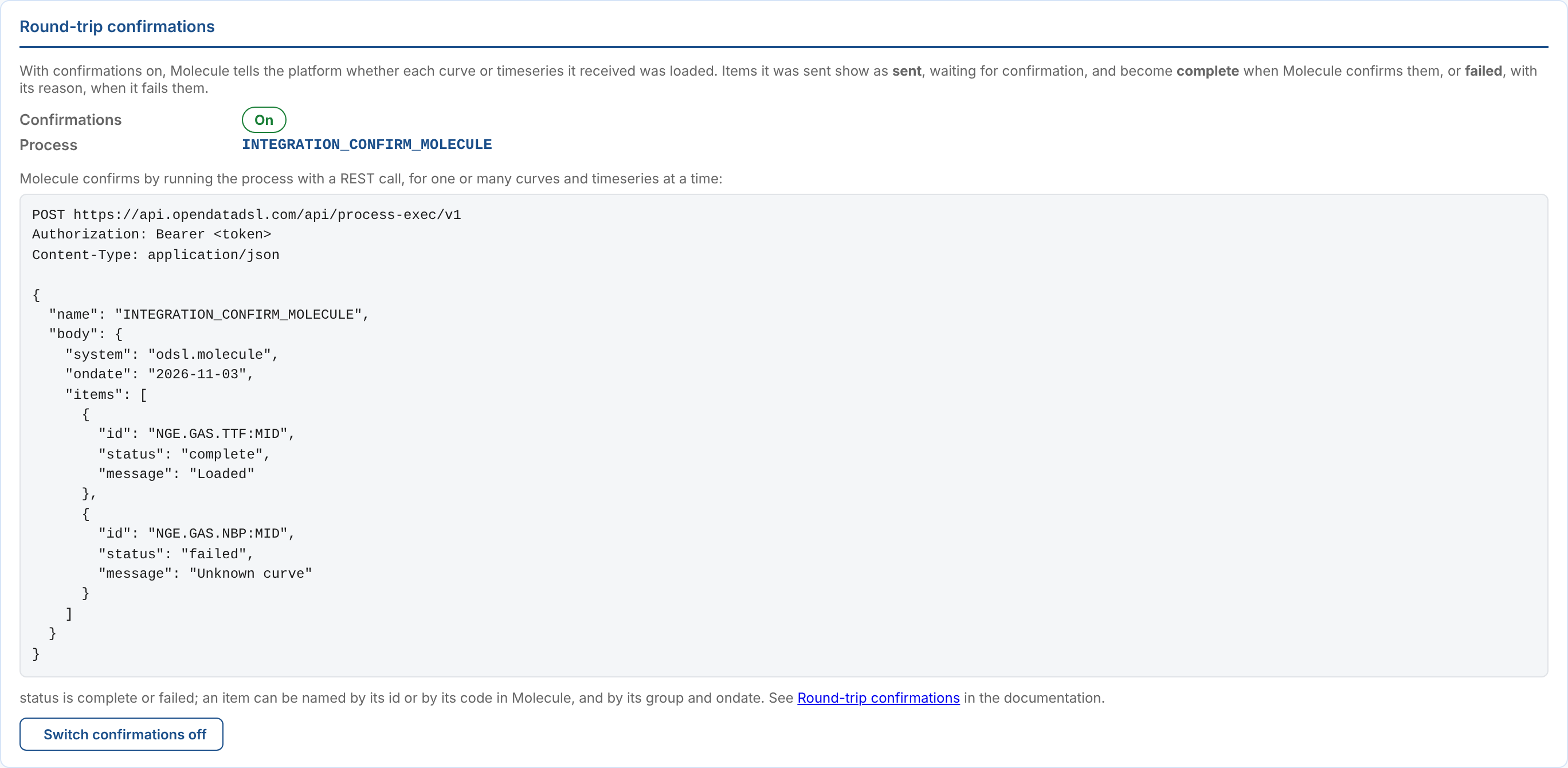
This makes the process INTEGRATION_CONFIRM_<CODE> for the system, such as INTEGRATION_CONFIRM_MOLECULE. The system runs it to report back. From the next run of each group, items sent to the system show as sent.
Switch confirmations off stops waiting for confirmations: from the next run, items are complete when sent. Items already waiting stay sent.
The REST call
The system confirms by running its confirmation process with the platform's REST API. One call can confirm or fail any number of curves and timeseries.
POST https://api.opendatadsl.com/api/process-exec/v1
Authorization: Bearer <token>
Content-Type: application/json
{
  "name": "INTEGRATION_CONFIRM_MOLECULE",
  "body": {
    "system": "INTEGRATION.MOLECULE",
    "ondate": "2026-11-03",
    "items": [
      {"id": "NGE.GAS.TTF:MID", "status": "complete", "message": "Loaded 12 contracts"},
      {"code": "M.NLB.F", "status": "failed", "message": "Unknown curve M.NLB.F"},
      {"id": "NGE.POWER.DE:BASE", "group": "NGE_MOLECULE_CURVES", "ondate": "2026-11-02", "status": "complete"}
    ]
  }
}
| Field | What it is |
|---|---|
name | The system's confirmation process, as shown on its System setup tab. |
body.system | The system's id, such as INTEGRATION.MOLECULE or INTEGRATION.NORTHGATE_RISK. Optional: the confirmation process already names its system. A system that confirmed before 2026-11-07 with odsl.molecule or custom.northgate_risk goes on working: the id finds the system upgraded from it. |
body.ondate | The date the data was sent for. An item can give its own ondate. |
body.items | One entry for each curve or timeseries. |
id | The curve or timeseries id, such as NGE.GAS.TTF:MID. |
code | Instead of id: the code the system knows the item by, its identity for the system. |
group | Optional: the group, when the item is in more than one group sending to the system. Without it, every group's entry for the item is updated. |
ondate | Optional: the date for this item, when it differs from body.ondate. |
status | complete (also received, ok, success or true) or failed (also error, rejected or false). |
message | Optional: the system's note, or the reason it failed the item. Shown with the item. |
The answer is the run that was started:
{"_id": "INTEGRATION_CONFIRM_MOLECULE", "id": "6f1c2a7e-0b5d-4f3e-9a51-1c8f2d7b6e40"}
The confirmation is applied by that run, shortly after the call. To check it, read the run with GET https://api.opendatadsl.com/api/process-exec/v1/<id>. Its message lists the counts and anything that did not match:
odsl.molecule: 2 confirmed, 1 failed; not found in the sent data: NGE.SOLAR.NL:CAPTURE; updated INTEGRATION_MOLECULE:2026-11-03
The run fails, with the reason in its message, when the body has no system or items, when confirmations are off for the system, or when no item matched anything sent.
A system can confirm an item again: the latest confirmation counts. A group's next run for the same date sends its items again, so they are sent until they are confirmed again.
Getting a token
The call needs an access token for the OpenDataDSL API, as any other API call. For a system calling unattended, use an application registration and the client credentials flow (see Security). The application needs the rights to run processes, to read groups, processes, extensions and report configurations, and to update reports.
How it shows
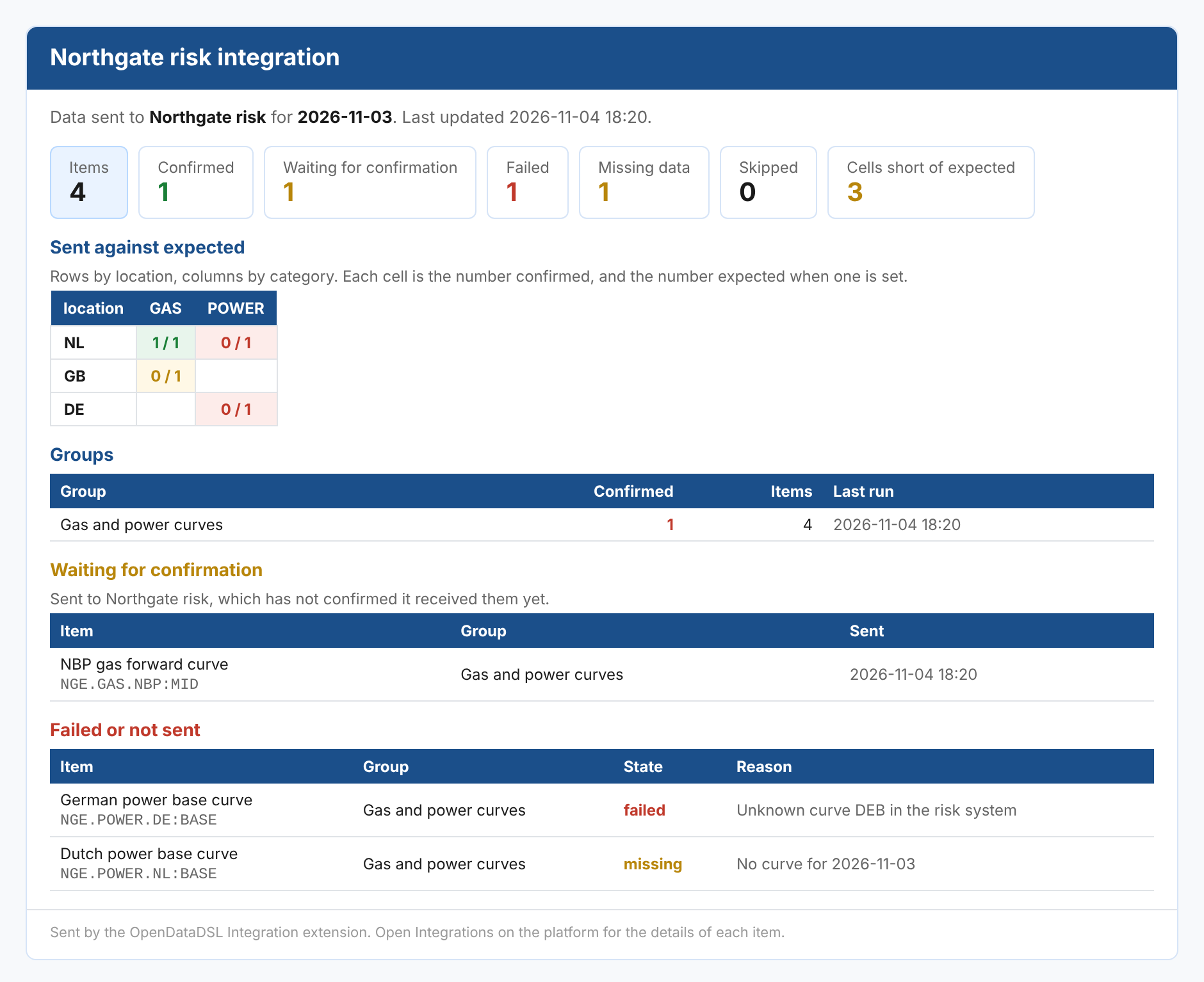
| Where | What changes |
|---|---|
| The report's Summary | Confirmed instead of Sent, and Waiting for confirmation while items are waiting. |
| The matrix | A cell counts confirmed items. A cell with items still waiting, and no failures, is amber. |
| The Items tab | The state sent, the Confirmed time and the system's message. Filter on Waiting for confirmation to see what is still to come. |
| The Groups tab | Each group's confirmed and waiting counts. |
| The scheduled email | The same counts, and a list of the items waiting for confirmation. |
| The group's runs | The run message ends with waiting for <system> to confirm them. |
Next
- Integration reference: where everything is kept, and troubleshooting.
- The report: the matrix, the expected counts and the scheduled email.