Insights
The Integrations screen has Insights: reports that look across every system and group, and over weeks rather than one day. They come with the extension (category odsl.integration) and read the same daily reports, corrections logs, runs and codes as the screen.
The reports
| Report | What it answers |
|---|---|
| Integration Delivery History | How much of each system's daily report was sent each day, which days fell short and what was not sent, and the days that missed the cutoff |
| Integration Problem Items | The curves and timeseries that failed, had no data or were held back most often, whether they still do, and the reasons |
| Integration Send Times | When each group finishes sending, how late it has been against its usual time and the cutoff, and how long its runs take |
| Integration Corrections | The corrections found in a period, the ones waiting for approval, and how long sending them took |
| Integration Codes by System | The codes each system knows your data by, the required codes that are missing and codes given to two items |
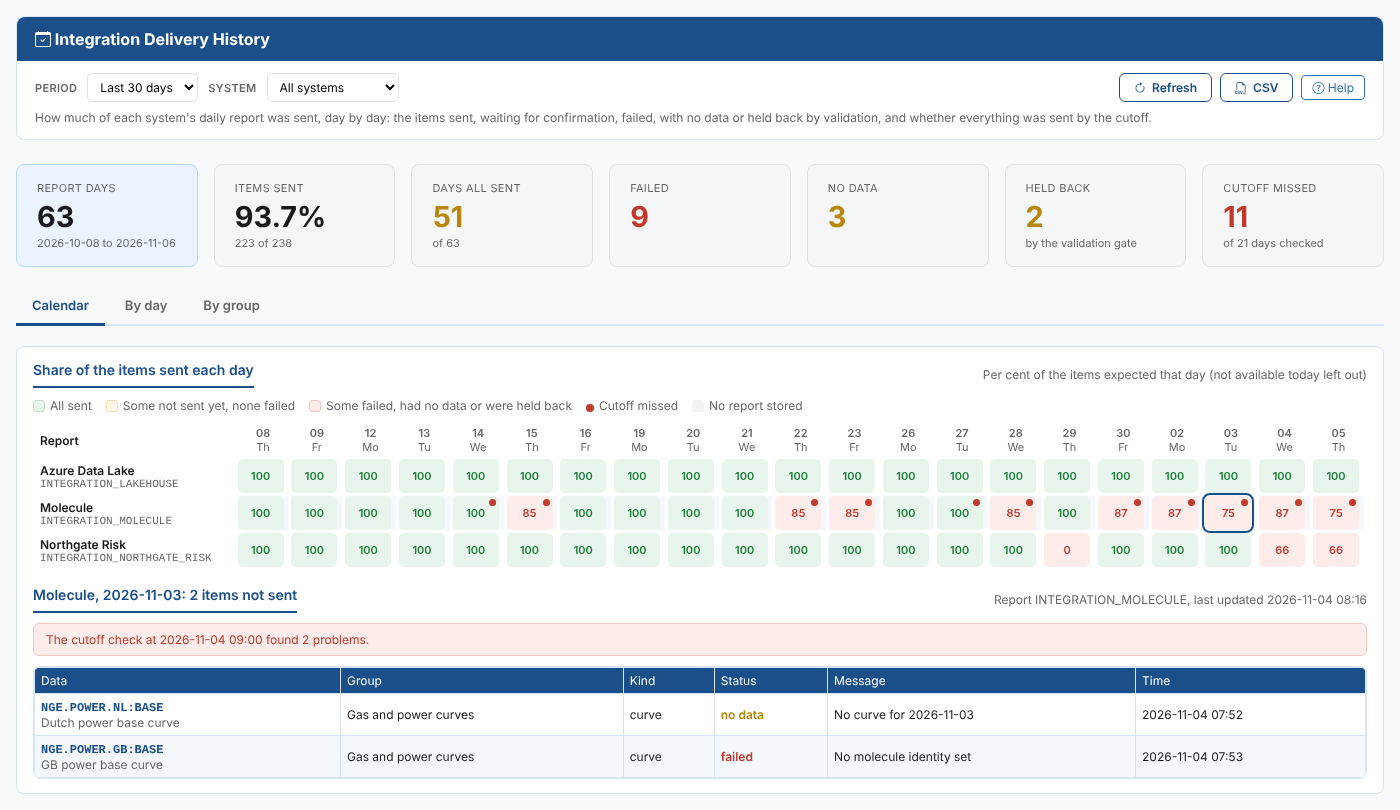
Opening a report
- Open Operations > Integrations.
- Open the screen's Insights tab and choose the report.
Each report has a Help link at the top that opens its own page in this documentation.
tip
When a curve keeps failing, open Integration Problem Items to see since when and why, then Integration Codes by System to check its codes in every system.