Alerts and the cutoff
What they do
The daily report shows what was sent. Alerts and the cutoff tell you when something needs attention, so nobody has to check the report every morning.
| What | When it raises an alert |
|---|---|
| Group alerts | A group's run cannot send an item, an item has no data for the date, or the validation gate holds an item back. |
| The cutoff | At a set time, anything in the day's report is still not done. This covers items that failed, have no data or are still waiting for confirmation, cells short of their expected count, and groups that did not run at all. |
| Not every day | Never. An item marked as not available every day shows as not available on days without data, instead of missing. |
The alerts are ordinary alerts: they show on the Alerts screen and can send emails or Teams messages through automations.
Group alerts
- On the Integrations screen, open the group on the Groups tab.
- On its Settings tab, under Alerts, tick Raise an alert when items fail, have no data or are held back by validation.
- Choose the Priority and who the alert is With: your team, or OpenDataDSL.
- Select Save settings.

A run with problems raises one alert for the group and the date, listing each item that failed, had no data or was held back, with the reason. Another run for the same date with problems adds an occurrence to the same alert instead of raising a new one. A run that sends everything closes it.
With round-trip confirmations, an item the system fails also counts. An item still waiting for confirmation does not: the cutoff catches those.
| Alert field | Value |
|---|---|
| Title | Such as Molecule: 2 of 6 items failed or missing for Gas and power curves on 2026-11-03 |
| Subject | Service group, the group id and the ondate |
| Issue, category | export, integration. When the validation gate held items back, the issue is validation, unless the alert was already open with an issue from an earlier run. |
| Key | integration/INTEGRATION_<KEY>/<group>/<ondate> |
| Tags | integration and the system's extension id |
The cutoff
The cutoff is the time by which everything in a daily report should be sent, such as 09:30 UK time on weekdays. It is set for each report on the Report tab.
- On the Report tab, under Cutoff, tick Check that everything is sent by a cutoff time.
- Set the Cutoff time, the days it applies (On) and the Time zone.
- Check the Ondate offset and Calendar. They give the date the check looks at, and start as the groups' own settings. With
-1andBUSINESS, the 09:30 check on Tuesday looks at Monday's report. - Leave Raise an alert when something is not sent by the cutoff ticked to be alerted, and choose its Priority and who it is With.
- Select Save the cutoff.
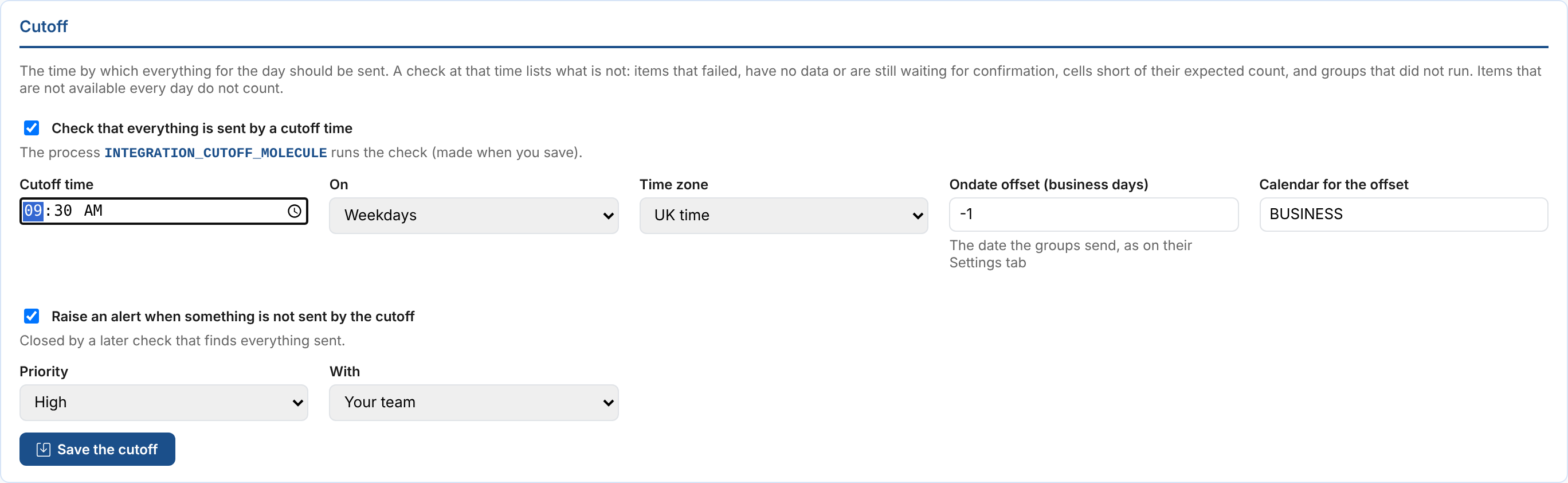
Saving makes the process INTEGRATION_CUTOFF_<KEY>, scheduled at the cutoff time. Check now runs the check straight away. Untick the box and save to stop the checks.
At the cutoff the check lists:
- items that failed, have no data or were held back by the validation gate;
- items still waiting for the system to confirm them;
- matrix cells with fewer items sent than expected;
- groups sending to the report that did not run for the date;
- no report at all, when nothing was sent.
The result is shown at the top of the day's report and in its scheduled email, as it was at the cutoff. Running the check again replaces it.
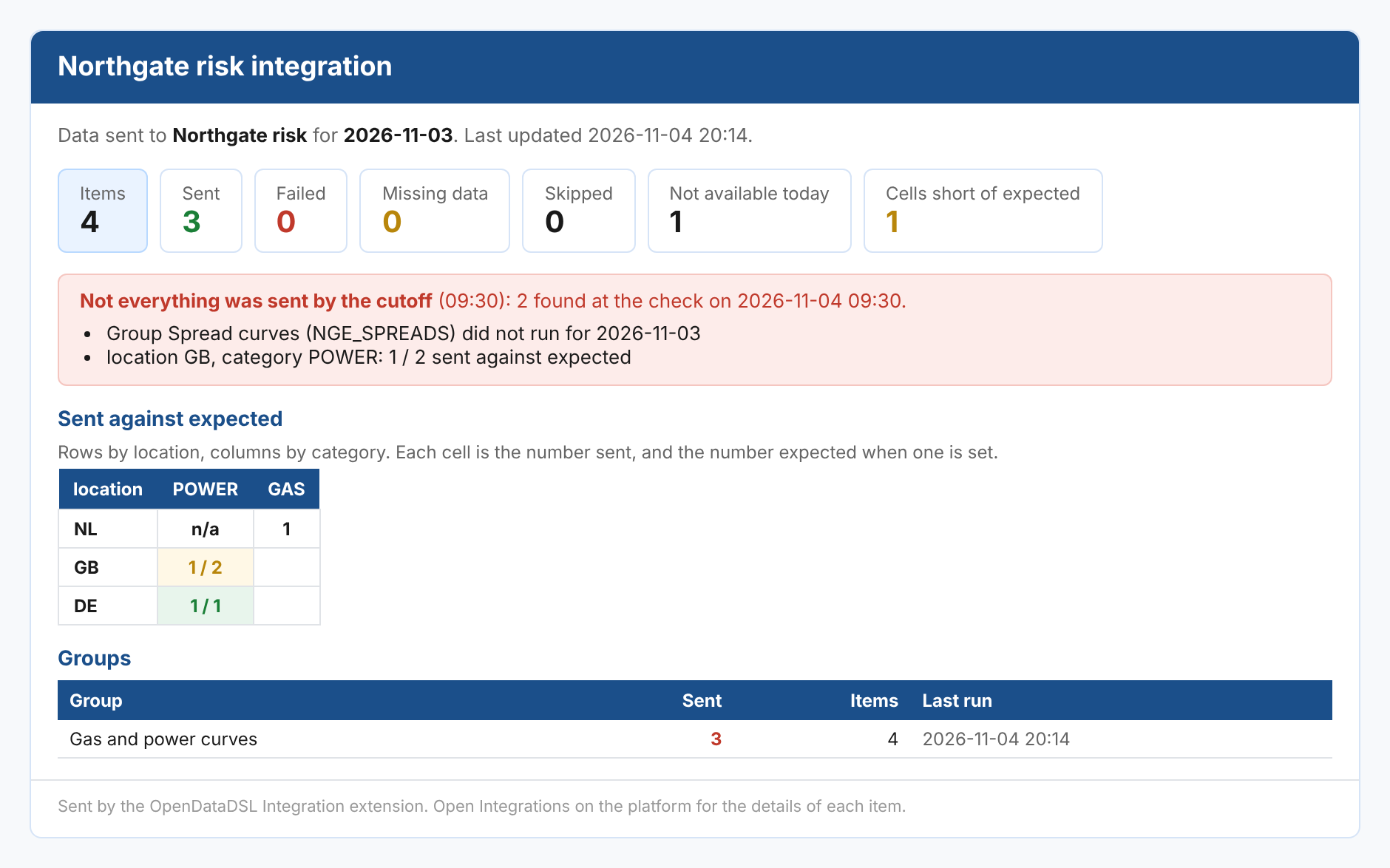
With problems, the check raises one alert for the report and the date, with every problem in its message. The alert's key is integration/INTEGRATION_<KEY>/<ondate>/cutoff, its subject the report and the ondate, and its issue cutoff, or validation when items were held back by the validation gate (unless the alert was already open with an issue).
After the cutoff
What was not sent by the cutoff is often sent or confirmed later: the system confirms a curve at 09:40, or a group is run again once its data arrives. Each time the day's report changes after a missed cutoff (a confirmation, a run, a correction), what is still not sent is checked again:
| What is left | What happens |
|---|---|
| Nothing | The alert is closed, with the resolution Everything was sent after the cutoff, by <time>, and the report shows Everything was sent after the cutoff under the cutoff result. |
| Fewer or other problems | The open alert is updated with what is still not sent, and the report shows Still not sent with the number left. |
| The same problems | The alert is left as it is. |
The cutoff result itself still says what was found at the cutoff, so the day still counts as a missed cutoff in the report and in the Integration Delivery History. An alert someone has closed is not opened again. Running the check again for the date also closes the alert when everything is now sent.
Items not available every day
Some data is not published every day: a curve only built on auction days, or a timeseries only updated weekly. Mark these so that a day without data is not a problem.
- On the group's Items tab, tick Not every day for each such item.
- Select Save changes.
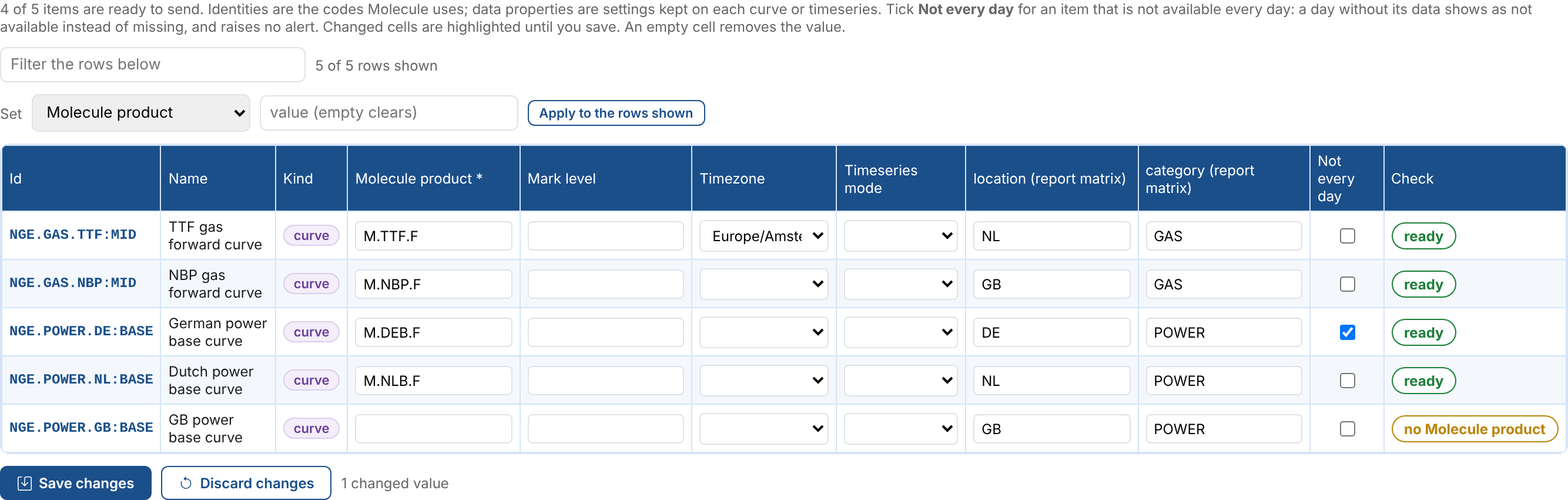
On a day without its data, a marked item:
- shows as not available in the report, with the KPI Not available today, instead of Missing data;
- does not raise a group alert, and is not a problem at the cutoff;
- lowers its matrix cell's expected count for the day, so that a cell expecting 2 with one item not available expects 1. A cell with nothing but such items shows
n/a.
On a day with data, it is sent like any other item. A marked item that fails is still a failure.
Next
- The validation gate: send only data that has passed validation.
- Round-trip confirmations: let the system confirm what it loaded.
- Integration reference: where everything is kept, and troubleshooting.