Custom systems
When a system has no plug-in, such as your own risk engine, an in-house API or a data lake, set it up as a custom system: a system that sends with Custom ODSL. You choose the codes it knows data by, the settings and secrets it needs, and write the ODSL that sends the data. Everything else works as for a plug-in: groups, the Items tab, schedules and the daily report.
Northgate's risk engine, Northgate Risk, takes each curve as a JSON message over a REST API, signed with an API key. This page sets it up from the REST API template. To have Fusion AI design the system with you instead, see Using Fusion AI.
1. Create the system
Select New system and choose Custom ODSL under Sends with (or select New blank system on the home page, which chooses it for you).
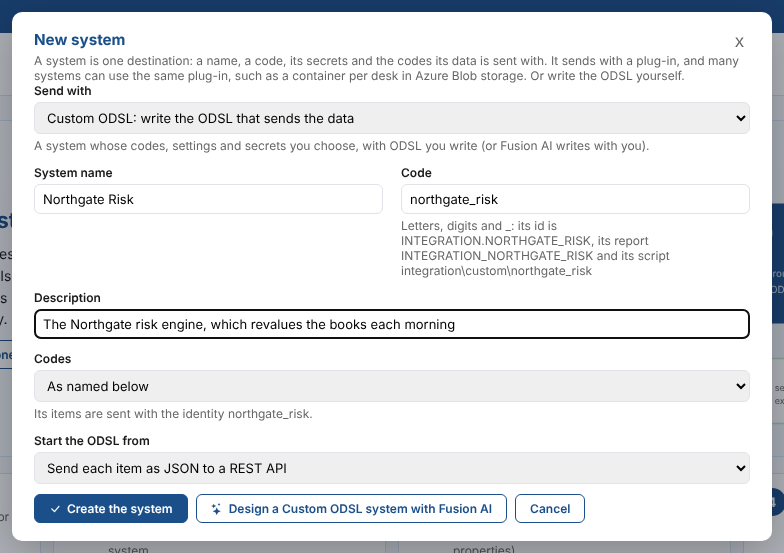
| Field | Example | Notes |
|---|---|---|
| System name | Northgate Risk | How the system shows in the System box. |
| Code | northgate_risk | Filled in from the name. Letters, digits and _. It becomes the name of the system's code (its identity), its id INTEGRATION.NORTHGATE_RISK and its script integration\custom\northgate_risk, and cannot be changed later. |
| Description | The Northgate risk engine, which revalues the books each morning | |
| Codes | As named below | The identities you choose on the System setup tab. Or the same codes as another custom system. |
| Start the ODSL from | Send each item as JSON to a REST API | Or Blank: the three hooks to fill in. |
Select Create the system. The screen opens on its System setup tab.
2. Choose its codes and settings
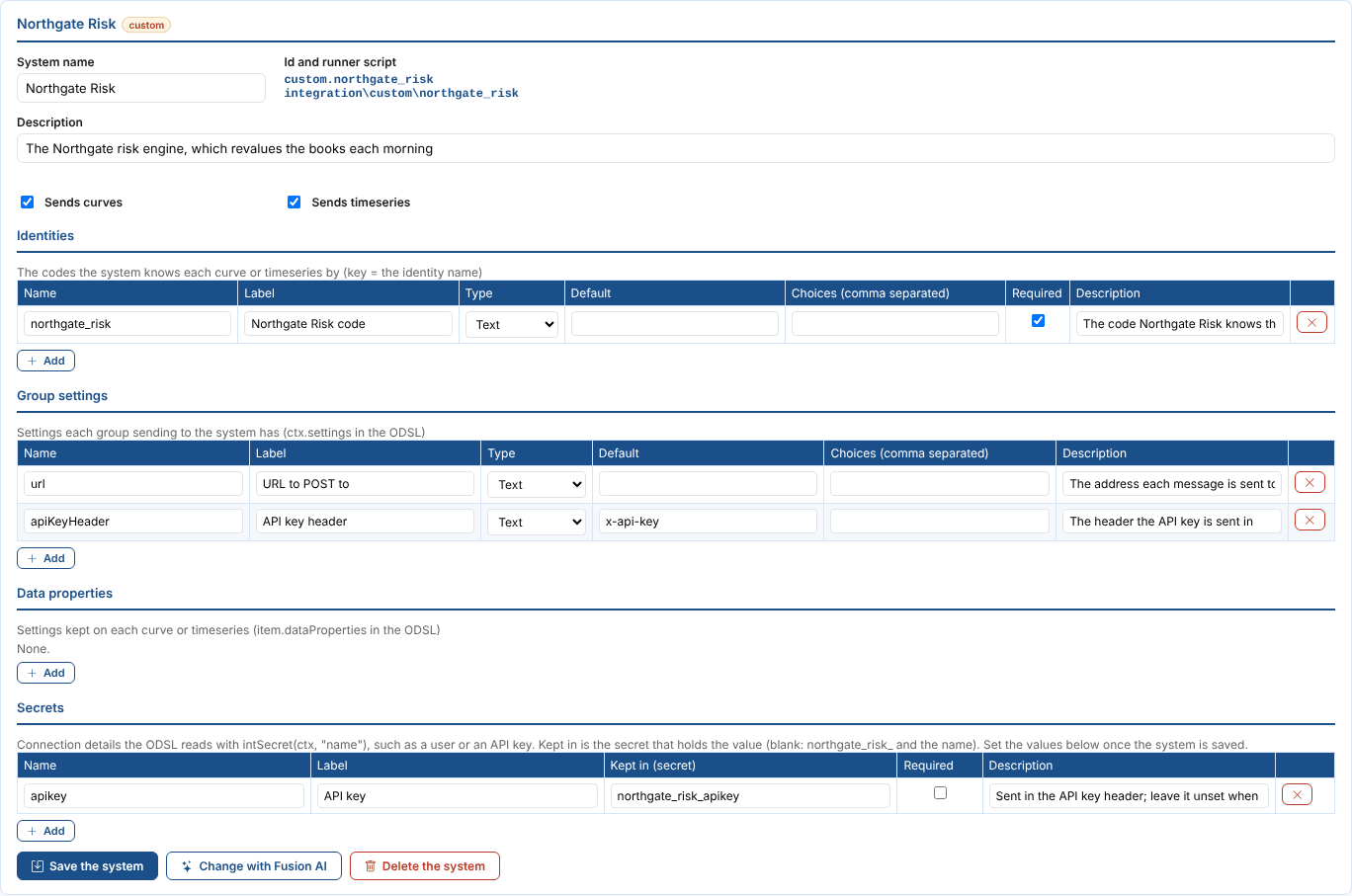
At the top are the name, the description and the kinds of data the system takes: curves, timeseries, options, or any of them. Items of a kind it does not take fail without reaching its ODSL. Below are five tables:
| Table | What it holds | In the ODSL |
|---|---|---|
| Identities | The codes the system knows each curve or timeseries by. A new system has one, named after its code. Required stops items without it from being sent. | item.identity.northgate_risk |
| Group settings | What each group sending to the system is asked for, such as the URL to send to. They show on each group's Settings tab. | ctx.settings.url |
| Data properties | Settings kept on each curve or timeseries. They show as columns on each group's Items tab. | item.dataProperties.book |
| Transformations | Optional: the different ways a group can turn its data into what the system takes, each a function of the ODSL with its own parameters. Each group chooses one on its Settings tab. See Transformations. | ctx.transformation, intParam(ctx, "count", 12) |
| Secrets | What the system needs to connect, such as a user or an API key. Only their names are kept here; the values are set in the next step. | intSecret(ctx, "apikey") |
Each row has a Name (a letter, then letters, digits or _), a Label for the screens, a Type (Text, Number, True/false or Choice), a Default, the Choices for a choice (separated by commas) and a Description shown as a hint. A secret has a Name, a Label, Kept in (the secret record that holds its value: left empty, the system's code, _ and the name, such as northgate_risk_apikey), Required and a Description. A run stops before sending anything when a required secret is not set. Add adds a row and the cross removes one. Select Save the system.
The REST API template asks each group for:
| Setting | What it is |
|---|---|
url | The address each message is posted to. |
apiKeyHeader | The header the API key is sent in, x-api-key unless you change it. |
It also reads one secret, apikey, kept in <code>_apikey. When it is set, its value is sent in the API key header; when it is not, the messages are sent without a key.
3. Set the secret values
The Secret values part of the tab lists the system's secrets as saved, the secret record each one is kept in, and whether it is set.

Select Set the value, type the value and select Save the value (or press Enter). The value is typed into a password box; the eye button shows what you typed.

The value goes straight to the platform's secret store and is never shown back. The status shows Set, and Change the value replaces it. Remove deletes the secret after a second click.

| Status | What it means |
|---|---|
| Set | The secret has a value. in your key vault when it is kept in your company's own Azure Key Vault. |
| Not set, amber | No value yet. The runs read it as empty. |
| Not set, red | A required secret with no value: the runs stop until it is set. |
| Disabled | The secret exists but is disabled in the secret store. |
Each group sending to the system uses these secrets unless it names its own on its Settings tab.
When your company keeps its secrets in its own Azure Key Vault with read access only, OpenDataDSL cannot save values there: add the secret in your vault under the name shown in Kept in (with - in place of _), and the runs read it from there. This screen still shows it as Not set, because it only sees the platform's own secret records. See Keeping your secrets in your own Azure Key Vault.
4. Finish the ODSL
The second part of the tab is the ODSL that sends the data. The process of every group sending to the system runs it.
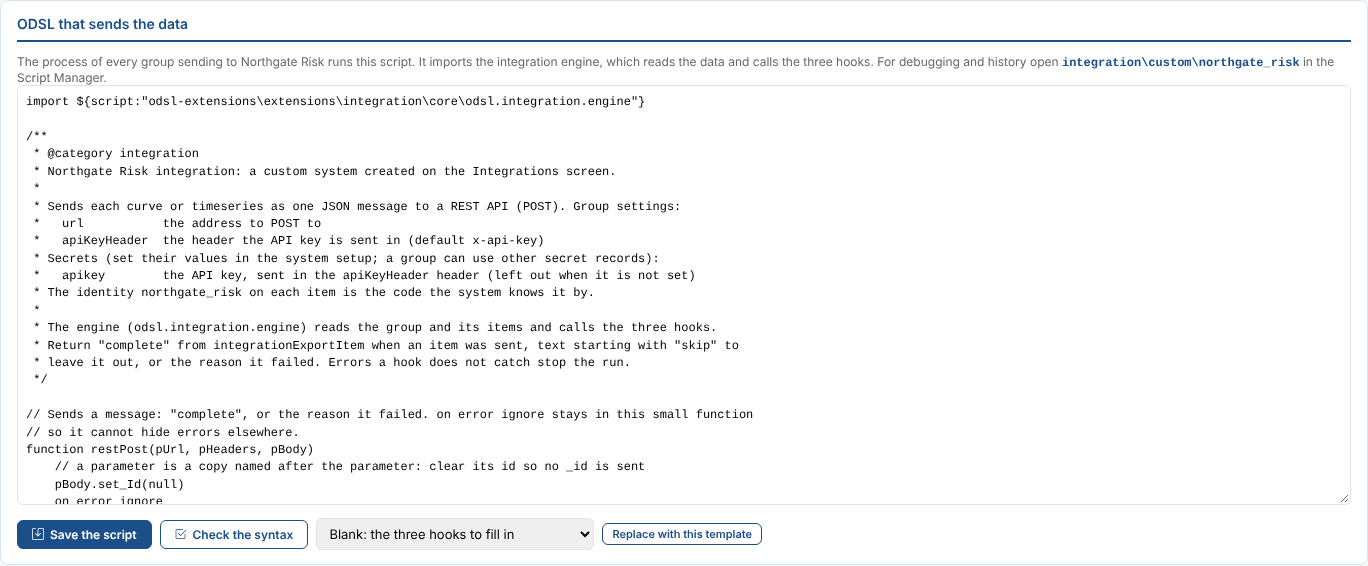
Select Check the syntax to check it and Save the script to save it (it is checked first, and saved even with errors, which are listed). Replace with this template starts again from a template. The script is an ordinary private script, so you can also open it in the Script Manager to run it, debug it and see its history.
How the ODSL works
The script imports the integration engine, defines three functions (the hooks), and hands over to the engine, which reads the group, works out the date, reads each item and calls the hooks:
import ${script:"odsl-extensions\extensions\integration\core\odsl.integration.engine"}

// Called once before the items: what it returns is ctx.session. Set .error on it to stop the run.
function integrationBegin(ctx)
	integrationBegin = SimpleObject()
end

// Called for each item that has data: return "complete", "skip..." or the reason it failed
function integrationExportItem(ctx, item)
	integrationExportItem = "complete"
end

// Called once after the items: return "" or a reason the run failed
function integrationEnd(ctx, results)
	integrationEnd = ""
end

res = integrationRun(input, "INTEGRATION.NORTHGATE_RISK")
if res.ok == false
	fail res.message
end
return res.message
What the hooks are given:
| Field | What it is |
|---|---|
ctx.ondate | The date sent, as yyyy-MM-dd. |
ctx.settings | The group's settings for the system, such as ctx.settings.url. |
ctx.session | What integrationBegin returned: a connection, a list to fill. |
intSecret(ctx, "apikey") | The value of one of the system's secrets, "" when it is not set. intSecretId(ctx, "apikey") is the secret record it was read from, for messages. |
ctx.group, ctx.groupName, ctx.system, ctx.report | The group's id and name, the system's name and the report the run goes into. |
item.dataid | The id of the curve or timeseries. |
item.name, item.kind, item.type | Its name, curve, timeseries or options, and its data type. |
item.data | The curve for the date (item.data.contracts, each with tenor, start and value), the whole timeseries (item.data.getValues(), each with time and value), or the options for the date (item.data.tenors, each with strikes, each with strike, call and put). |
item.identity | Its codes, such as item.identity.northgate_risk. |
item.dataProperties | Its data properties, such as item.dataProperties.location. |
results | In integrationEnd: one result per item with dataid, state, status and message. |
What integrationExportItem returns decides the item's state: "complete" means sent, text that starts with skip means left out on purpose, anything else is the reason it failed. Items the engine cannot read, and curves with no curve for the date, never reach the hook.
The REST API template builds a message with the item's id, code, name, kind, date, group and values, and posts it with:
function restPost(pUrl, pHeaders, pBody)
	pBody.set_Id(null)
	on error ignore
	error = null
	restPostRes = null
	restPostRes = ${json:pUrl, "base64_requestbody=" + encodeBase64(json(pBody)) + ",headers=" + pHeaders + ",options=ignoreHttpErrors&true"}
	on error exit
	restPost = "complete"
	if error != null
		restPost = "" + error
	elseif restPostRes == null
		restPost = "No response from " + pUrl
	elseif restPostRes.errors != null
		restPost = "" + restPostRes.errors[0]
	elseif restPostRes.error != null
		restPost = "" + restPostRes.error
	end
end
Transformations
When groups need the data turned into the system's format in different ways, list each way in the Transformations table: the Function that does it, a Label for the screens, a Description, and its Parameters as name:type=default, separated by commas, such as count:number=12, skip:number=0 (types text, number and boolean; text when no type is given). Each group sending to the system then chooses one on its Settings tab, with its parameter values; the first is the default.
The engine gives the hooks the choice as ctx.transformation (the function's name) and its parameters, which intParam(ctx, "name", default) reads. ODSL cannot call a function by its name, so the hook calls the matching one:
function integrationExportItem(ctx, item)
	if ctx.transformation == "exportMonths"
		integrationExportItem = exportMonths(ctx, item, toInt(intParam(ctx, "count", 12)), toInt(intParam(ctx, "skip", 0)))
	else
		integrationExportItem = exportAll(ctx, item)
	end
end
A group that names a transformation the system does not list cannot run: the run fails with the transformations there are. The Molecule plug-in works this way, with Standard marks and Blended curves.
Good to know when writing the ODSL
| Rule | Why |
|---|---|
Return results by assigning to the function's name (integrationExportItem = "complete"), never with return in a function that calls another function. | A return after a nested call ends the whole script. |
Keep on error ignore in a small function of its own, as restPost does, and return the error text from it. | After on error ignore and on error exit, errors in the functions called later are still ignored, which could make a failed send look complete. An error the hooks do not catch stops the run and fails the process. |
Use item.dataid and item.dataProperties. | On an ODSL object, .id reads the object's own name and properties is reserved. |
Call set_Id(null) on an object before json(). | Otherwise the message carries an _id field with the variable's name. |
Read optional settings with intOpt(ctx.settings, "name", default) and turn values into text with intText(v). | Joining a missing value to text gives {null}. |
Read secrets with intSecret(ctx, "name"), not ${secret:...}, and never print a secret's value or put it in a message. | The engine reads the system's secrets (and a group's own ones) before integrationBegin, and stops the run when a required one is not set. Messages and prints end up in the process log and the daily report. |
| Avoid secret values made only of digits. | ODSL reads a secret value that looks like a number as a number, so 007 arrives as 7. |
To send one message for the whole group, write function integrationExportItem(byref ctx, item), add each item's rows to a list in ctx.session and send the list in integrationEnd. | Without byref the hook works on a copy of ctx, and what it adds is lost. The Northgate Lakehouse on the Fusion AI page works this way. |
Copying a system
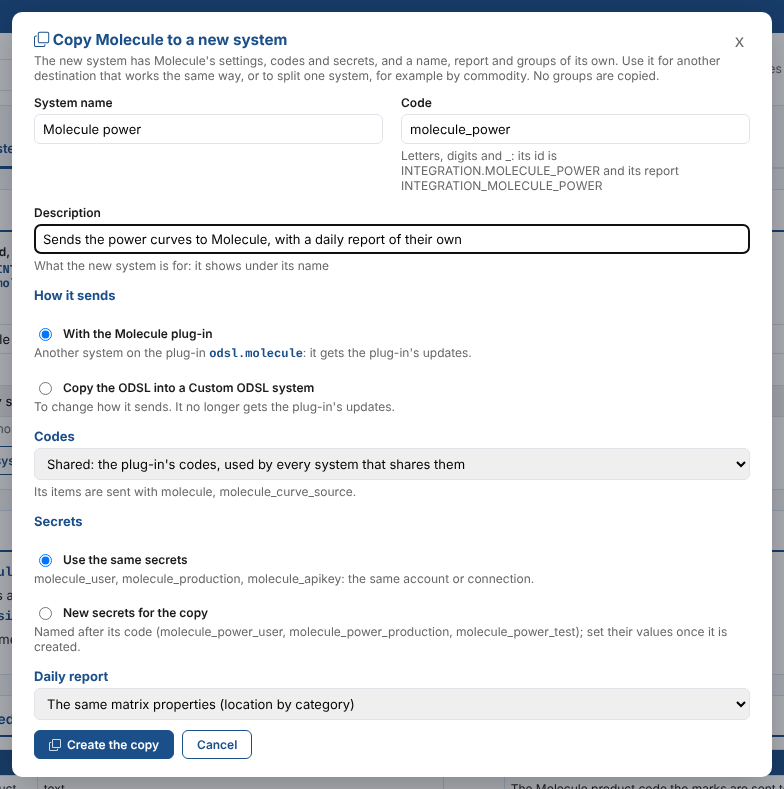
Copy to a new system, on any system's System setup tab, makes a new system with the same settings, codes and secrets, and a name, report and groups of its own. Use it to send the same way to another destination, such as a second blob container or queue, or to split one system, such as Molecule power and Molecule gas. No groups are copied.
| Choice | What it does |
|---|---|
| System name, Code, Description | As for a new system. The copy's id is INTEGRATION.<CODE> and its report INTEGRATION_<CODE>. The description starts as <name>: a copy of <system>; change it to say what the copy is for. |
| With the plug-in | For a system on a plug-in, and the default. The copy is another system on the same plug-in, so it gets the plug-in's updates. It has no ODSL of its own. |
| Copy the ODSL into a Custom ODSL system | The plug-in's ODSL is copied into the new system's script integration\custom\<code>, pointed at the new system, ready for you to change, with the plug-in's codes, group settings, data properties, transformations and secrets as its own. It no longer gets the plug-in's updates. A copy of a custom system is always one. |
| Codes | The same codes as the system copied (the default), shared, its own, or the same as another system on the plug-in. See The codes a system sends with. |
| Use the same secrets | The copy reads the same secret records: the same account or connection. |
| New secrets for the copy | The copy reads records named after its code, such as molecule_power_user. Set their values on its System setup tab. |
| Daily report | Start with an empty matrix, with the same matrix properties, or with the same matrix and expected counts. |
The copy has its own name everywhere: on the screens and, for a Custom ODSL copy, in its script, whose header names the copy and the system it was copied from, such as Molecule gas (INTEGRATION.MOLECULE_GAS): a copy of Molecule (INTEGRATION.MOLECULE). Renaming a custom system on its System setup tab renames it in the script header too. The copy opens on its System setup tab.
Deleting a system
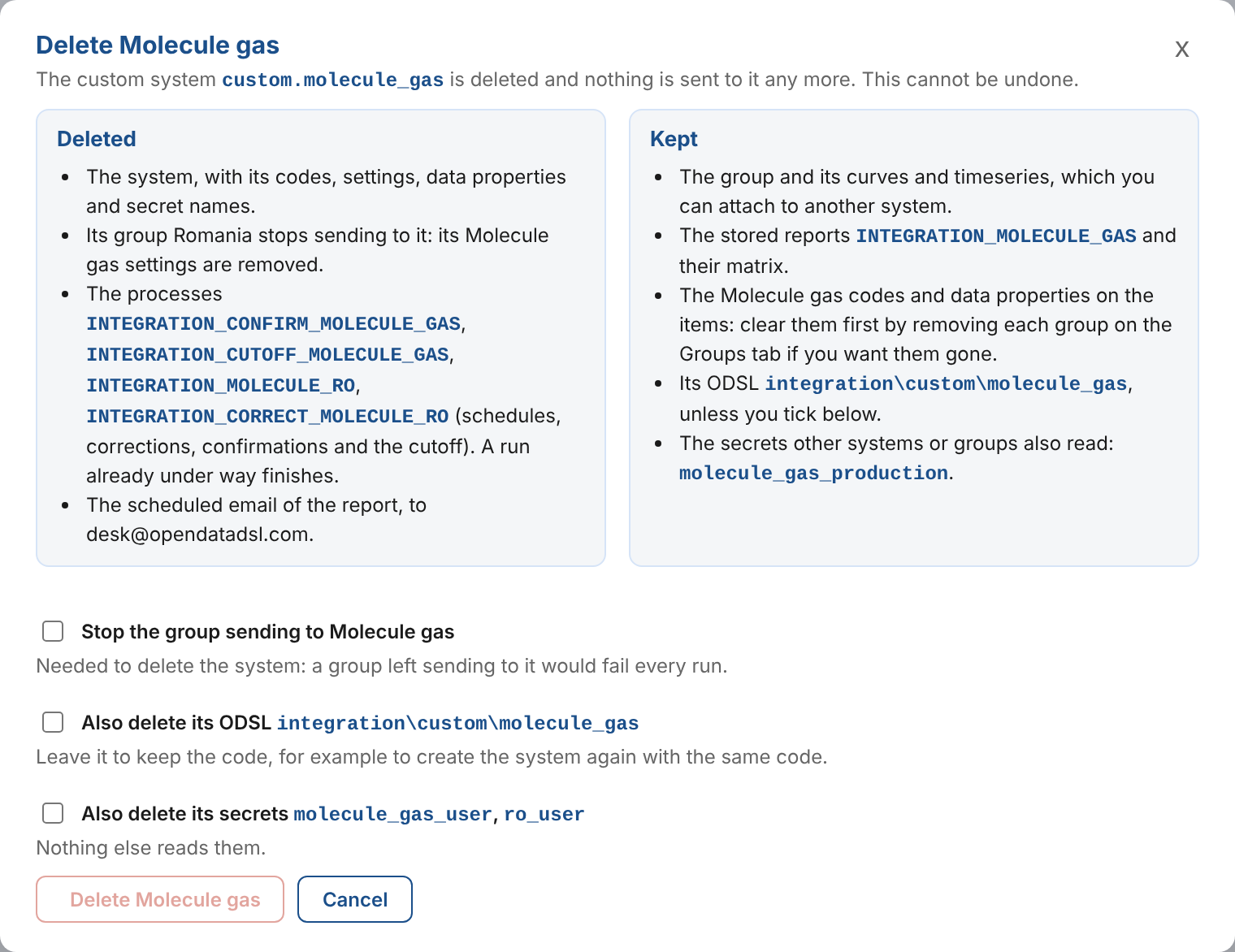
Delete the system on the System setup tab opens a dialog that lists what goes with the system and what is kept.
| Deleted | Kept |
|---|---|
| The system object, with its codes, settings, data properties and secret names. A plug-in stays installed for its other systems; uninstall it on the Extensions screen. | The groups and their curves and timeseries, ready to attach to another system. |
| The system's settings on each group that sends to it, so the groups stop sending. | The stored reports and their matrix. |
| The processes of its groups (their schedules and corrections schedules), its confirmations process and its report's cutoff. | The system's codes and data properties on the items. To clear them, remove each group first with Remove on the Groups tab (see Removing a group from a system). |
| The scheduled emails of its report. | The cutoff and scheduled emails of a report that another system's groups also use. |
When groups send to the system, tick Stop the group sending (Stop all 3 groups sending for three groups) before you can delete it: a group left sending to a deleted system would fail every run. Two more choices are off unless you tick them:
| Choice | What it does |
|---|---|
| Also delete its ODSL | For a custom system: deletes the script integration\custom\<code>. Leave it to keep the code, for example to create the system again with the same code. |
| Also delete its secrets | Deletes the secret records the system and its groups read that no other system or group reads. Shared secrets are always kept. |
A custom system made before 2026-11-07 is an extension custom.<code>, which depends on the Integration extension, so the Integration extension cannot be uninstalled while one exists. The upgrade turns each into a system object and removes its extension record. Its script keeps working: the engine still accepts integrationRun(input, "custom.<code>").
Next
Using Fusion AI: describe a system and let Fusion AI write it with you.