What is the Integration extension?
Your curves and timeseries rarely stop at the platform. An ETRM needs the morning forward curves, a risk engine revalues the books on them, and a data lake keeps everything for analysis. Each system wants the data in its own format, with its own codes, at its own time, and somebody needs to know when it did not arrive. The Integration extension sends groups of curves and timeseries to these downstream systems on a schedule, and reports every day on what reached each one. It answers questions like:
- Can our German, Dutch and UK curves go to Molecule every weekday morning, with the product codes Molecule uses?
- Can the monthly capture prices go to the ETRM as quarter hours for next month?
- Did everything we expect reach the ETRM today, by location and commodity?
- Did the risk engine confirm it loaded what we sent it, and why did it reject the rest?
- Can we make sure only curves that have passed validation reach the ETRM?
- Can we send data to our own risk engine or lakehouse, which has no ready-made connector?
- Can Fusion AI write the code that sends it?
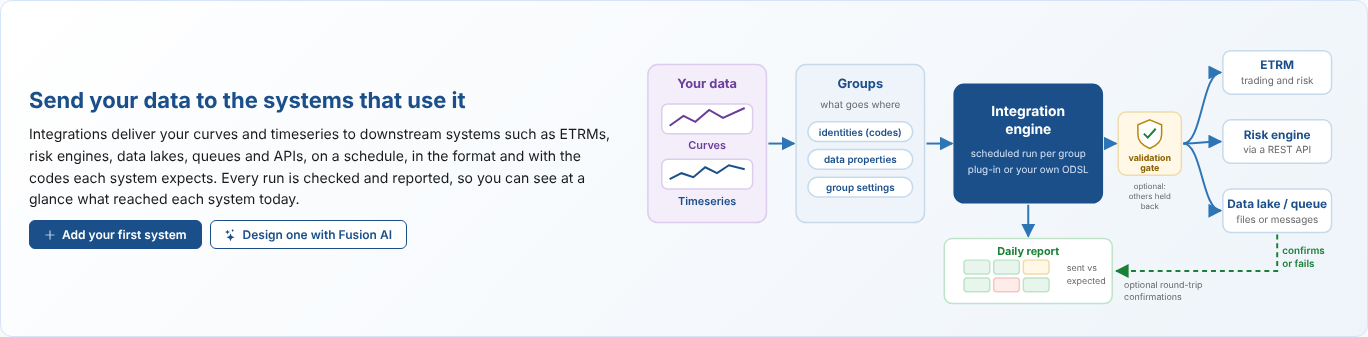
Throughout these pages we follow Northgate Energy, a fictional gas and power trader. Every weekday at 08:00 it sends the previous business day's forward curves for TTF, NBP and German, Dutch and UK power to its ETRM, Molecule. On the 25th of each month it sends next month's solar and wind capture prices as quarter hours. It also sends curves to its own risk engine, Northgate Risk, and to the Northgate Lakehouse, neither of which has a plug-in.
Key ideas
| Idea | What it means |
|---|---|
| System | One destination the data goes to, with a name, a code, its secrets and the codes its data is sent with. A system sends with a plug-in (an extension made for a kind of destination, such as Molecule or Azure Blob Storage), so many systems can use one plug-in, such as a blob container per desk. A Custom ODSL system sends with ODSL you write instead. |
| Group | A group of curves and timeseries. You attach a group to a system; the group holds that system's settings for it. A group sends to one system. |
| Identities | The codes the downstream system knows each curve or timeseries by, such as the Molecule product M.TTF.F. They are kept on the data item. |
| Data properties | Settings kept on each curve or timeseries, such as the timezone of its quarter hours, and the values the report counts by, such as location and category. |
| Secrets | What a system needs to connect, such as a user and an API key. Their values are kept in the platform's secret store, never on the screen or in the ODSL. |
| Run | A scheduled process per group. It works out the date to send, reads each item and hands it to the system's ODSL, which turns it into the system's format and sends it. |
| Daily report | One report per system per date. Every group's run is merged into it. It shows a matrix of two data properties (for example location by category) with the number sent against the number expected. |
| Confirmations | Optional for each system: the system reports back which items it loaded, so an item is sent until the system confirms it (complete) or fails it with a reason. See Round-trip confirmations. |
| Validation gate | Optional for each group, and for each item in it: only data that has passed validation is sent. Anything else is held back, and the report and the alert say why. See The validation gate. |
What you get
| Screen | Where | What it does |
|---|---|---|
| Integrations | Operations menu | Opens on a home page with your systems, how each one is doing, and the plug-ins you can install. Choose a system to manage the groups that send to it, their codes, settings and schedules, its secrets and its daily report. Create systems on the installed plug-ins, and Custom ODSL systems. |
| Integration app | Groups, then a group, then Apps | The same screen for the selected group. A group that sends nowhere yet can be attached to a system. |
| Integration reports | Reports, category Integration | One report INTEGRATION_<KEY> per system, stored for each date sent. |
| Insights | Integrations, Insights tab | Reports across every system over a period: delivery day by day, the items that keep failing, send times, corrections and the codes of each system. |
Where next
- How integrations work: systems, groups, codes and settings, what happens in a run, and how each item is judged.
- Getting started with a plug-in: install Molecule, set its secrets, attach a group, give its curves their codes and schedule it.
- The daily report: the matrix of sent against expected, setting the expectations, and the stored reports.
- Custom systems: send data to a system that has no plug-in, with your own codes, settings, secrets and ODSL, and copy or delete a system.
- Using Fusion AI: describe a system and let Fusion AI ask what it needs and write the ODSL.
- Plug-ins: the systems with a ready-made plug-in, starting with Molecule: what Molecule needs, how curves and timeseries become Molecule marks.
- The validation gate: send only data that has passed validation.
- Insights: delivery over time, problem items, send times, corrections and codes across every system.
- Integration reference: where everything is kept, writing a plug-in extension, and troubleshooting.