Corrections
What it does
A vendor corrects data: a settlement price is republished, a capture price for last month is revised. The platform records every value of a dataset that changes after it was delivered as a correction. With corrections on, a group sends the items that value feeds again, for every ondate the value is in, and marks what it sends as a correction so the downstream system can treat it as one.
Which ondates are sent again depends on the data:
| Corrected value | Ondates sent again |
|---|---|
| A contract of a curve | The curve's ondate. |
| A daily value of a timeseries | That day. |
| A monthly value of a timeseries | Every ondate of that month, in the group's calendar (BUSINESS by default, DAILY for every day). |
So when the capture price for October changes, a group that sends it to Molecule as the day's quarter hours sends all of October's days again, each as that day's quarter hours with the corrected value.
Only ondates within the look back are sent (62 days by default, enough for the previous month), and never ondates after today. Several corrections of the same item and ondate, such as many contracts of one curve, are sent together once.
Setting it up
- On the Integrations screen, open the group on the Groups tab.
- On its Settings tab, under Corrections, choose how they are sent:
- Send corrections automatically: each correction is sent as soon as it is found.
- Hold corrections for approval: each waits on the Corrections tab until someone sends or ignores it.
- Set Look back (days), Send again (every ondate the value is in, or only the first of them) and how often to Check for corrections.
- Select Save settings.

Saving creates the group's corrections process, INTEGRATION_CORRECT_<GROUP>, which runs the system's script on the schedule you chose. Its first run notes where the corrections are up to: corrections recorded before corrections were switched on are not sent. To send those, use a history export for the dates.
Choosing Off switches the process off.
Where an item's corrections come from
Corrections are recorded for datasets. The process works out each item's dataset once a day:
- a curve or timeseries built from a dataset's events has its dataset in its
dsidproperty; - for any other item, such as a smart timeseries calculated from dataset data, set the data property
correction_dsidto the dataset it comes from, such asNGE.CAPTURE.DE.
The Corrections tab lists the datasets watched and names the items it found no dataset for.
The Corrections tab
The group's Corrections tab shows the corrections of the day, newest first, with what changed, when it was received and what happened to it.
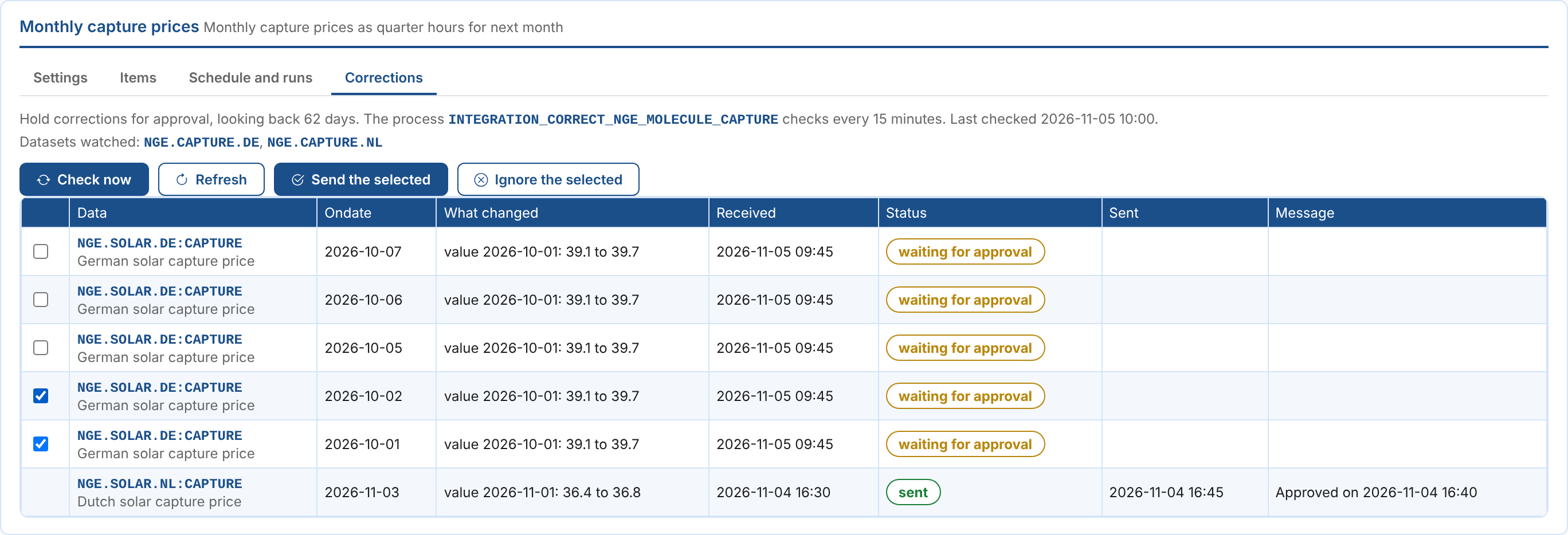
| Status | What it means |
|---|---|
| waiting for approval | The group holds corrections for approval. Select it and Send the selected, or Ignore the selected. |
| to send, approved, to send | It is sent by the process's next run. |
| sent | Sent again, marked as a correction. |
| failed | It could not be sent: the message says why. Select it and Send the selected to try again. |
| skipped | The system skipped it. |
| ignored | Someone chose not to send it. |
| too old | It waited past the look back without being sent. |
Check now runs the process at once instead of waiting for its schedule. Corrections still open at the end of a day (waiting, to send or failed) are carried into the next day's list; the rest stay in the log of their day, the report INTEGRATION_CORRECTIONS_<GROUP> on the platform's Reports screen.
What the system receives
A correction is sent the way the group sends anything, for the ondate it corrects, with the group's transformation, the validation gate and the dry run setting. The plug-ins mark it as a correction:
| Plug-in | How a correction is marked |
|---|---|
| Molecule | With the group's Mark level of corrections as the mark_level, when it is set. See Mark levels. |
| Queue, webhook, Event Grid, blob, data lake and files | "correction": true in the message, with note saying what changed; {correction} in a file name pattern becomes _correction. See What the generic plug-ins send. |
| A custom system | Its ODSL reads ctx.correction (true for a correction) and item.correction (what changed). |
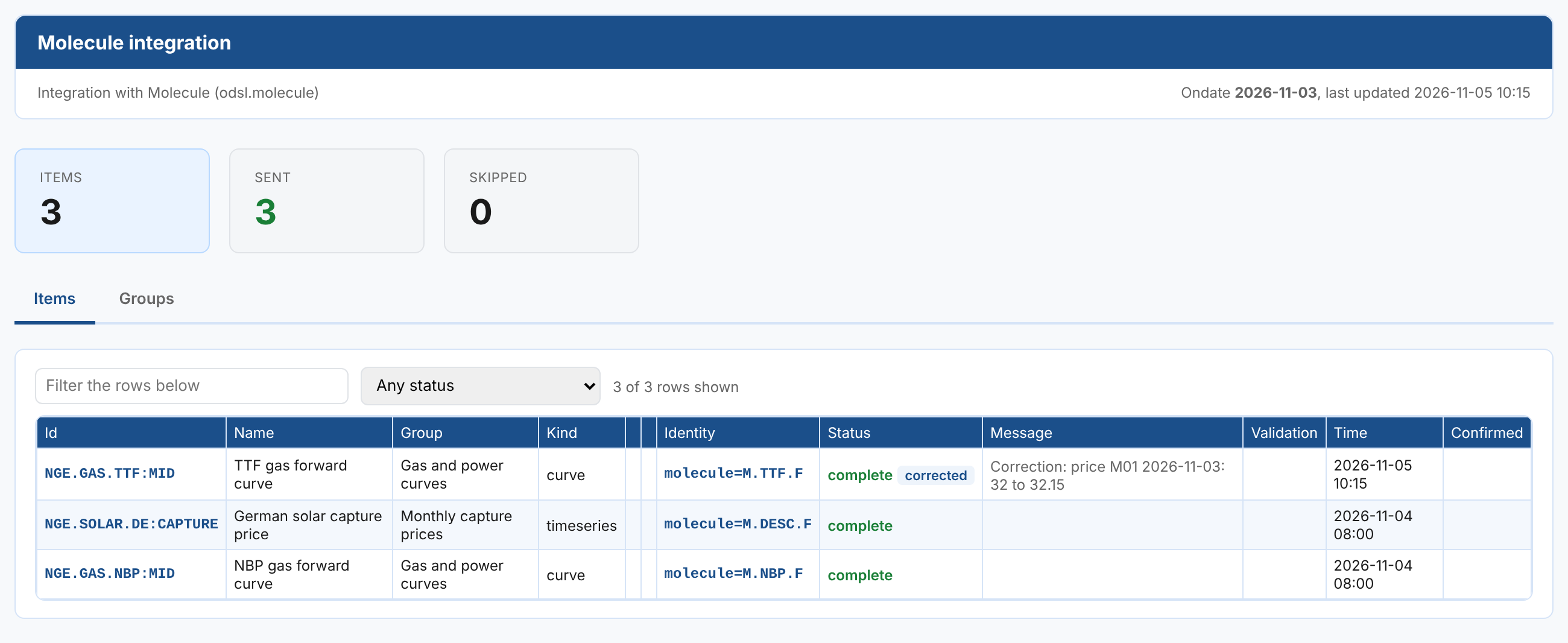
In the day's report the item shows corrected, with what changed under its message, and the status filter Sent again as a correction finds it. The report's other items stay as they were.
Alerts
With group alerts on, a corrections run with corrections that could not be sent raises the alert integration/<group>/corrections, with issue export. A later run that sends corrections closes it.
Next
- Insights: the corrections of every group over a period, in the Integration Corrections report.
- Integration reference: where the settings and logs are kept, and troubleshooting.