The Molecule plug-in
The Molecule ETRM Integration extension (odsl.molecule) is a plug-in for the Molecule ETRM. It sends curves and timeseries to the Molecule marks API as marks: one value per contract, or per quarter hour.
What it needs
Once installed, add a system that sends with it: select New system and choose Molecule under Sends with. The plug-in's codes, settings and secrets are listed on the system's System setup tab. Each system on the plug-in has its own secrets, groups and daily report, and its own codes when you choose them (see The codes a system sends with).
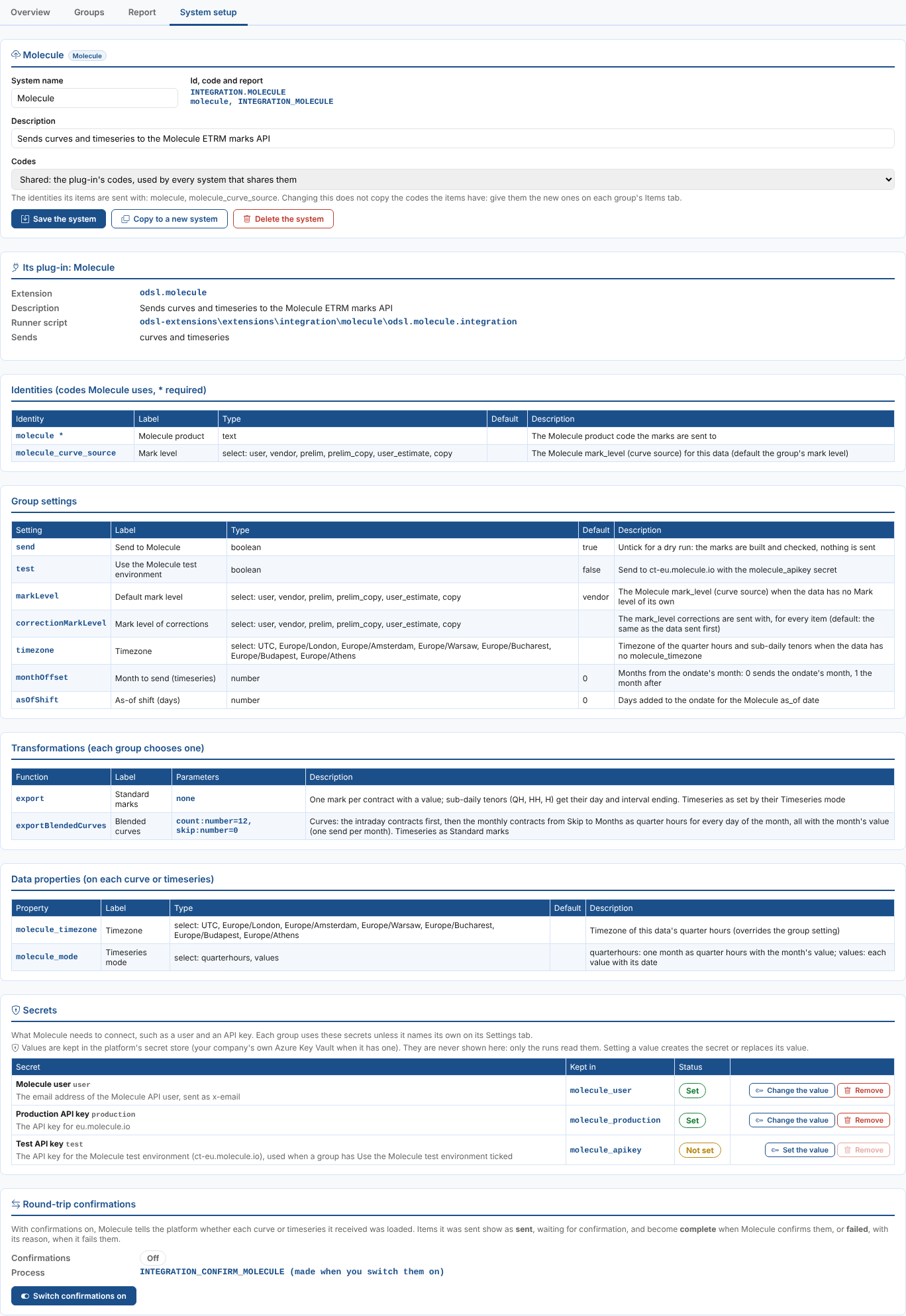
| Kind | Name | What it is |
|---|---|---|
| Identity, required | molecule | The Molecule product the marks are sent to, such as M.TTF.F. |
| Identity | molecule_curve_source | The Molecule mark level (curve source) for this curve or timeseries: see Mark levels. |
| Group setting | Send to Molecule | Untick for a dry run: the marks are built and checked, nothing is sent. Each item shows as skipped with the number of marks it would have sent, and Preview on the daily report shows the payload with its first 24 marks (each send of blended curves in turn). |
| Group setting | Use the Molecule test environment | Sends to the Molecule test environment instead of production. |
| Group setting | Default mark level | The mark level for items with no molecule_curve_source; vendor unless you change it. |
| Group setting | Mark level of corrections | The mark level of corrections, for every item. Left empty, corrections go with the item's usual mark level. |
| Group setting | Timezone | The clock quarter hours and sub-daily tenors are counted in, for items with no timezone of their own. |
| Group setting | Month to send (timeseries) | Which month of a monthly timeseries to send, counted from the month of the date sent: 0 the same month, 1 the month after. |
| Group setting | As-of shift (days) | Days added to the date sent for the Molecule as-of date. |
| Transformation | Standard marks (export) | The default: one mark per contract, as below. |
| Transformation | Blended curves (exportBlendedCurves) | Curves as intraday contracts plus months as quarter hours, with the parameters Months (count, 12) and Skip (skip, 0). See Blended curves. |
| Transformation | Timeseries as the day's quarter hours (exportDayQuarterHours) | Timeseries: the value for the ondate, or for its month, as the quarter hours of the ondate. See The day's quarter hours. |
| Data property | molecule_timezone | The timezone of this item's quarter hours, instead of the group's. |
| Data property | molecule_mode | For a timeseries: quarterhours (the default) or values. |
Secret, kept in molecule_user | Molecule user | The email address of the Molecule API user, sent as x-email. |
Secret, kept in molecule_production | Production API key | The API key for Molecule production. |
Secret, kept in molecule_apikey | Test API key | The API key for the Molecule test environment, used when a group has Use the Molecule test environment ticked. |
The timezone used is the item's molecule_timezone, else the group's Timezone, else the timezone of the data itself, else UTC. Northgate gives its German capture prices Europe/Berlin and its Dutch ones Europe/Amsterdam.
The plug-in signs in to Molecule with the user and the production API key, or the test API key for the test environment. Set their values in the Secrets part of the system's System setup tab (see Getting started). A group can use another Molecule account by naming its own secret records on its Settings tab. A run that has to send stops with, for example, Set the secret molecule_production (Molecule production API key) on the System setup tab of the Integrations screen when one it needs is not set; a dry run does not need them.
The Molecule plug-in sends curves and timeseries. Options in a group set up for Molecule are not sent: they fail with Molecule does not take options: it takes curves and timeseries.
Mark levels
Molecule keeps marks at a mark level, its mark_level, which Northgate sets from the curve source. It is one of user, vendor, prelim, prelim_copy, user_estimate and copy, chosen from a list wherever it is set:

The mark level of an item is, in this order:
- for a correction, the group's Mark level of corrections, when it is set;
- the item's
molecule_curve_sourceidentity, set on the group's Items tab; - the group's Default mark level;
vendor.
How curves are sent
Each contract of the curve for the date that has a value becomes one mark, dated by the contract's start. Contracts with sub-daily tenors (quarter hours QH, half hours HH and hours H) are dated by their day in the timezone and given an interval ending, numbered through the day: 0015, 0030 ... 2400 for quarter hours.
Blended curves
Choose a group's Transformation on its Settings tab. Standard marks sends curves as above. Blended curves is the export group function exportBlendedCurves(count, skip) of molecule-export-curves, for curves that Molecule takes as quarter hours:
- The curve's intraday contracts (quarter hours, half hours, hours) are sent first, as marks like the standard ones. A curve without any fails with
No Intraday contracts found, and its months are not sent. - Then each monthly contract, from the one after Skip up to Months, is sent as quarter hours for every day of its month, every one with the month's value, with the clock changes as in How timeseries are sent. Each month is its own send. With Months
12and Skip0that is M01 to M12; with Skip1it starts at M02. A curve with fewer months sends the months it has, and a month without a value is left out.
The first send Molecule refuses stops the item, with the part that failed in its message, such as month 2027M01: batch 2 of 3: Unknown product. In a dry run the item shows the number of marks and sends it would have made. Timeseries are sent as standard marks with this transformation.
The export group function exportShifted, which dates the marks a day after the ondate, is the group setting As-of shift (days) set to 1.
The day's quarter hours
With the transformation Timeseries as the day's quarter hours, a timeseries is sent as the quarter hours of the ondate, every one with the same value:
- a daily (or any other) timeseries: its value for the ondate, read in the timeseries' own timezone;
- a monthly timeseries (its calendar is monthly, such as
MONTHLY): its value for the ondate's month.
The day has 96 quarter hours, 0015 to 2400, or 92 and 100 on the days the clocks change in the timezone, as in How timeseries are sent. The marks are dated by the ondate; the as-of date still follows As-of shift (days). A timeseries without a value for the day (or the month) fails with No value for 2026-11-03 (or No value for 2026-11), or The value for ... is missing when the value is empty. Run it every day, or use a history export to send a range of days. Curves are sent as standard marks, and a timeseries' molecule_mode is not used.
How timeseries are sent
In quarterhours mode the plug-in sends one month of a monthly timeseries as quarter hours, every one with the month's value. Northgate's capture prices group has Month to send (timeseries) set to 1 and runs on the 25th, so the run on 25 November sends December.
Every day has 96 quarter hours, apart from the days the clocks change in the timezone:
| Day | Quarter hours | Interval endings |
|---|---|---|
| An ordinary day | 96 | 0015 to 2400 |
| The day the clocks go forward (29 March 2026 in Europe) | 92 | 0015 to 2300 |
| The day the clocks go back (25 October 2026 in Europe) | 100 | 0015 to 2500 |
So March 2026 in Warsaw has 2,972 quarter hours, October 2,980 and December 2,976. A month the timeseries has no value for fails with No value for 2026-12, or The value for 2026-12 is missing when the value is empty.
In values mode every value of the timeseries is sent as a mark dated by its own date.
Sending
Molecule takes at most 1,000 marks in one call, so a month of quarter hours goes in three calls. When Molecule does not answer, the plug-in waits 20 seconds and tries once more. The first call Molecule refuses stops that item, and its message names the call, for example batch 2 of 3: Invalid product.
The Molecule curve export groups used before this plug-in (the scripts molecule-export-curves and molecule-export-timeseries) keep working alongside it. A curve can be in an export group and in an integration group, but then it is sent twice.
More than one Molecule system
Each system on the Molecule plug-in has its own secrets, groups and daily report. Add one with New system, choosing Molecule under Sends with, or with Copy to a new system on a system's System setup tab:
| To | Codes | Secrets |
|---|---|---|
| Split one Molecule into two reports, such as Molecule power and Molecule gas | Shared: a curve has one Molecule product | The same secrets |
| Send to a second Molecule account or tenant | Own codes when the second tenant has other products, else Shared | New secrets for the system, such as molecule_uk_user |
The first system on the plug-in, with the code molecule, keeps the secret records listed above.
Next
- All plug-ins: every system with a ready-made plug-in.
- Integration reference: where everything is kept, and writing a plug-in for another system.