Integration Delivery History
The daily report of a system says what was sent on one day. Integration Delivery History puts the days side by side, so you see how reliable each feed has been over a month or a quarter. It answers questions like:
- Has everything reached Molecule every day this month?
- Which days fell short, and what was not sent on them?
- How often did a report miss its cutoff?
- Which group sends least reliably?
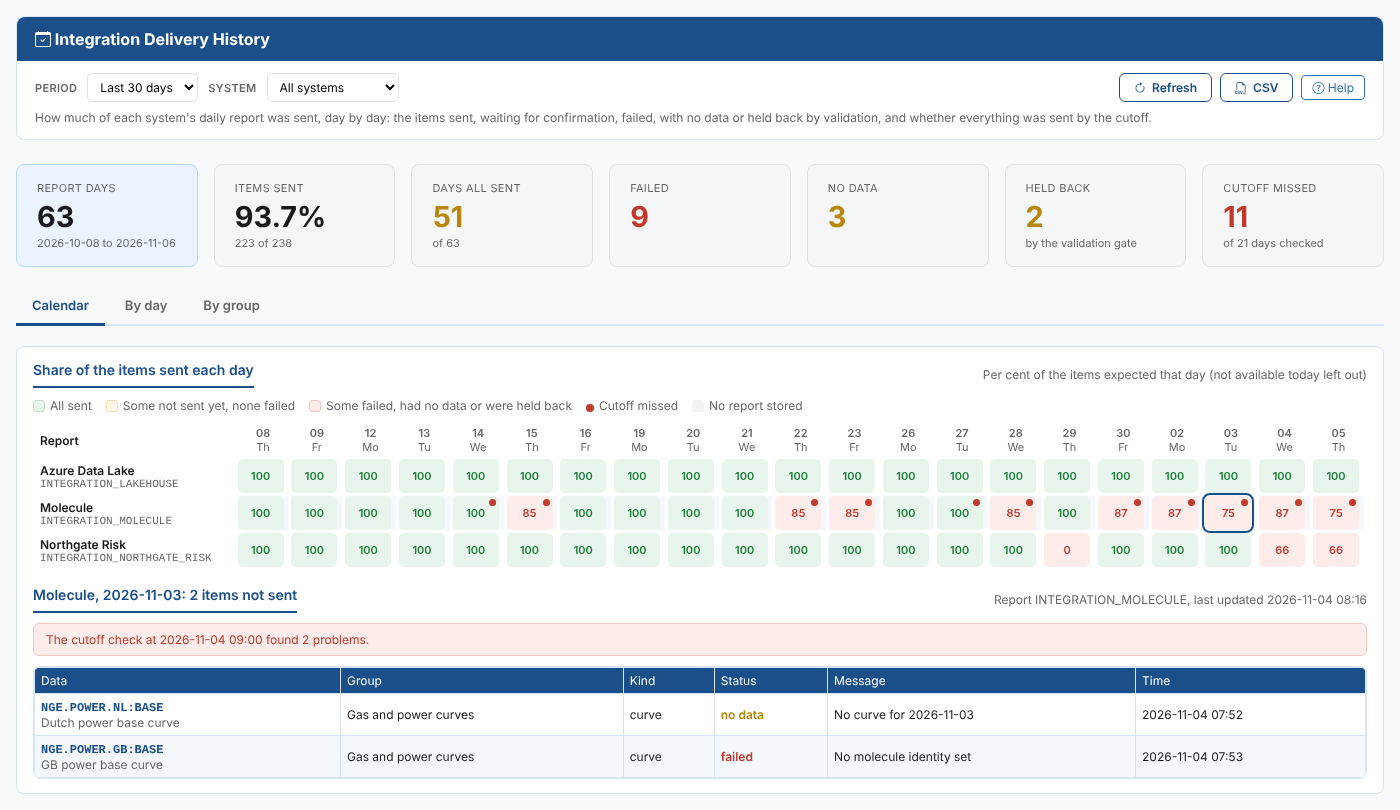
At Northgate Energy, the operations team opens the report on Monday mornings. The calendar shows that Molecule has been short every day since 30 October, and selecting 3 November shows why: the GB power curve has no Molecule product, and the Dutch power curve had no data.
Opening the report
The report is on the Insights tab of Operations, Integrations (the Integration extension), as Integration Delivery History (odsl.integration.delivery).
It opens with the last 30 days of every system that has groups.
| Control | What it does |
|---|---|
| Period | The ondates to show: the last 7, 30 or 90 days, this month, last month, or Custom with a first and last day (at most 400 days) |
| System | All systems, or one |
| Refresh | Reads the reports again |
| CSV | Downloads the table of the tab (only the rows the filter shows) |
| Help | Opens this page |
The period and the system are remembered in your browser for the next time.
Key ideas
| Idea | What it means |
|---|---|
| Report day | One daily report of a system for one ondate, such as INTEGRATION_MOLECULE for 3 November. A report holds every group that shares its report key. |
| Expected | The items in the report that day, less those marked not available today (items that do not have data every day) |
| Sent | Items the system received. For a system that confirms what it loads, an item counts once the system has confirmed it. |
| Waiting | Items sent to a system that confirms, but not confirmed yet |
| Failed, No data, Held back | Items the run could not send, items with no data for the ondate, and items the validation gate kept back |
| Cutoff | The result of the report's cutoff check for the day, when the report has one |
Summary cards
| Card | What it shows |
|---|---|
| Report days | The daily reports stored in the period, with the period |
| Items sent | The share of the expected items that were sent, with the numbers |
| Days all sent | Report days on which every expected item was sent |
| Failed, No data, Held back | How many items, over all the days |
| Cutoff missed | Days on which the cutoff check found something not sent, of the days checked |
The tabs
Calendar
A row per report and a column per day. Each cell shows the per cent of the expected items sent that day:
| Cell | What it means |
|---|---|
| Green | Everything expected was sent |
| Amber | Some items were not sent yet, and none failed: usually waiting for the system to confirm |
| Red | Some items failed, had no data or were held back |
| Red dot | The cutoff check found something not sent |
-, grey | No report was stored for the day |
n/a | Nothing was expected that day |
Hover over a cell for the numbers. Select a cell to list the items that were not sent that day, with their status, message and time; select it again to close the list.
By day
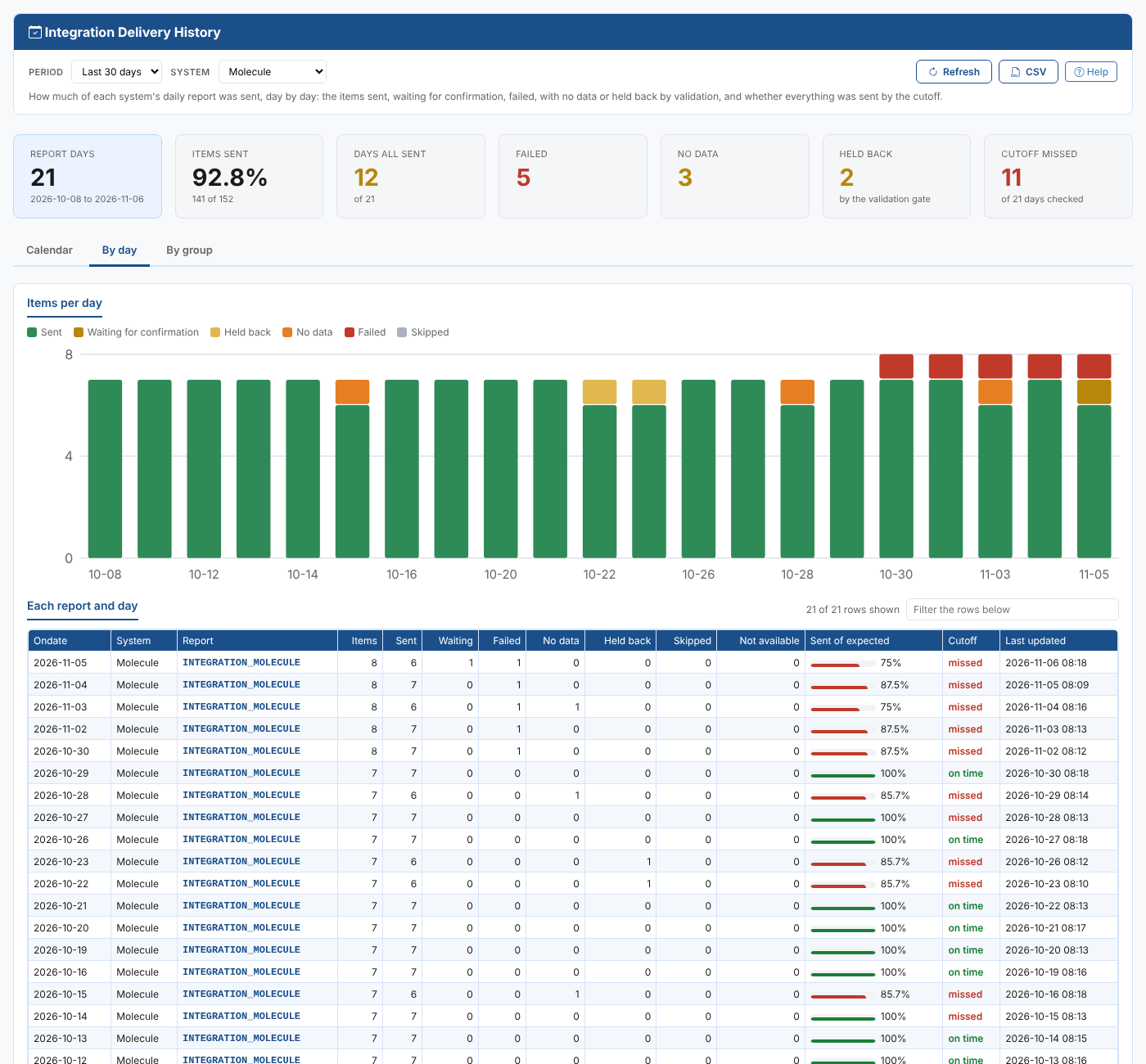
A chart of the items per day by status, over all the reports shown, and a table with a row per report and day: the items, sent, waiting, failed, no data, held back, skipped and not available, the share sent, the cutoff result and when the report was last updated. Type in Filter the rows below to find rows, such as missed for the days that missed the cutoff.
By group
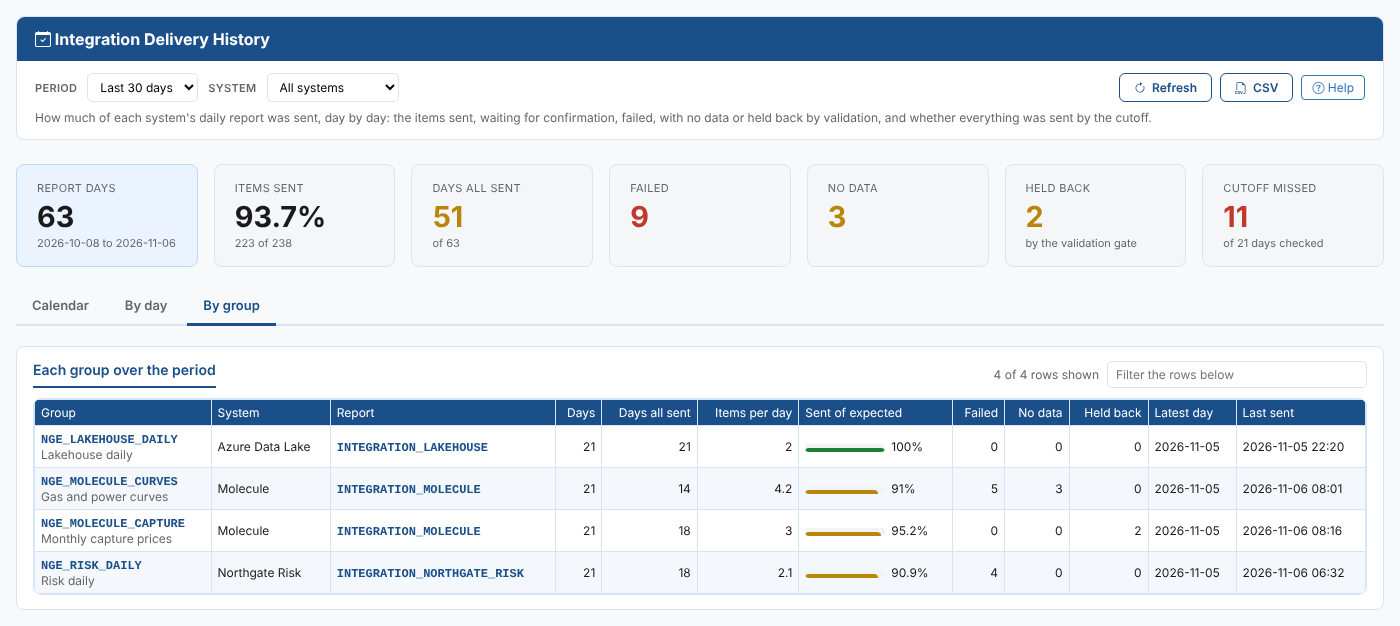
A row per group: its system and report, the days it was in a report, the days everything it sends was sent, the items it sends per day, the share sent, the failed, no data and held back items, the latest day and when it last sent.
Where the data comes from
The report reads the stored daily reports INTEGRATION_<KEY>:<ondate> of the reports your groups send to, one for each day of the period. A long period over many systems can take a few seconds to read. The cutoff result is the one stored in the day's report by the cutoff check.
Troubleshooting
| What you see | Why, and what to do |
|---|---|
| No group sends to a system yet | No group is attached to a system. Set one up on the Integrations screen. |
| A day is grey | No group of the report ran for that ondate: the schedule was off, or the day was a holiday in the group's calendar. |
Choose a period of at most 400 days | Shorten the custom period. |
| Some stored reports could not be read | The message names them. Select Refresh; if it persists, open the report on the Integrations screen. |