The Azure Event Grid plug-in
The Azure Event Grid Integration extension (odsl.integration_eventgrid) publishes an event to an Azure Event Grid custom topic for each curve and timeseries sent. Event Grid passes the events on to its subscribers: Azure Functions, Logic Apps, Service Bus queues or topics in your own subscription, Event Hubs, storage queues and webhooks.
What it needs
Once installed, add a system that sends with it: select New system and choose Azure Event Grid under Sends with. The plug-in's codes, settings and secrets are listed on the system's System setup tab. Each system on the plug-in has its own secrets, groups and daily report, and its own codes when you choose them (see The codes a system sends with).
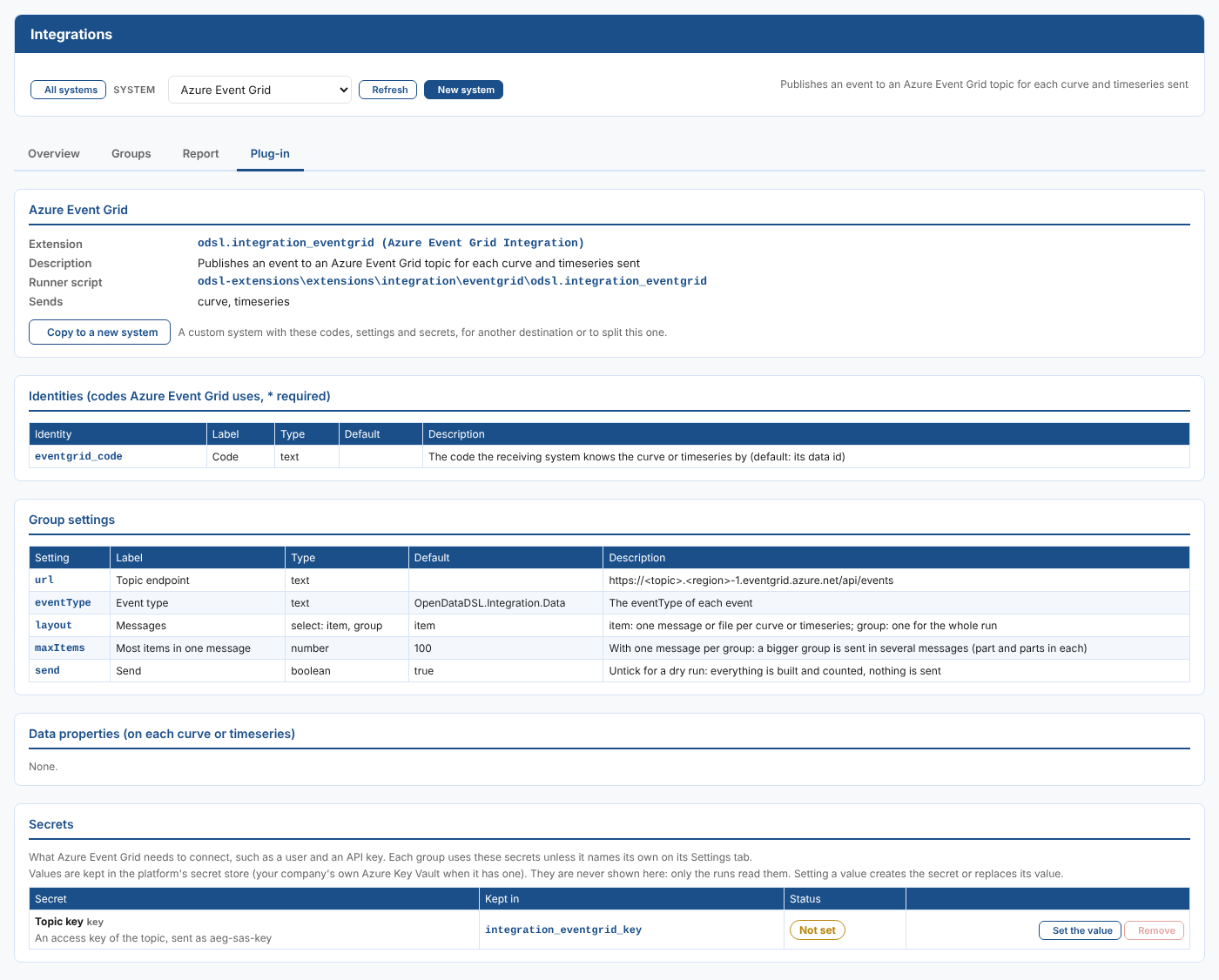
| Kind | Name | What it is |
|---|---|---|
| Identity | eventgrid_code | The code the receiving system knows the data by. Left empty, the data id is sent, such as NGE.GAS.TTF:MID. |
| Group setting | Topic endpoint (url) | https://<topic>.<region>-1.eventgrid.azure.net/api/events. |
| Group setting | Event type (eventType) | OpenDataDSL.Integration.Data unless you change it. The eventType of each event. |
| Group setting | Messages (layout) | item or group, item unless you change it. item: one message or file per data item; group: one for the whole run. |
| Group setting | Most items in one message (maxItems) | 100 unless you change it. With one message per group, a bigger group is sent in several messages, each with part and parts. |
| Group setting | Send (send) | Ticked unless you change it. Untick for a dry run: everything is built and counted, nothing is sent. |
Secret, kept in integration_eventgrid_key | Topic key (key) | An access key of the topic, sent as aeg-sas-key. |
Set the secret values in the Secrets part of the system's System setup tab (see Getting started). A group can use its own secret records instead, named on its Settings tab, for example to send to a second account.
How it sends
Each event uses the Event Grid schema:
| Field | What it is |
|---|---|
id | The data id, the ondate and the time of the run, such as NGE.GAS.TTF_MID-2026-11-03-20261104080500. |
eventType | The Event type setting, OpenDataDSL.Integration.Data unless you change it. |
subject | /<system>/<group>/<code>, so subscribers can filter on it. |
eventTime | When the run started (UTC). |
dataVersion | 1.0 |
data | The item message: see What the generic plug-ins send. |
With Messages set to item (the default), each event is posted as it is built. With group, the events are posted together at the end of the run, in requests of at most Most items in one message events. The topic key is sent as aeg-sas-key.
What each message or file holds, the CSV columns and the file names are the same for every generic plug-in: see What the generic plug-ins send.
This is also the way to reach queues and event hubs in your own Azure subscription, which the plug-ins cannot sign in to directly.
Examples
Northgate Energy forwards its marks to a Service Bus queue in its own subscription: the Event Grid topic has a subscription with the queue as its endpoint and a subject filter /Azure_Event_Grid/NGE_CURVES/.
| Setting | Value |
|---|---|
| Topic endpoint | https://nge-marks.westeurope-1.eventgrid.azure.net/api/events |
| Event type | Nge.Marks |
One plug-in, several destinations
Each group sending to Azure Event Grid has its own settings, so groups can already send to different topics. To keep destinations apart, with their own secrets, codes, report and groups, add a system for each one on this plug-in: select New system and choose Azure Event Grid under Sends with, or Copy to a new system on a system's System setup tab (see Copying a system). The plug-in is installed once, and every system on it gets its updates.
Next
- All plug-ins: every system with a ready-made plug-in.
- What the generic plug-ins send: the messages, rows and file names.
- Integration reference: where everything is kept, and troubleshooting.