The OAuth API plug-in
The OAuth API Integration extension (odsl.integration_oauth) posts curves, timeseries and options as JSON to an API that signs in with OAuth 2.0 client credentials: an application (client) id and a secret registered with an identity provider such as Microsoft Entra ID, Auth0 or Okta. It is the Webhook plug-in with a sign-in: at the start of each run it asks the identity provider for an access token and sends it with every request.
Use it for APIs behind Azure API Management or another gateway that expects a bearer token, where a fixed token in a secret is not allowed or expires.
What it needs
Once installed, add a system that sends with it: select New system and choose OAuth API under Sends with. The plug-in's codes, settings and secrets are listed on the system's System setup tab. Each system on the plug-in has its own secrets, groups and daily report, and its own codes when you choose them (see The codes a system sends with).
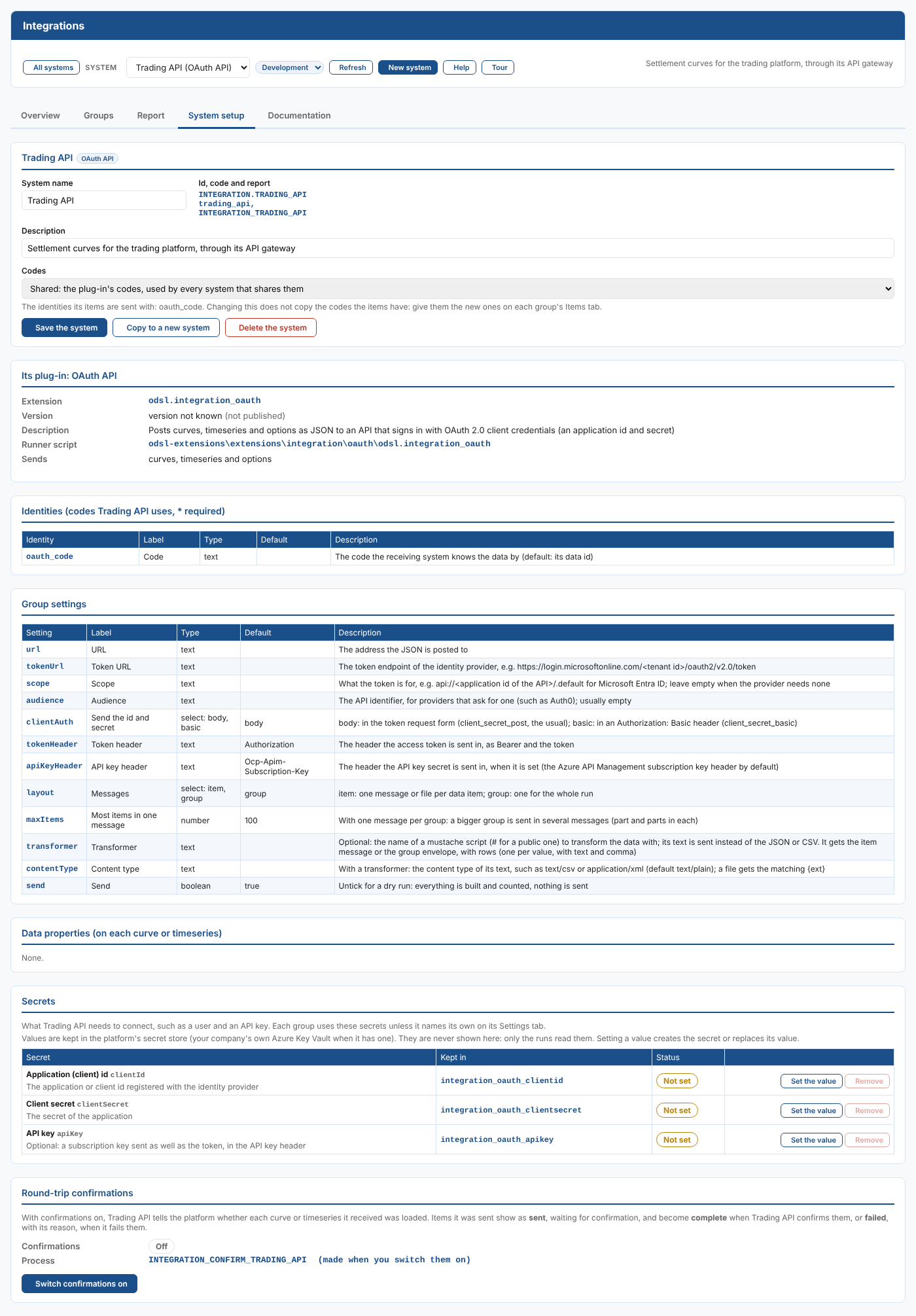
| Kind | Name | What it is |
|---|---|---|
| Identity | oauth_code | The code the receiving system knows the data by. Left empty, the data id is sent, such as NGE.GAS.TTF:MID. |
| Group setting | URL (url) | The address the JSON is posted to. |
| Group setting | Token URL (tokenUrl) | The token endpoint of the identity provider, such as https://login.microsoftonline.com/<tenant id>/oauth2/v2.0/token for Microsoft Entra ID. |
| Group setting | Scope (scope) | What the token is for, such as api://<application id of the API>/.default for Microsoft Entra ID. Leave it empty when the provider needs none. |
| Group setting | Audience (audience) | The API identifier, for providers that ask for one, such as Auth0. Usually empty. |
| Group setting | Send the id and secret (clientAuth) | body unless you change it: the id and secret go in the token request (client_secret_post, which most providers expect). basic: they go in an Authorization: Basic header (client_secret_basic). |
| Group setting | Token header (tokenHeader) | Authorization unless you change it. The header the access token is sent in, as Bearer and the token. |
| Group setting | API key header (apiKeyHeader) | Ocp-Apim-Subscription-Key unless you change it. The header the API key secret is sent in, when it is set. |
| Group setting | Messages (layout) | item or group, group unless you change it. item: one message per data item; group: one for the whole run. |
| Group setting | Most items in one message (maxItems) | 100 unless you change it. With one message per group, a bigger group is sent in several messages, each with part and parts. |
| Group setting | Transformer (transformer) | Optional: the name of a mustache script (# for a public one) to transform the data with. Its text is sent instead of the JSON. See Transforming with a Mustache template. |
| Group setting | Content type (contentType) | With a transformer: the content type of its text, such as text/csv or application/xml, text/plain unless you change it. |
| Group setting | Send (send) | Ticked unless you change it. Untick for a dry run: everything is built and counted, nothing is sent, and no token is asked for. |
Secret, kept in integration_oauth_clientid | Application (client) id (clientId) | The application or client id registered with the identity provider. |
Secret, kept in integration_oauth_clientsecret | Client secret (clientSecret) | The secret of the application. |
Secret, kept in integration_oauth_apikey | API key (apiKey) | Optional: a subscription key sent as well as the token, in the API key header. |
Set the secret values in the Secrets part of the system's System setup tab (see Getting started). A new system keeps them in its own records, named after its code, such as trading_api_clientSecret. A group can use its own secret records instead, named on its Settings tab.
How it signs in
At the start of each run (and of each day of a history export) the plug-in posts a token request to the Token URL:
POST <Token URL>
content-type: application/x-www-form-urlencoded

grant_type=client_credentials&client_id=<id>&client_secret=<secret>&scope=<scope>
The identity provider answers with an access token, which the run sends with every request as Authorization: Bearer <token>. A token usually lasts an hour, longer than a run. The token is never written to the run's log; the log says only where it came from and how long it is valid for:
Signed in: an access token from https://login.microsoftonline.com/.../oauth2/v2.0/token (valid for 3599 seconds)
When the sign-in fails, nothing is sent and the run says why, with the identity provider's own reason, for example:
No access token from https://login.microsoftonline.com/.../oauth2/v2.0/token for the client id 6f0c...: AADSTS7000215: Invalid client secret provided.
How it sends
The same as the Webhook plug-in. With Messages set to group (the default), a run posts the whole group in one request, split into several when it has more items than Most items in one message. With item, each curve or timeseries is one request. Each request is a POST with content-type: application/json, the token, and the API key when it is set.
Any 2xx answer is a success, including 202 Accepted with an empty body. An answer with another status is a failure, with the status in the message. With one request per group, every item of the group is then marked failed with that message.
When the API confirms each item later (for example once the downstream system has loaded it), switch on Round-trip confirmations: items wait as sent until the API calls back.
What each message holds is the same for every generic plug-in: see What the generic plug-ins send.
Examples
Northgate Energy posts its settlement curves to its trading platform through Azure API Management, which checks a Microsoft Entra ID token and a subscription key:
| Setting | Value |
|---|---|
| URL | https://api.northgate-energy.example/marketdata/v1/forward |
| Token URL | https://login.microsoftonline.com/<Northgate tenant id>/oauth2/v2.0/token |
| Scope | api://northgate-market-data-api/.default |
| Messages | group |
| Secret Application (client) id | The id of the app registration made for OpenDataDSL |
| Secret Client secret | A client secret of that app registration |
| Secret API key | The API Management subscription key |
In Microsoft Entra ID, the API's own app registration gives the OpenDataDSL app registration an application permission (app role) on the API, and an administrator grants it.
One plug-in, several destinations
To keep destinations apart, with their own secrets, codes, report and groups, add a system for each one on this plug-in: select New system and choose OAuth API under Sends with, or Copy to a new system on a system's System setup tab (see Copying a system). The plug-in is installed once, and every system on it gets its updates.
Next
- All plug-ins: every system with a ready-made plug-in.
- The Webhook plug-in: the same, with a fixed token or none.
- What the generic plug-ins send: the messages and rows.
- Integration reference: where everything is kept, and troubleshooting.