Automation Logs
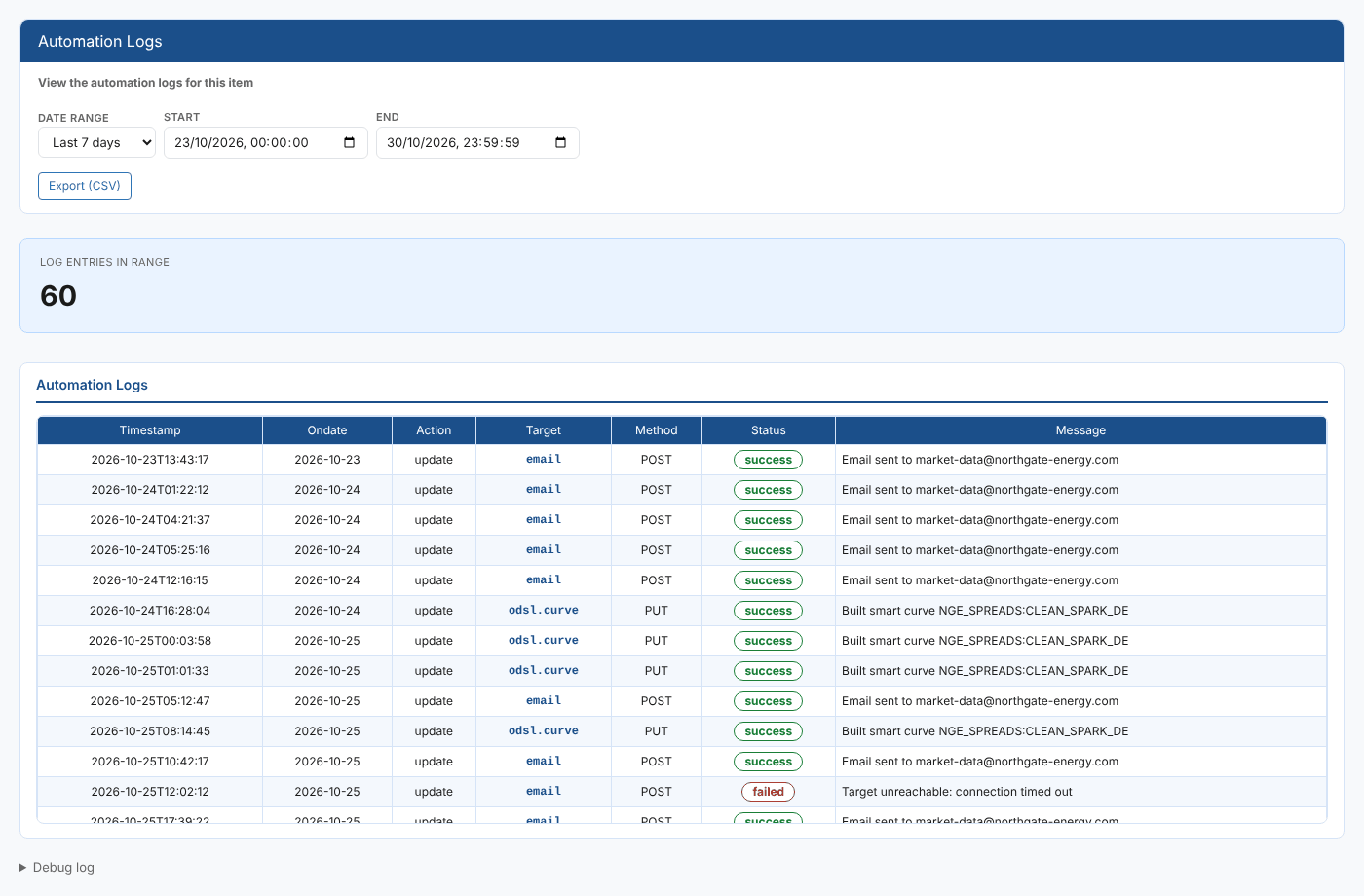
An automation that fails quietly is easy to miss: the email does not arrive or a downstream system misses a curve, and nobody notices until someone asks. The Automation Logs item insight shows every automation log entry for the selected item in a date range, and answers questions like:
- Did the email for this curve go out yesterday?
- When did the smart curve build last run for this item, and did it work?
- Why did a delivery for this item fail?
At Northgate Energy, Priya Shah opens it on the TTF mid curve NGE.GAS.TTF:MID when the risk team says they did not get the evening curve.
Opening the report
Automation Logs (report id #AUTOMATION_LOGS, category *Item Insights*) is an item insight: it does not appear in the Reports menu. Select an item, then open Automation Logs from that item's insights menu. It loads the entries for Today when it opens.
| Control | What it does |
|---|---|
| Date range | Today, Yesterday, Last 7 days, Last 30 days, Last 60 days, This month, Last month or All. Choosing one fills in Start and End and reloads the list. |
| Start, End | Override the range with your own dates and times |
| Export (CSV) | Downloads the table as automation-logs.csv |
| Debug log | At the bottom of the page: the range used and how many entries were returned |
The report
The Log entries in range card shows how many entries were found. The table has one row per entry:
| Column | What it shows |
|---|---|
| Timestamp | When the automation ran |
| Ondate | The date of the data the automation acted on |
| Action | The action that triggered it, such as create or update |
| Target | The automation target, such as email, queue or odsl.curve |
| Method | How the target was called, such as POST or PUT |
| Status | A green badge for success, red for failed or error, amber for anything else |
| Message | What happened, or the error returned |
The entries shown are those for the selected item's service and id (or its dataset id). Up to 10,000 entries are loaded.
Troubleshooting
| Problem | What to do |
|---|---|
| No automation log entries fall in the selected range. | Nothing ran for this item in that range. Choose a longer range, or check with the Automations insight that the item has automations. |
| An automation ran but is not listed | Entries are matched on the log entry's service and key. An entry logged under another key, for example one triggered by a different item, does not appear here. Use Automation Log Search to search across all items. |
Related
- Automations: the automations set up on the same item
- Automation Log Search: automation log entries across the platform
- Insights: how insight reports work