Calendar Usage Across Services
A calendar is not only set on timeseries and curves. A dataset feed expects its deliveries on the business days of a calendar, a curve build group skips the holidays of one, an expiry calendar moves on a trading calendar, and an intraday calendar opens on the days of a holiday calendar. Before you change or delete a calendar, you need all of them. Calendar Usage Across Services answers questions like:
- What uses this calendar, in every service: timeseries, curves, dataset feeds, groups, objects and other calendars?
- Which curves are affected because the calendar is the trading calendar of their expiry calendar?
- Which smart curves are built on a curve that uses it?
- Is anything still using the calendar we want to delete?
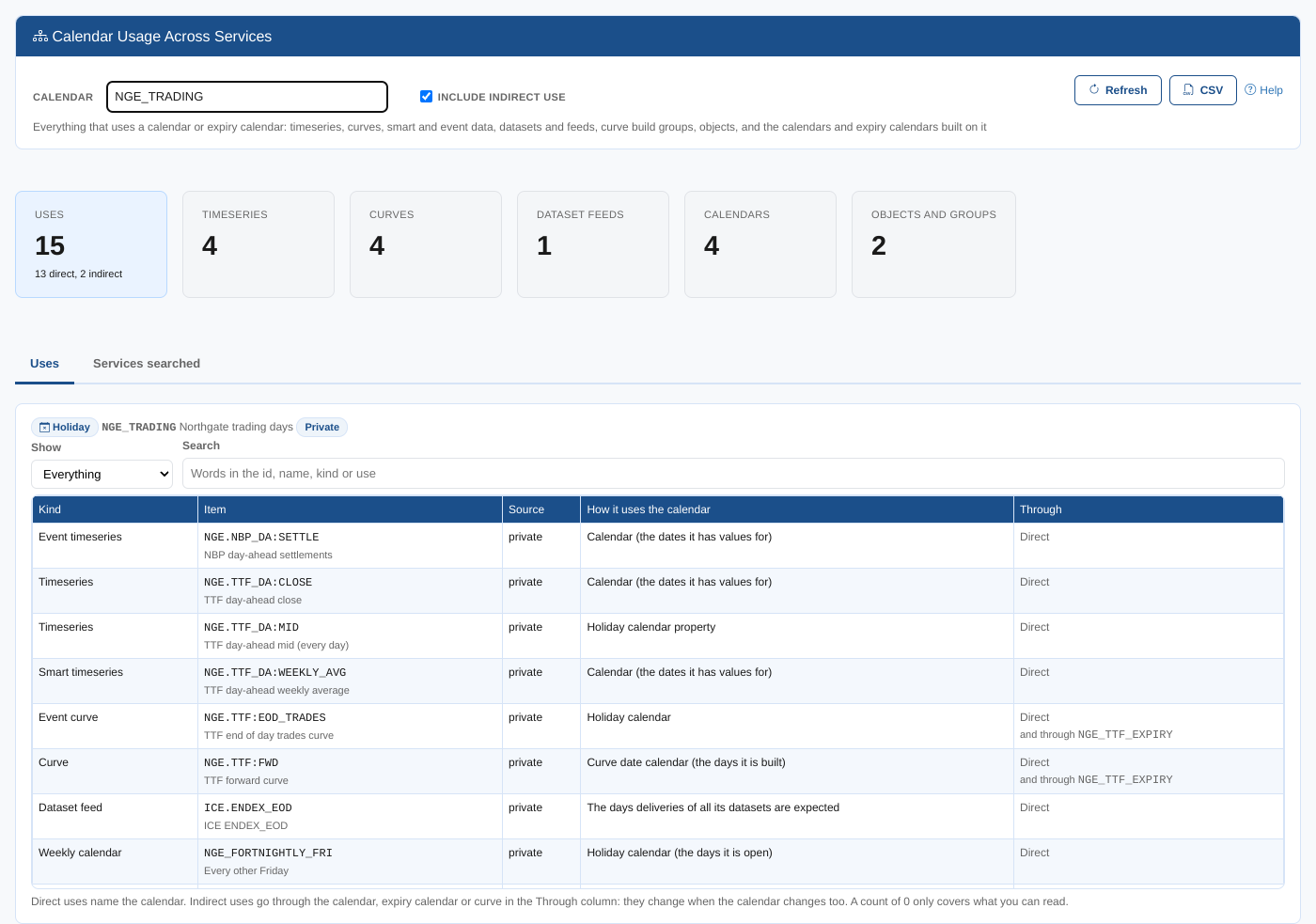
At Northgate Energy, Priya Shah adds an office closure to NGE_TRADING and checks first what depends on it: the TTF timeseries and curves, the ICE Endex feed, the TTF close build group, the TTF product, four calendars built on it, and two smart curves on the TTF forward curve.
Opening the report
The report is on the Insights tab of Manage, Calendars (the Calendar Manager), as Calendar Usage Across Services (odsl.calendar_manager.usage).
It opens with your first private holiday calendar. Type or pick another calendar or expiry calendar in Calendar.
| Control | What it does |
|---|---|
| Calendar | The calendar or expiry calendar to look for. Every calendar you can read, private and public, is in the list. |
| Include indirect use | Also lists the items that use a calendar or expiry calendar built on this one, and the smart curves and smart timeseries built on the items found. On by default. |
| Refresh, CSV, Help | Search again, download the table, open this page |
Summary cards
| Card | What it shows |
|---|---|
| Uses | How many items use the calendar, with how many name it directly and how many use it indirectly |
| Timeseries | Timeseries, smart, event and composed timeseries |
| Curves | Curves, smart curves, event curves and curve series |
| Dataset feeds | Dataset feeds: the calendar of a feed is the calendar of all its datasets |
| Calendars | Calendars and expiry calendars built on it |
| Objects and groups | Objects (such as products) and groups (such as curve build groups) |
The tabs
Uses
One row per item: direct uses first, then indirect ones. Show keeps one kind of item, and Search finds words in the id, name, kind or use.
| Column | What it shows |
|---|---|
| Kind | What the item is: Timeseries, Curve, Smart curve, Event curve, Dataset feed, Curve build group, Object, Monthly calendar, Expiry calendar... |
| Item | Its id and name |
| Source | private, or public for public data and calendars |
| How it uses the calendar | The setting that names the calendar, such as Curve date calendar (the days it is built), Trading calendar or The days deliveries of all its datasets are expected |
| Through | Direct when the item names the calendar. Otherwise the calendar, expiry calendar or curve it uses the calendar through. A direct item that also uses the calendar through another one shows both. |
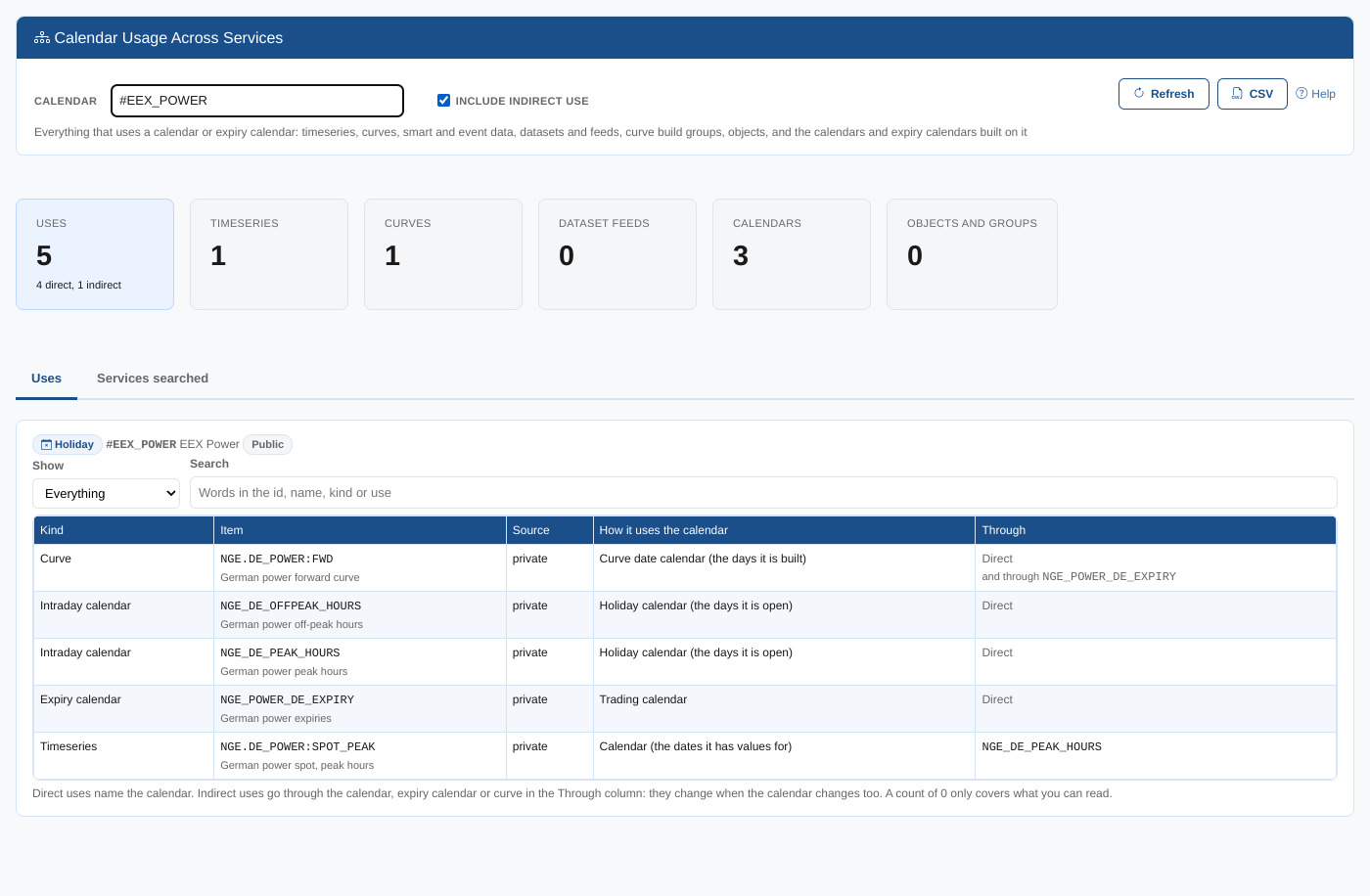
An indirect use changes when the calendar changes, just like a direct one. For a public calendar such as #EEX_POWER, the German power spot timeseries is listed through the intraday calendar NGE_DE_PEAK_HOURS, whose holiday calendar is #EEX_POWER:
Services searched
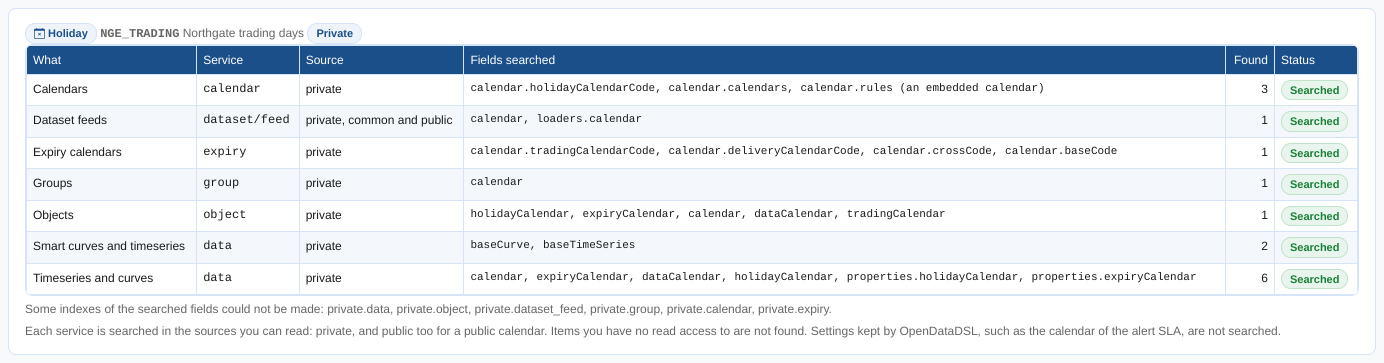
What was searched: one row per service and source, with the fields searched, how many items were found, and whether the search worked. A service that could not be searched (for example because your security policies do not allow you to read it) is marked, and the report says the list may be incomplete. Under the table, a line says whether the searched fields are indexed (see Speed).
Where the data comes from
The report asks each service for the items that name the calendar, with a filter on the fields that keep a calendar id:
| Service | Items | Fields |
|---|---|---|
data | Timeseries, curves, smart, event and composed data | calendar (not the DAILY calendar of a curve's own dates), expiryCalendar, dataCalendar, holidayCalendar, properties.holidayCalendar, properties.expiryCalendar |
object | Objects such as products | holidayCalendar, expiryCalendar, calendar, dataCalendar, tradingCalendar |
dataset (dataset/v1/feed) | The dataset feeds of the datasets you monitor, private, common and public | calendar, loaders.calendar |
group | Groups, such as curve build groups | calendar |
calendar | Intraday, monthly, weekly, combined and holiday calendars | calendar.holidayCalendarCode, calendar.calendars, a holiday calendar embedded as a rule |
expiry | Expiry and financial expiry calendars | calendar.tradingCalendarCode, calendar.deliveryCalendarCode, calendar.crossCode, calendar.baseCode |
Private items are always searched; public items too when the calendar is public. Groups are private only, and dataset feeds are searched in one request whatever their source. Only the feeds of the datasets you monitor are found. Datasets are not searched one by one: a dataset's deliveries are expected on the days of its feed's calendar, so the feed stands for all its datasets. With Include indirect use, the same search runs for each calendar and expiry calendar found (up to three levels and 40 calendars), and then the smart curves (baseCurve) and smart timeseries (baseTimeSeries) built on the curves and timeseries found are added (up to four levels). At most 10,000 items of a service are listed.
The report only finds what you can read: items in services or sources your security policies do not let you read are not counted. A count of 0 is not proof that nothing in other teams' data uses the calendar. Settings kept by OpenDataDSL for your company, such as the calendar of your alert SLA, are not searched.
Speed
Each search filters a whole collection on its calendar fields, so on a large data or object collection it needs indexes on those fields. When the report opens, it asks the platform to make sure they exist (GET calendar/v1/private?_function=usage-indexes):
- One partial index per field (only the documents that have the field), named
calusage_and the field, for examplecalusage_expiryCalendarondataandcalusage_holidayCalendaronobject. - Your private collections are indexed when any user opens the report. The public collections are indexed when an OpenDataDSL user opens it.
- Each collection is checked once per platform process. Asking again for an index that exists does nothing, so it costs nothing after the first time.
- The report does not wait for the indexes. The first time, building an index on a large collection can take a while, and the searches run as before until it is done.
- New environments get the indexes when they are created.
In a test with 200,000 data items and 100,000 objects, searching for one calendar went from 146 ms to 7 ms on data and from 53 ms to 2 ms on object. &force=true checks every collection again, for example after a collection was rebuilt.
Related
- The Calendar Manager
- Calendar Usage Report, the Reports menu report of the timeseries and curves on several calendars
- Calendar Health Check
- Insights