Dashboard Audit Report
Dashboards are shared and edited by several people. The Audit Report on a dashboard shows every save, so you can answer questions like:
- Who created this dashboard, and who has changed it since?
- When was a widget added, renamed or removed?
- What did the dashboard look like before last week's change?
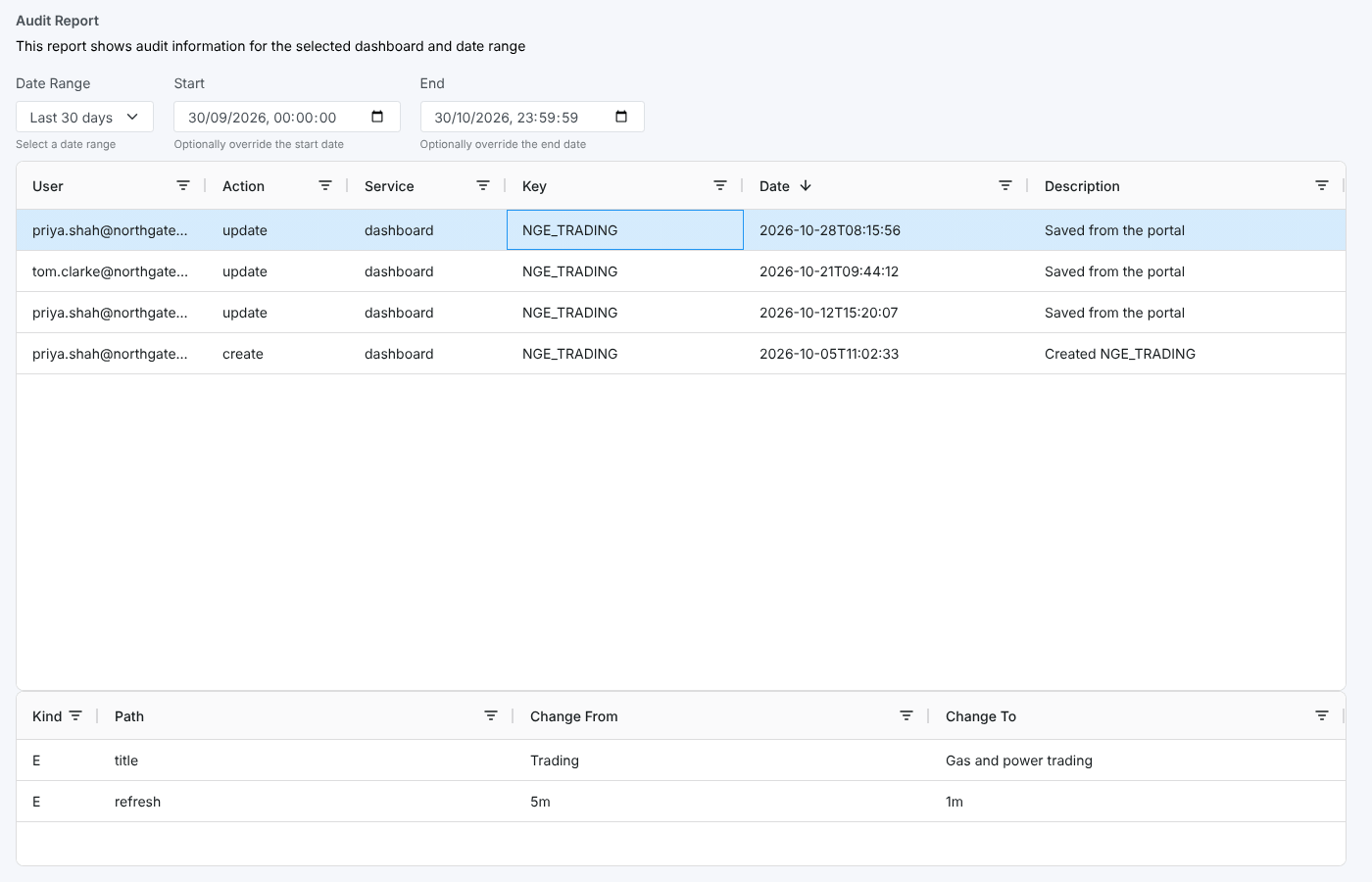
At Northgate Energy the NGE_TRADING dashboard is used by the whole trading floor. When its title and refresh rate changed, Priya Shah used its audit report to see that she had made the change herself on 28 October, and what the old values were.
Opening the report
This is an item insight: open a dashboard, then choose Audit Report from its insights (report id #DASHBOARDI_AUDITING, category Dashboard Insights). The screen passes the dashboard's id to the report, which lists the audit entries for that dashboard in the chosen date range.
| Control | What it does |
|---|---|
| Date Range | Today (the default), Yesterday, Last 7 days, Last 30 days, Last 60 days, This month, Last month or All. Choosing one fills in Start and End and reloads the list. |
| Start, End | Change the start or end date and time yourself; the list reloads. |
| Report name | Select the report name at the top left to hide or show the description and date controls, which gives the table more room. |
| Column menus | Select the filter icon in a column header to filter the rows shown, or a column header to sort by it. |
The report opens on Today. Choose Last 30 days or All to see older saves.
The report
The top table lists the dashboard's audit entries:
| Column | What it shows |
|---|---|
| User | Who made the change. data@opendatadsl.com is the platform itself, for example a monitoring job. |
| Action | create, update, delete or rollback |
| Service | dashboard |
| Key | The dashboard id |
| Date | When the change was made, newest first |
| Description | The reason given when the change was saved |
Select a row to see its field changes in the table underneath:
| Column | What it shows |
|---|---|
| Kind | E edited, N added, D removed, A a change inside a list |
| Path | The field that changed. A nested field shows each level separated by commas. |
| Change From | The value before (blank for an added field) |
| Change To | The value after (blank for a removed field) |
Changes to widgets show their position in the dashboard in the path, for example widgets,1,title is the title of the second widget (positions count from 0).
Where the data comes from
| What | Where |
|---|---|
| Audit entries | The audit service, filtered on service dashboard and the dashboard's id |
| Source | Public for an id starting with #, otherwise private |
A value that is itself a list or an object, such as a whole widget that was added or removed, shows as [object Object] in Change From or Change To. The path still tells you which widget changed.
Related
- Item Audit Report: the same idea for master data, reports and other items
- Audit Report: every change across all services
- Insights: how insight reports work