Quality and Critical Checks Summary
Every dataset you monitor can run quality checks (do the values look right) and critical checks (is the delivery complete enough to use). Looking at them one dataset at a time does not tell you where your data quality problems really are. The Quality and Critical Checks Summary puts every dataset together and answers questions like:
- How many datasets failed a check last week, and how many checks passed overall?
- Which datasets fail most often, and when did they last fail?
- Which checks fail most, and on how many datasets?
- Can I give the data quality team a list of every failure this month?
At Northgate Energy, Priya Shah reviews the last 30 days every Friday to decide which datasets and checks need attention from the market data team.
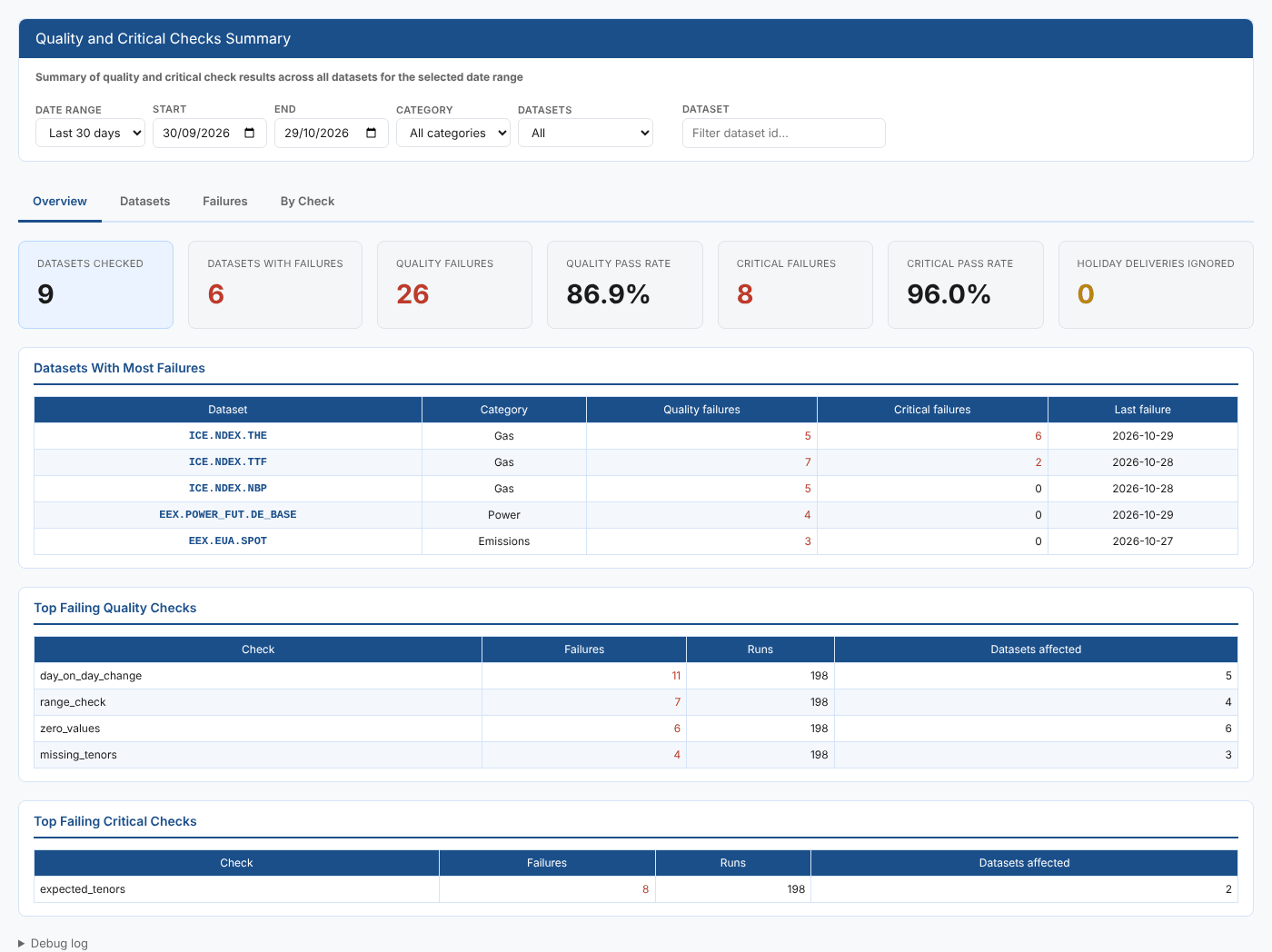
Opening the report
The report is on the Dataset Monitoring screen's reports list, in the Dataset Monitoring category, as Quality and Critical Checks Summary. Its report id is #DM_QUALITYSUMMARY.
It opens on Yesterday and loads straight away. Every date range ends at yesterday at the latest, because today's data will not have loaded yet.
| Control | What it does |
|---|---|
| Date range | Yesterday, Last 7 days, Last 30 days, This month or Last month. Sets Start and End. |
| Start, End | The on dates to include. An end date after yesterday is moved back to yesterday. |
| Category | Shows only the datasets in one category, taken from your own dataset settings |
| Datasets | All, or With failures only on the Datasets tab |
| Dataset | Shows only datasets whose id contains this text |
Changing the dates loads the data again. Category, Datasets and Dataset work on the data already loaded, so they update the page at once.
Key ideas
| Idea | What it means |
|---|---|
| Quality check | A check on the values of a delivery, such as a range check or a day on day change limit. A delivery has an overall quality status and a status for each check. |
| Critical check | A check that a delivery is complete enough to use, such as all expected tenors being present |
| Failure | Any status other than valid. A delivery whose overall status is not valid is one failed result. |
| Holiday | A day the dataset has no delivery because of a holiday. Checks are not meaningful then, so any check results on a holiday are ignored completely. |
| Category and priority | Your own settings for each dataset, shown and filtered here |
The tabs
Overview
| Card | What it counts |
|---|---|
| Datasets checked | Datasets with at least one quality or critical check result in the range |
| Datasets with failures | Datasets with at least one failed quality or critical result |
| Quality failures | Deliveries whose overall quality status was not valid |
| Quality pass rate | Valid quality results as a percentage of all quality results |
| Critical failures | Deliveries whose overall critical status was not valid |
| Critical pass rate | Valid critical results as a percentage of all critical results |
| Holiday deliveries ignored | Delivery records on holiday dates that were left out |
Under the cards:
| Table | What it shows |
|---|---|
| Datasets With Most Failures | The five datasets with the most critical failures, then the most quality failures, with the date of their last failure. Select a row to open it on the Datasets tab. |
| Top Failing Quality Checks | The quality checks that failed most, with how often they ran and on how many datasets they failed |
| Top Failing Critical Checks | The same for critical checks |
Datasets
One row per dataset, worst first (most critical failures, then most quality failures), 50 to a page.
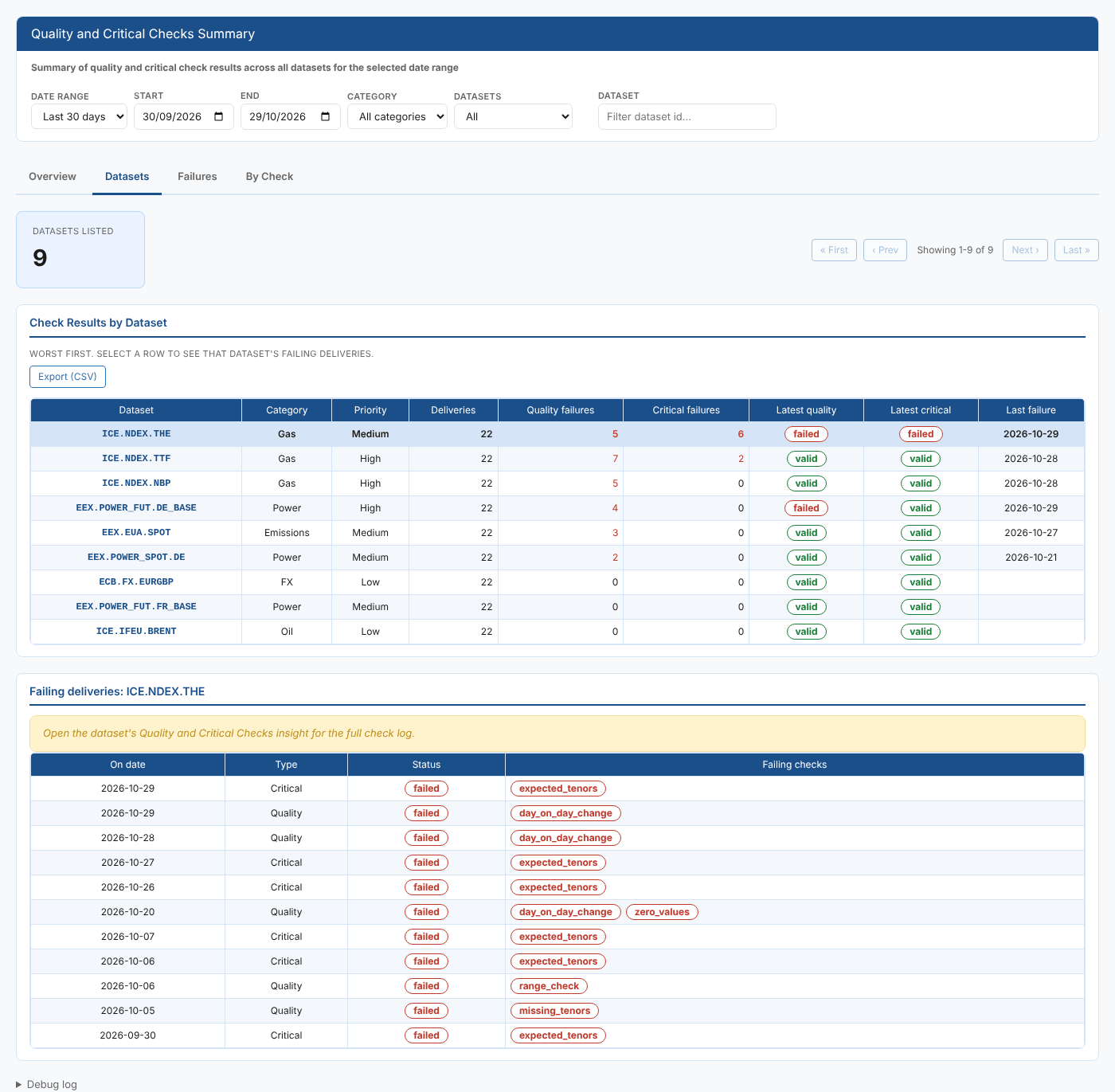
| Column | What it shows |
|---|---|
| Dataset, Category, Priority | The dataset and your own settings for it |
| Deliveries | Delivery records with check results in the range |
| Quality failures, Critical failures | Failed results of each kind |
| Latest quality, Latest critical | The status on the newest delivery in the range |
| Last failure | The newest on date with any failed result |
Select a row to list that dataset's failing deliveries under the table: the on date, whether it was a quality or critical failure, the status and the checks that failed. For the full check log of a delivery, open the dataset's Quality and Critical Checks report.
Failures
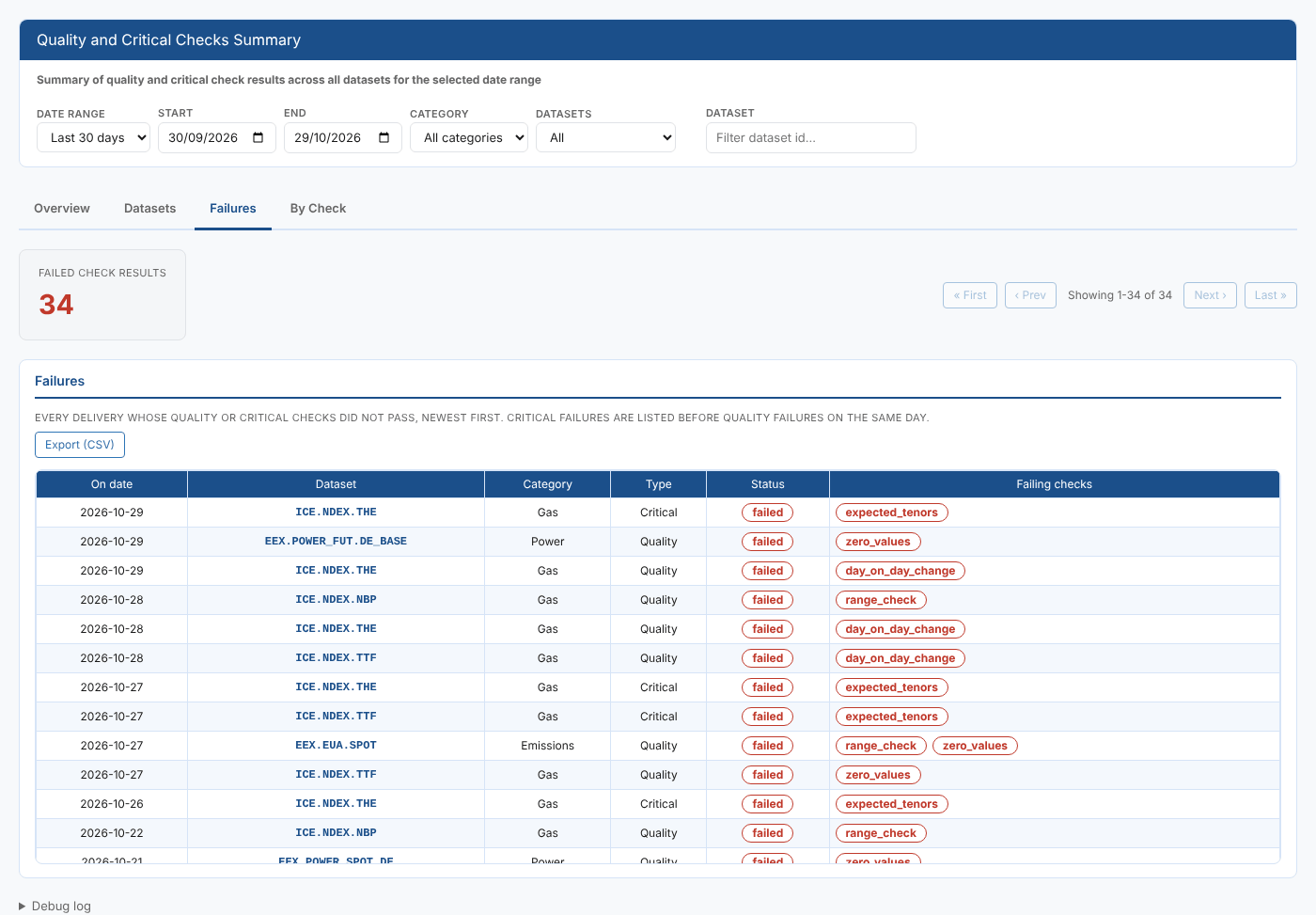
Every failed result in the range, newest first, 50 to a page. On the same day, critical failures are listed before quality failures. Each row shows the on date, dataset, category, type (Quality or Critical), status and the checks that failed.
By Check
Every quality and critical check that ran in the range, worst pass rate first.
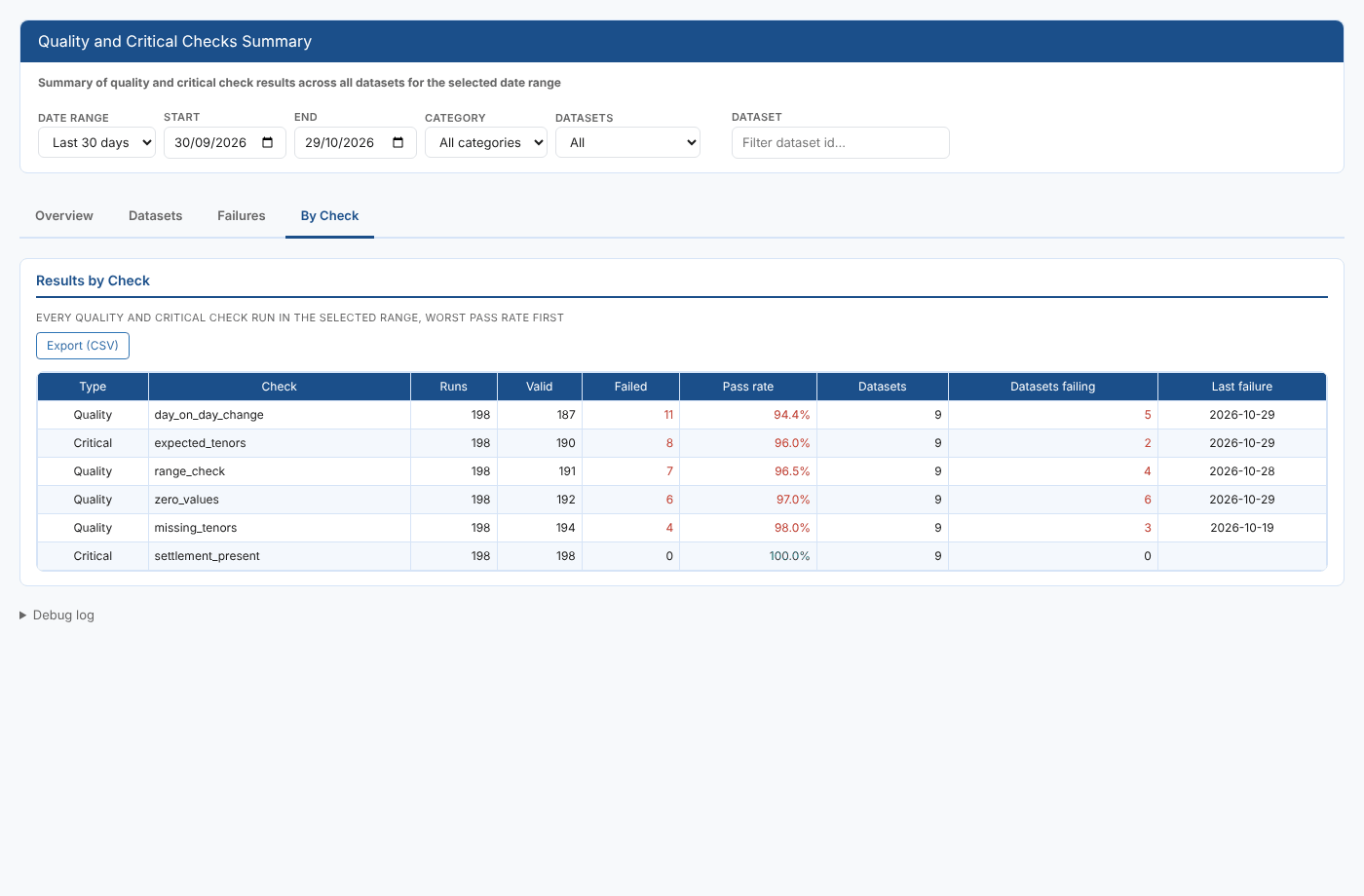
| Column | What it shows |
|---|---|
| Type | Quality or Critical |
| Check | The check name |
| Runs, Valid, Failed | How often it ran and with what result |
| Pass rate | Valid runs as a percentage of all runs |
| Datasets, Datasets failing | How many datasets ran the check, and on how many it failed at least once |
| Last failure | The newest on date it failed |
At Northgate, day_on_day_change has the lowest pass rate and fails on five datasets, so Priya asks whether its 15% limit is too tight for the front months.
Exporting
Each list tab has an Export (CSV) button that exports the whole filtered list, not just the page on screen:
| Tab | File |
|---|---|
| Datasets | One row per dataset, as on screen |
| Failures | One row per failed check, so a delivery with two failing checks has two rows |
| By Check | One row per check, as on screen |
Where the data comes from
| Data | Service and source |
|---|---|
| Check results | dataset_delivery, private: your own quality and critical check results |
| Holidays | dataset_delivery, common: delivery records with status holiday |
| Category and priority | dataset, info: your own dataset settings |
The report summarises up to 10,000 delivery records. If a range has more, a message under the filters says so and asks you to choose a shorter range.
Troubleshooting
| Problem | What to do |
|---|---|
| No checked deliveries in the selected range. | No delivery in the range has check results. Choose a longer range, or check that quality or critical checks are configured on your datasets. |
| Category has no choices, or datasets show no category | Set a category in your dataset settings. Only categories of datasets in the range are offered. |
| Could not load checks. See the debug log. | Open Debug log at the bottom of the page for the reason the platform gave. |
Related
- Quality and Critical Checks: the check history and check log for one dataset
- Critical List: critical check status of every dataset for one date
- Data Monitoring: how dataset monitoring, deliveries and checks work
- Insights: how insight reports work