Delivery Scores
Every day a dataset loads, the platform gives the delivery a score for how well it went: 4 when the data arrived on time, less the later it arrived. A run of low scores is the clearest sign that a feed is slipping. The Delivery Scores report shows the score history of one dataset and answers questions like:
- Has this dataset been arriving on time this month?
- On which days was it late, and by how much?
- Is the feed getting later over time?
At Northgate Energy, Priya Shah checks the scores of ICE.NDEX.TTF before the monthly review with the data provider.
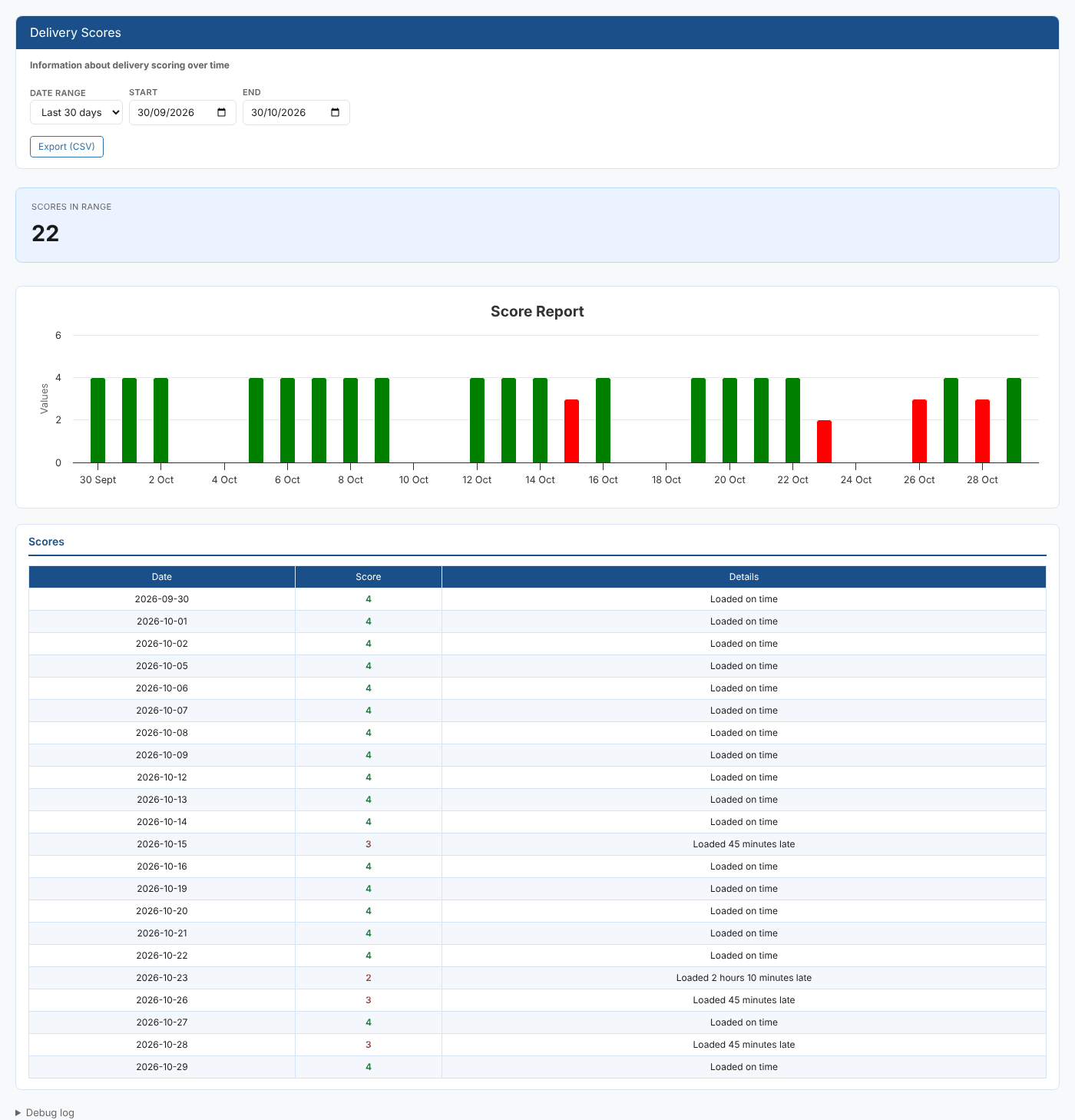
Opening the report
This is a dataset insight. Select a dataset on the Dataset Monitoring screen, then choose Delivery Scores from its insights (category Dataset Monitoring Insights). Its report id is #DMI_SCOREREPORT, and the dataset is passed in the DSID report property.
The report opens on Last 30 days and loads straight away.
| Control | What it does |
|---|---|
| Date range | Last 7 days, Last 30 days, Last 60 days, This month, Last month or All |
| Start, End | The on dates to include. All leaves both empty, for the dataset's whole history. |
| Export (CSV) | Downloads the table as scores.csv |
The report
| Part | What it shows |
|---|---|
| Scores in range card | How many days in the range have a score |
| Score Report chart | One column per day. Columns for a score of 4 are green; lower scores are red. |
| Scores table | Date, Score (green for 4, red below 4) and Details, the reason the platform gave for the score |
What the scores mean
| Score | Meaning |
|---|---|
| 4 | Data was loaded on time |
| 3 | Data was at most 1 hour late |
| 2 | Data was between 1 and 4 hours late |
| 1 | Data was more than 4 hours late |
| 0 | No data was expected, for example a holiday |
Days with a score of 0 are left out of the chart and the table, so holidays do not show as failures.
At Northgate, three days in the last 30 scored 3 and one scored 2 (Loaded 2 hours 10 minutes late), so Priya raises the late deliveries with ICE.
The score measures timeliness. A delivery that arrived on time but failed a quality check, or was missing tenors, can still score 4: see Quality and Critical Checks and Tenor Delivery for those.
Where the data comes from
The scores come from the dataset_delivery service (fields ondate, score and scoreinfo). The report first reads the dataset's settings (dataset service, info source) to find where its delivery records are kept, so it reads the shared delivery records of a public dataset and your own records of a private one.
Related
- Loaded Time Analysis: what time of day the dataset loads
- Tenor Delivery: which tenors were delivered each day
- Quality and Critical Checks: check history for the same dataset
- Data Monitoring: how scores are calculated
- Insights: how insight reports work