Corrections
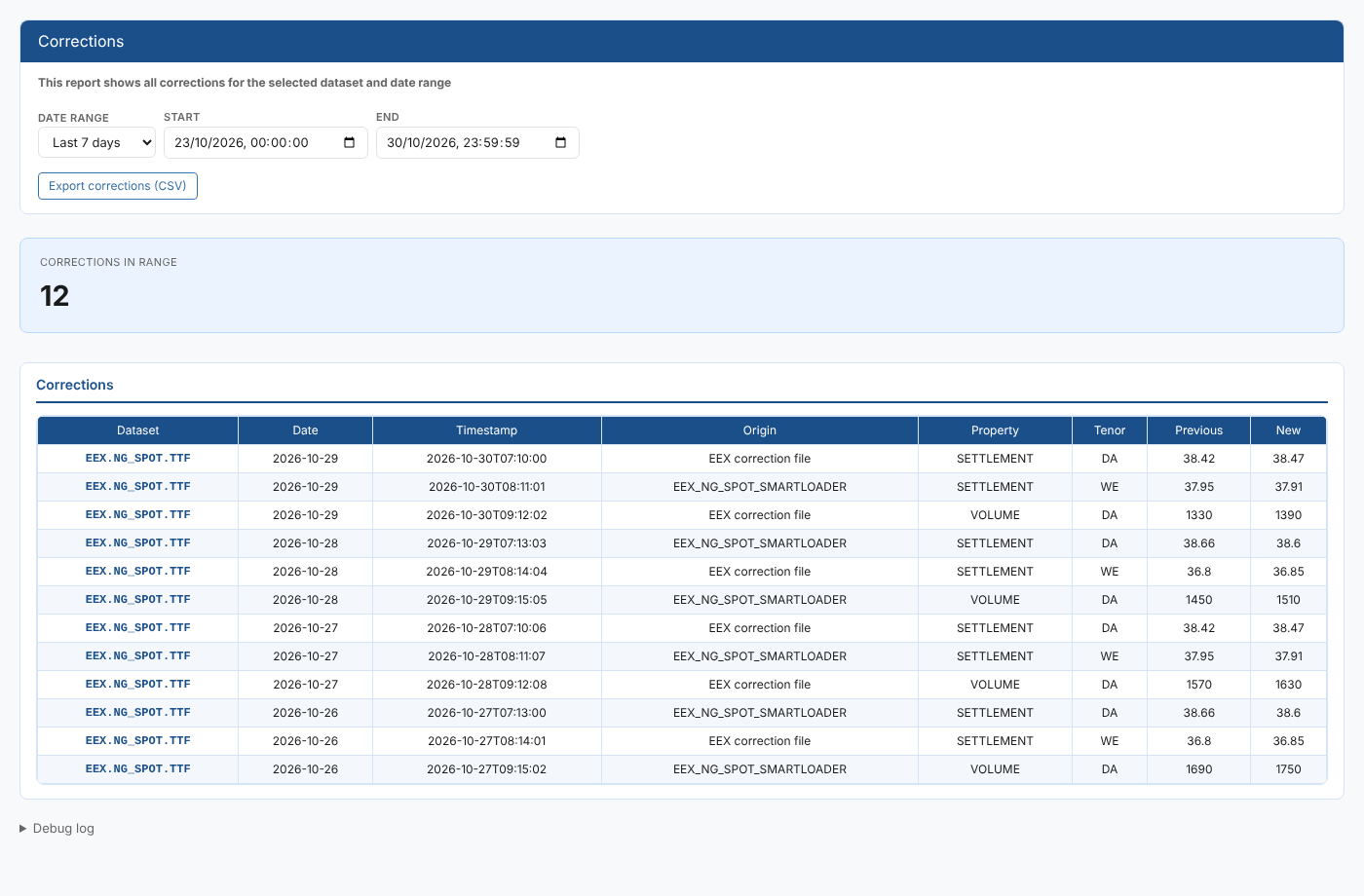
Providers correct their data: a settlement price is republished the next morning, a traded volume is revised, a tenor is restated. Each correction changes data you may already have used. The Corrections report lists the corrections made to one dataset in a date range and answers questions like:
- Which prices in this dataset were corrected this week, and by how much?
- Which tenors and properties are corrected most often?
- Did a correction come from the provider's correction file or from our own loader?
- Which delivery dates were affected?
Throughout this page we follow Northgate Energy, a fictional gas and power trader that loads the EEX TTF spot dataset EEX.NG_SPOT.TTF.
Opening the report
Select a dataset on the Dataset Monitoring screen and choose Corrections from its insights (category Dataset Monitoring Insights). It is not listed in the Reports menu.
| Registration | Value |
|---|---|
| Report id | #DMI_CORRECTIONS |
| Category | Dataset Monitoring Insights |
| Template | #insight-dm-dsidcorrections |
| Input | The selected dataset, passed as the DSID report property |
The report looks up whether the dataset is your own (private) or a shared one (common), reads the corrections from the same place, and opens on Today.
| Control | What it does |
|---|---|
| Date Range | Today, Yesterday, Last 7 days, Last 30 days, Last 60 days, This month, Last month or All |
| Start, End | The range in use. Change either one to set your own range; the list reloads straight away. |
| Export corrections (CSV) | Downloads the table as shown |
| Debug log | At the bottom of the page: the steps the report took and how many corrections it found |
The report
The Corrections in range card shows how many corrections were found. The table lists them, up to 10,000.
| Column | What it shows |
|---|---|
| Dataset | The dataset id |
| Date | The delivery date (ondate) of the data that was corrected |
| Timestamp | When the correction was recorded. The date range filters on this. |
| Origin | Where the correction came from, such as the loading process or the provider's correction file |
| Property | The value that changed, such as SETTLEMENT or VOLUME |
| Tenor | The tenor that changed, such as DA (day-ahead) or WE (weekend) |
| Previous | The value before the correction |
| New | The value after the correction |
At Northgate, the last 7 days show twelve corrections to the TTF spot settlement prices and volumes, each recorded the morning after the delivery date.
The date range filters on when the correction was recorded, not on the delivery date. To find corrections to one delivery date, use a range that starts on that date and runs a few days later.
Troubleshooting
| Problem | What to do |
|---|---|
| No corrections fall in the selected range | Choose a longer range, such as Last 30 days or All. |
| A correction you expected is missing | Check its timestamp: a correction recorded after the end of the range is not shown. |
Related
- Insights: how insight reports work
- Auditing: changes to the dataset's settings
- Delivery Scores: how well the dataset is delivered over time