Process Cron Audit Report
When a loader suddenly runs at the wrong time, or stops running at weekends, the first question is whether someone changed its schedule. The Process Cron Audit Report lists every change to a process's cron expression in a date range, and answers questions like:
- Who changed the schedule of the ICE Endex loader, and when?
- What was the schedule before the change?
- Which process schedules changed this month?
At Northgate Energy, Sam Patel in IT reviews it at the end of each month to check that every schedule change was intended.
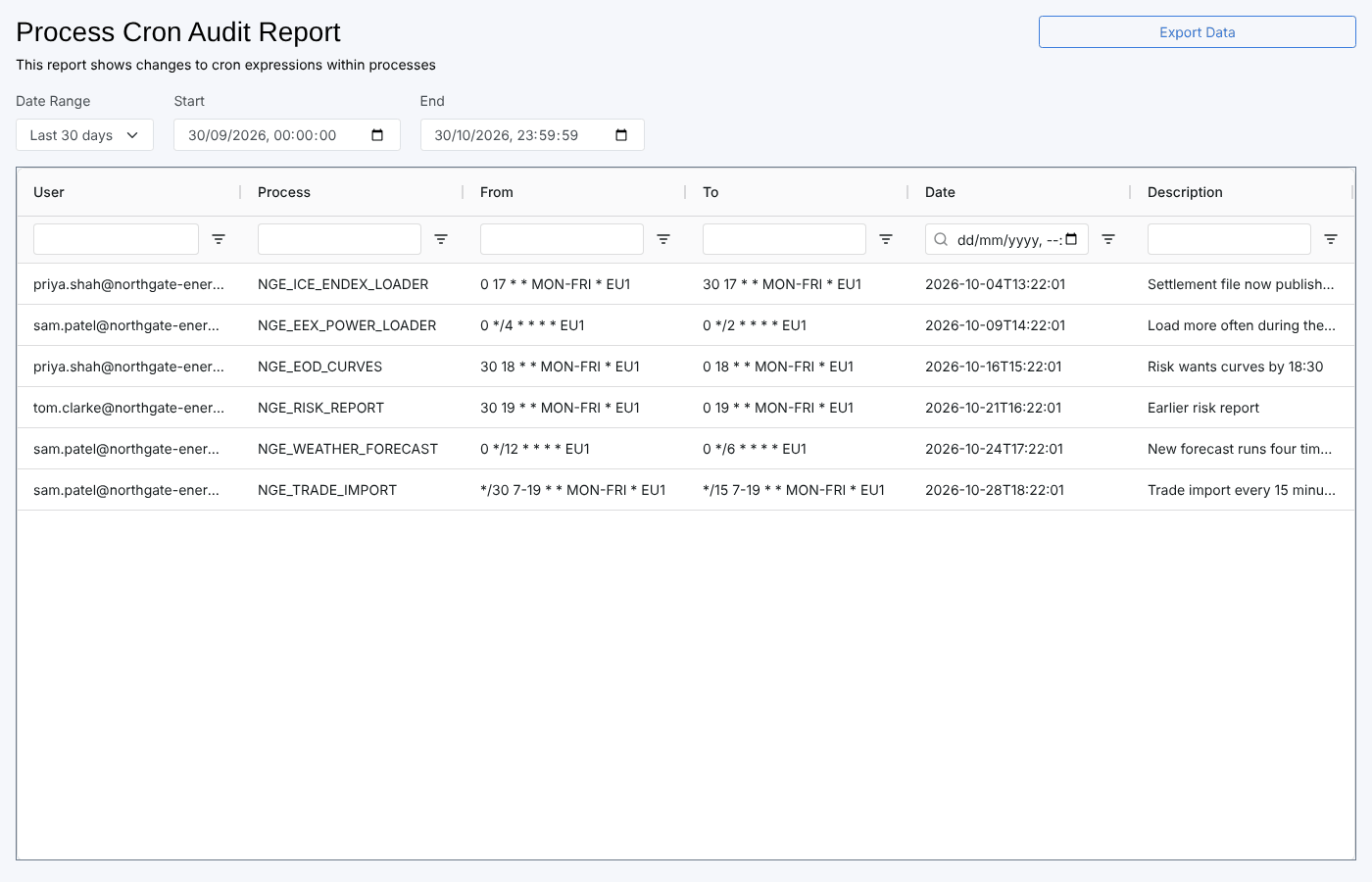
Opening the report
The report is in the Reports menu, in the Processes category, as Process Cron Audit Report (report id #INSIGHT_PROCESS_CRON). It loads the changes made Today when it opens.
| Control | What it does |
|---|---|
| Date Range | Today, Yesterday, Last 7 days, Last 30 days, Last month or This month. Choosing one fills in Start and End and reloads the list. |
| Start, End | Override the range with your own dates and times |
| Export Data | Meant to download the table. See the note under Troubleshooting. |
The report
One row per change to a process's cron setting, read from the audit trail:
| Column | What it shows |
|---|---|
| User | Who saved the change |
| Process | The process that was changed |
| From | The cron expression before the change |
| To | The cron expression after the change |
| Date | When the change was saved |
| Description | The reason given when the change was saved |
Each column has a filter box under its heading, which narrows the rows on screen. Click a heading to sort by that column.
A save that changed several settings of a process at once shows only its cron change here. Changes to other settings of a process are in the Audit Report.
Cron expressions on the platform end with a timezone code, such as EU1. See CRON expressions for how to read them.
Troubleshooting
| Problem | What to do |
|---|---|
| The table is empty | No schedule was changed in the range. Choose Last 30 days or a longer custom range. |
| Export Data does nothing | In the current version of the report the button is not connected to the table. Copy the rows from the table instead, or use the Audit Report, which has a working CSV export. |
Related
- Process Execution Insights: whether processes ran, including scheduled processes that did not run
- Execution History: the runs of one process
- Audit Report: every change recorded in the audit trail
- Insights: how insight reports work