Holiday Report
Holidays decide when markets are closed, when data is not expected and when processes should not run. The Holiday Report lists the holidays of the holiday calendars you choose, with the name of each one, for any date range. It answers questions like:
- Which days is the exchange closed this year?
- Does our own trading calendar include the same holidays as the UK bank holiday calendar?
- What holidays are coming up next month?
- What is the holiday on a given date called?
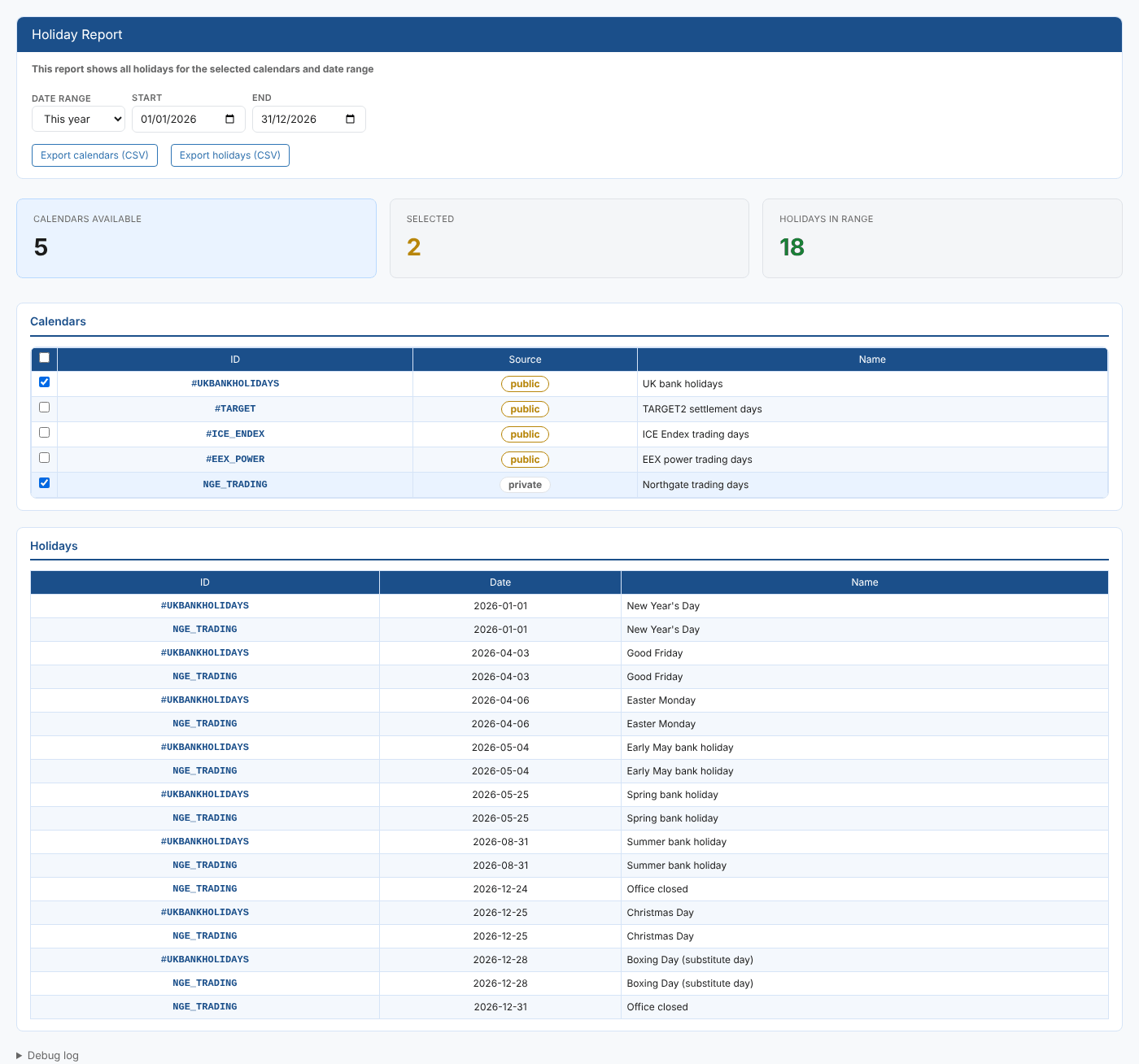
At Northgate Energy, Priya Shah checks the company's trading calendar NGE_TRADING against the public UK bank holiday calendar before Christmas, when the office also closes on Christmas Eve and New Year's Eve.
Opening the report
The report is in the Reports menu, in the Calendars category, as Holiday Report (#INSIGHT_HOLIDAY_REPORT). It is a public report, so it is available in every tenant.
When it opens, the report lists the holiday calendars you can read, public and private, and sets the date range to This year. Only holiday calendars are listed: calendars without holidays, such as a daily or monthly calendar, are left out. No holidays are shown until you select at least one calendar.
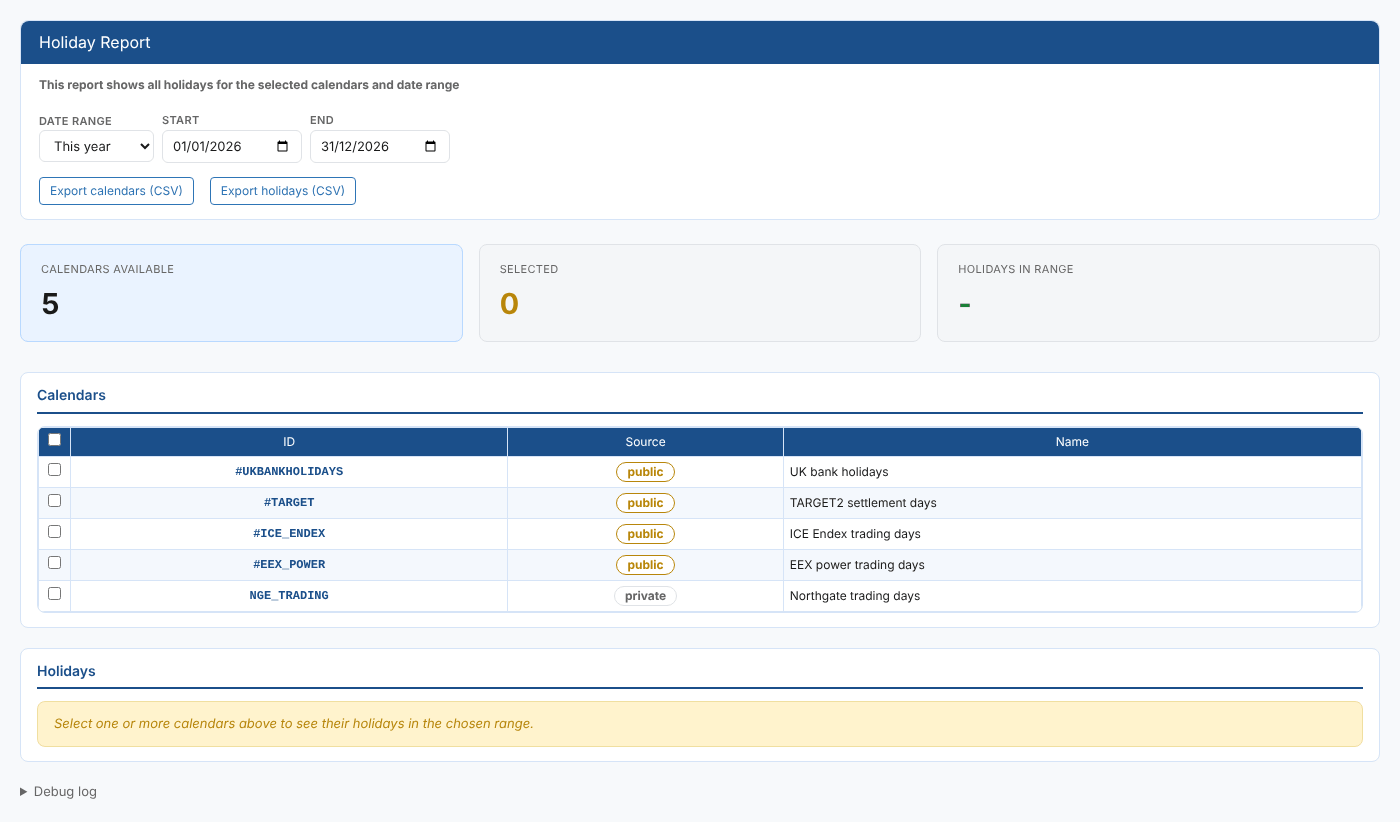
| Control | What it does |
|---|---|
| Date range | Today, Next 7 days, This month, Next month, This year (the default) or Next year. Choosing one fills in Start and End. |
| Start, End | The first and last day of the range. Change either to set your own range. |
| Export calendars (CSV) | Downloads the calendar list (ID, Source, Name) |
| Export holidays (CSV) | Downloads the holidays table as shown |
| Debug log | At the bottom of the page: what the report fetched and when |
The report
Summary cards
| Card | What it shows |
|---|---|
| Calendars available | How many holiday calendars you can read |
| Selected | How many calendars are ticked |
| Holidays in range | How many holidays the selected calendars have in the range, all calendars together. It shows - until you select a calendar. |
Calendars
One row per holiday calendar, with a tick box to select it. The tick box in the header selects or clears every calendar.
| Column | What it shows |
|---|---|
| ID | The calendar id |
| Source | public for a shared calendar (its id starts with #), private for one your company owns |
| Name | The calendar's name |
Holidays
Every holiday of the selected calendars in the range, in date order. With more than one calendar selected, a holiday that is in both appears once for each calendar.
| Column | What it shows |
|---|---|
| ID | The calendar the holiday belongs to |
| Date | The date of the holiday, as YYYY-MM-DD |
| Name | The holiday's name, as defined in the calendar |
In the example, the list shows that NGE_TRADING has two extra days, 24 and 31 December, when the office is closed.
Where the data comes from
The calendar list comes from the calendar service, filtered to holiday calendars. The holidays come from each calendar's own holiday rules, through the calendar service's holiday-report function, for the range you choose.
Related
- Calendar Holiday Report: the holidays of one calendar, from the calendar itself
- Calendar Report: every valid date of a calendar
- Expiry Report: contract expiry dates
- Insights: how insight reports work