Data Usage
A dataset that loads events, such as trades or bids, rarely ends there: event curves and event timeseries are built from those events, and other people and systems read them. The Data Usage report shows what is built from one dataset and answers questions like:
- Which event lists does this dataset load into?
- Which event curves and event timeseries are built from those events?
- If this dataset is late or wrong, which of our curves and timeseries are affected?
Throughout this page we follow Northgate Energy, a fictional gas and power trader that loads EEX TTF spot trades from the dataset EEX.NG_SPOT.TTF.
Opening the report
Select a dataset on the Dataset Monitoring screen and choose Data Usage from its insights (category Dataset Monitoring Insights). It is not listed in the Reports menu.
| Registration | Value |
|---|---|
| Report id | #DMI_DATAUSAGE |
| Category | Dataset Monitoring Insights |
| Template | #insight-dm-datausage |
| Input | The selected dataset, passed as the DSID report property |
The report has no filters: it builds the list as soon as it opens.
| Control | What it does |
|---|---|
| Export (CSV) | Downloads the table as shown |
| Debug log | At the bottom of the page: each step and how many items it found |
How the list is built
- The report reads the dataset to find out whether it is your own (private) or shared (common).
- It finds every event list the dataset has loaded events into.
- It finds the event curves and event timeseries built on those event lists, in your private data and in public data.
The report
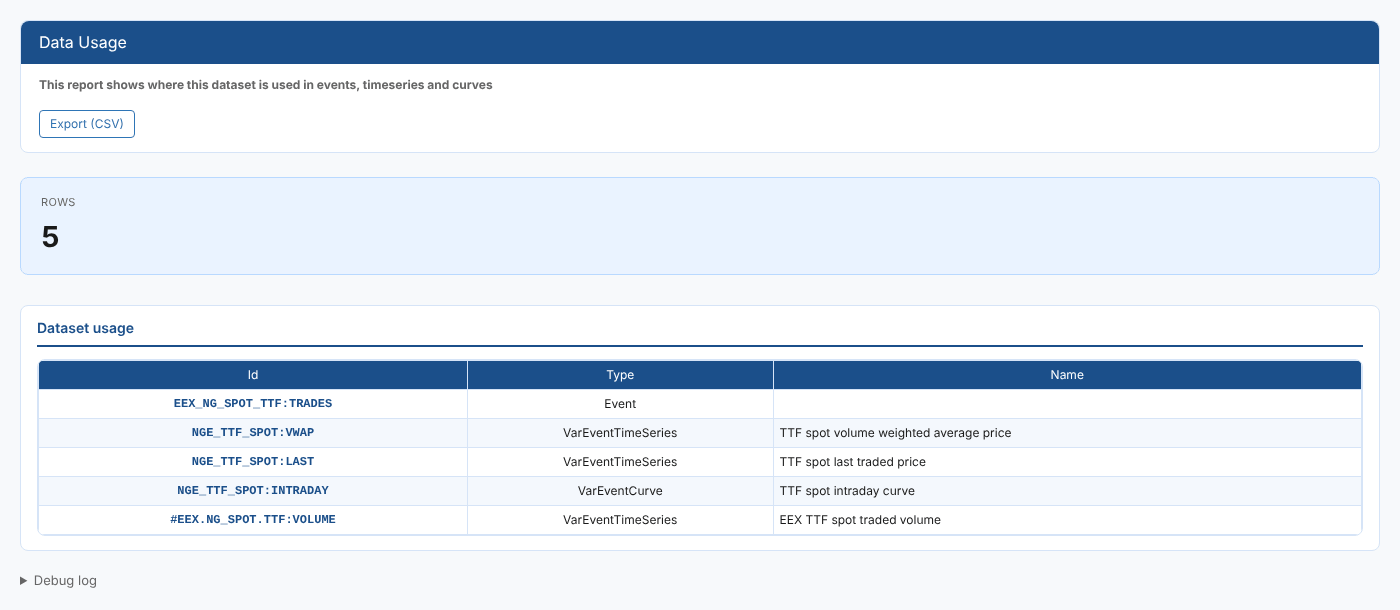
The Rows card shows how many rows the table holds.
| Column | What it shows |
|---|---|
| Id | The event list, curve or timeseries id |
| Type | Event for an event list, VarEventCurve for an event curve, VarEventTimeSeries for an event timeseries |
| Name | The curve or timeseries name |
At Northgate, the TTF spot dataset loads the event list EEX_NG_SPOT_TTF:TRADES, and four items are built from it: three of Northgate's own (the volume weighted average price, the last traded price and an intraday curve) and one public traded volume timeseries.
The report lists what is built directly on the dataset's events. Smart curves or scripts that read those event curves in turn are not listed: use the Dataset Dependency Report for the wider picture.
Troubleshooting
| Problem | What to do |
|---|---|
| No usage found for this dataset | The dataset has not loaded any events, or nothing is built on them. Datasets that load timeseries or curves directly have no rows here. |
Related
- Insights: how insight reports work
- Usage: who reads the dataset's data
- Dataset Dependency Report: a diagram of the dataset, its loader, events, curves and automations