Master Data Usage Report
Before you change a type, for example by adding a required property or renaming one, you need to know which records use it. The Master Data Usage Report lists them and answers questions like:
- How many records use this type?
- Which records will be affected if I change it?
- Are there public records of this type as well as our own?
At Northgate Energy, Sam Patel checks which product records use the type NGE_Product before adding a new property to it.
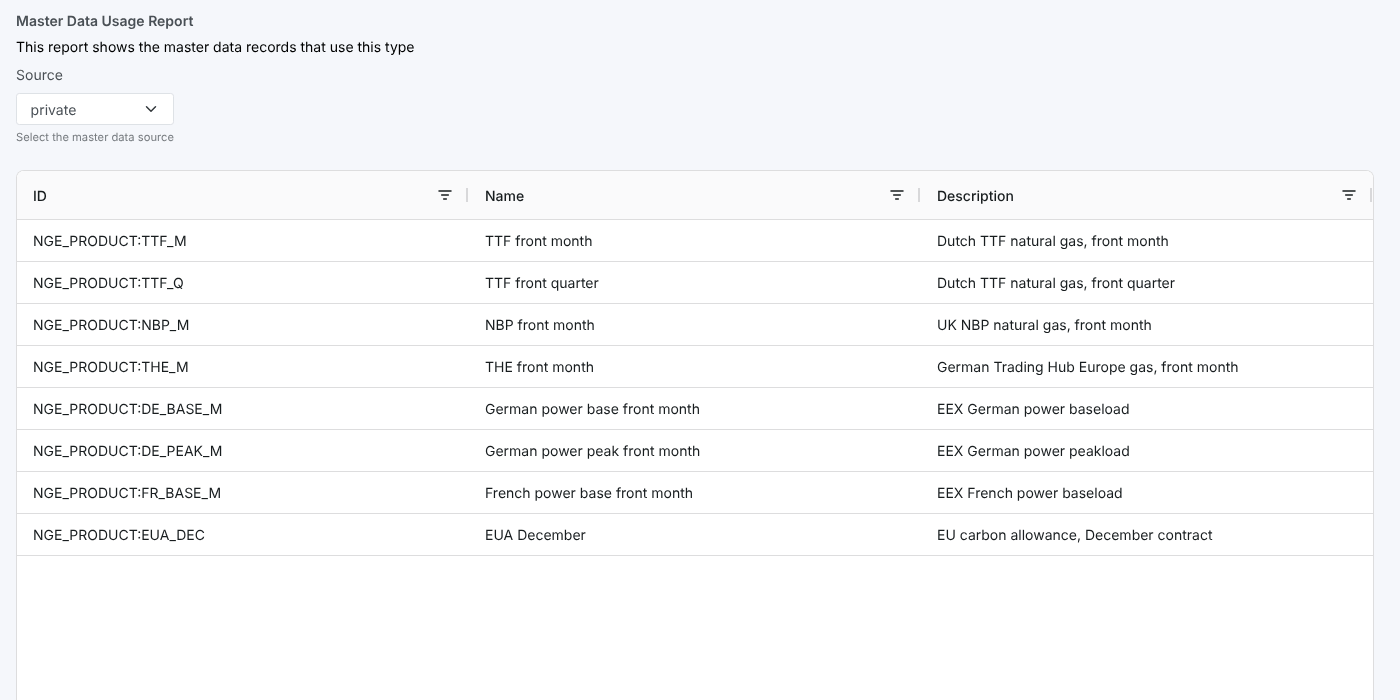
Opening the report
On the Types screen, select a type and open Master Data Usage Report from its insights. It is registered as #TYPEI_USAGE in the category Type Insights, and receives the selected type's id (ID).
The list loads as soon as the report opens.
| Control | What it does |
|---|---|
| Source | private (your own records) or public. Changing it reloads the list. |
| Report name | Click the report name at the top to hide or show the header and the Source picker |
The report
One row per master data record of the type, up to 10,000 records:
| Column | What it shows |
|---|---|
| ID | The record's id |
| Name | Its name |
| Description | Its description |
Use the filter icon in a column header to filter the rows on screen, and drag the column edges to resize them.
Related
- Insights: how insight reports work
- Relationships: a type with its subtypes and records, as a clickable chart